AI Knowledge Management: A Practical Guide for Support Teams
Sorin Alupoaie · · Updated · 8 minutes read
Picture the week after a big release. The product team has moved a setting, renamed a plan, and changed a limit, and somewhere in your help center a few dozen articles still describe the old way. Some of them are easy to find. Most aren’t, because the old wording hides in an FAQ answer, a troubleshooting table, or a screenshot nobody thinks to check.
That has always been the hard part of knowledge management, and it matters more now than it used to. Your help center isn’t only read by customers anymore. AI agents, generative search, and the reply suggestions your agents see all answer from the same articles, so one outdated sentence can turn into hundreds of wrong answers before anyone notices.
This guide explains what AI knowledge management means for a support team, where AI helps today, what to put in place before you let it touch your help center, and how we use it on our own.
What Is AI Knowledge Management?
AI knowledge management is the use of AI to help a team find, write, update, and organize the knowledge its customers and agents rely on, such as help center articles, internal documentation, and macros.
In support, it usually shows up in two ways. The first is AI that reads your knowledge to answer questions: an AI agent on your website, generative search in your help center, or suggested replies in the agent workspace. The second is AI that helps your team look after that knowledge, by finding the questions no article answers, spotting the articles a release made out of date, drafting new articles, and keeping translations in step.
Most of what’s written about AI knowledge management is about the first. For a support team, the second is where most of the work is, and it also decides whether the first gives good answers. An AI agent can only be as accurate as the articles it reads, which is why writing articles for both humans and AI has become part of the job.
Where AI Helps With Your Help Center
The examples below come from Claude connected to Zendesk. The screenshots use Larkspur Outdoor, an outdoor gear store we made up for these examples, so the questions, articles, and numbers only show the kind of answer you’d get.
Finding the questions no article answers
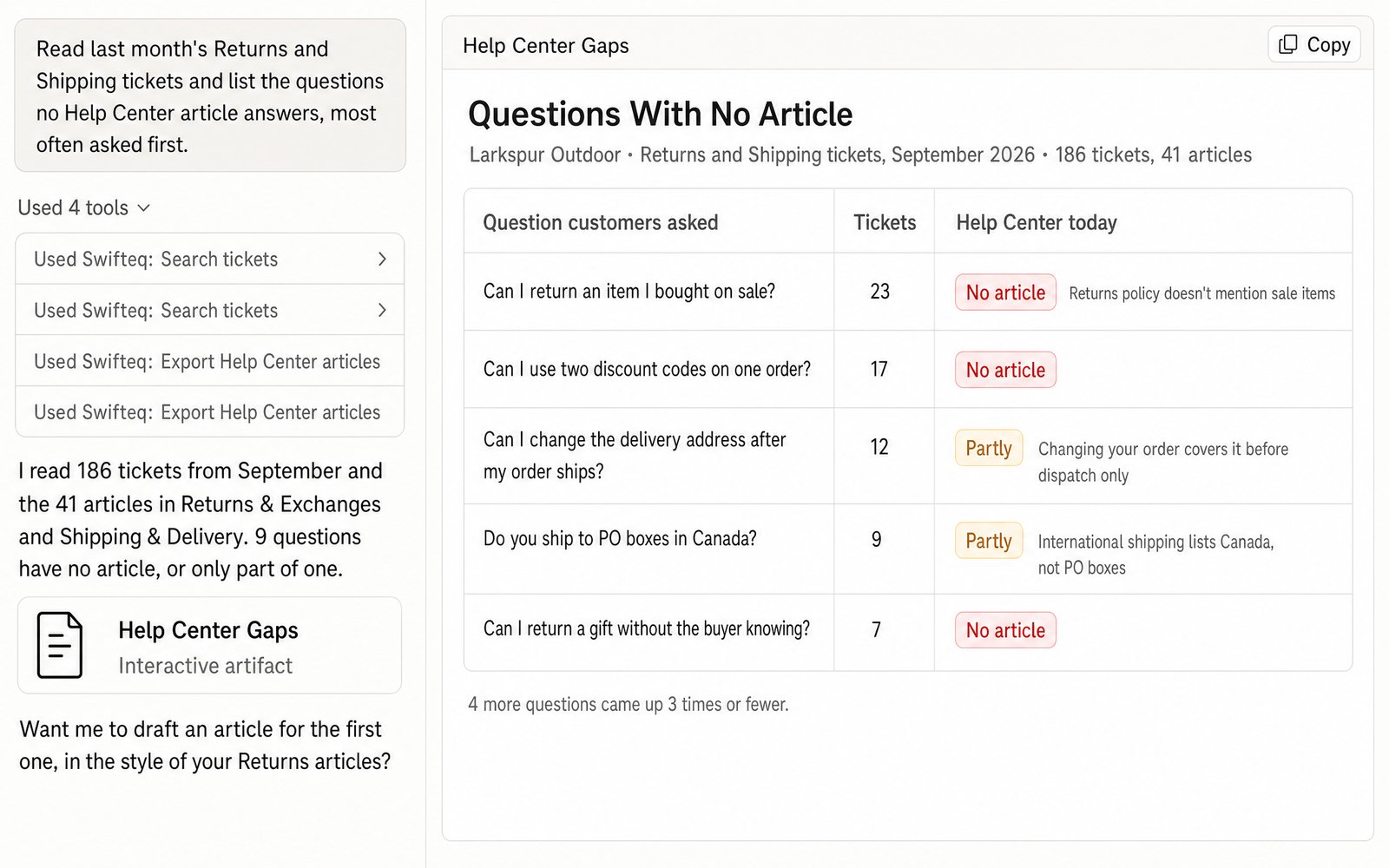
Your tickets are the best record of what your help center is missing, because customers open a ticket when they can’t find the answer themselves. Reading a month of tickets to find those questions used to take days, so it rarely happened. An AI assistant connected to Zendesk can read last month’s tickets, group them by the question each customer asked, and check every question against the articles you already have.
What you get back is a short list of the questions that keep coming up without an article, with the most common ones at the top, so you know which article to write first.
Spotting the articles a release made out of date
When something changes in your product, tell the AI what changed and ask it to find every article that still describes the old way, including the translated ones. It reads the full text of each article rather than only the titles, so it catches the sentence in the middle of an FAQ that a keyword search would miss.
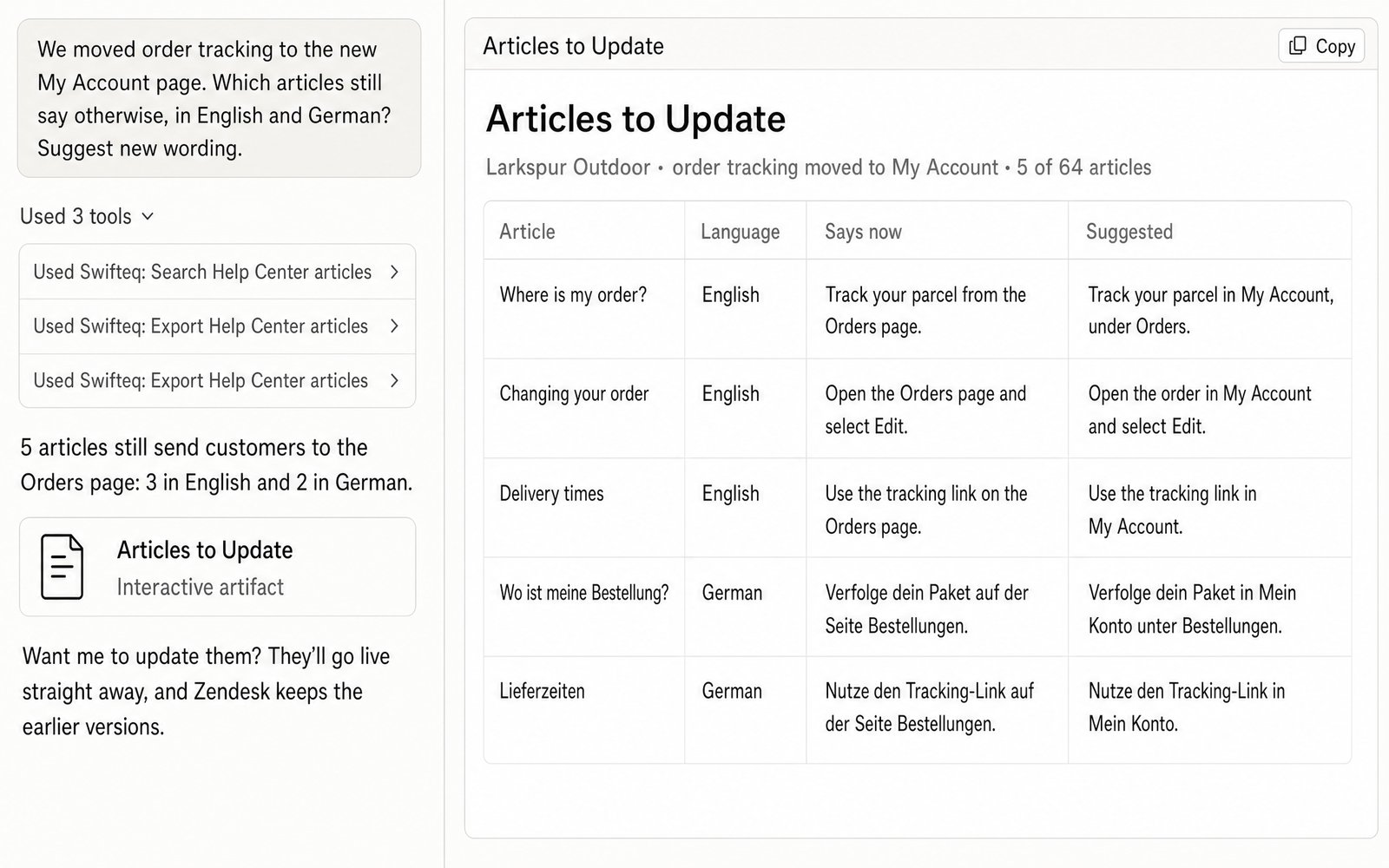
Instead of a quarterly audit that’s out of date by the time it ends, you can check the articles a release affects on the day it ships.
Drafting new articles in your own style
Once you know what’s missing, AI can write the first draft. The best drafts start from how your agents already answer the question in tickets and follow the structure and tone of your existing articles, so the new article reads like the rest of your help center.
This is also where the AI often finds a problem worth knowing about. For example, if some agents told customers that sale items can’t be returned and others offered an exchange, the article can’t be right until someone on your team settles the policy.
Keeping translations in step
Multilingual help centers tend to drift, because the English article gets updated and the translations don’t. AI translation makes it practical to update every language when the source changes, and Help Center Translate does this for a Zendesk help center. A native speaker should still review the articles where wording matters most, such as billing, refunds, and legal topics.
Finding the articles that don’t help
Not every problem is a missing or outdated article. Some articles are read often and still lead to a ticket, which usually means the answer is unclear or buried halfway down the page. Help center analytics show you which articles those are, and an AI assistant can read the tickets that followed to suggest what the article is missing. If you need to make the case for this work to leadership, Anne-Marie Traas explains how to measure knowledge management ROI beyond ticket deflection.
How We Keep Our Own Help Center Up to Date
We use this on our own help center at Swifteq. In September we released a new capability for our MCP Server that lets the AI assistant create Zendesk tickets. On release day, 8 of the 24 articles in that product’s help center category were out of date, and two of their screenshots showed settings text that no longer matched the app.
Nobody had to click through the help center to find them. We told Claude what had changed, and it found the eight articles, drafted the changes, retook the two screenshots, and uploaded them. A person on our team approved each step before Claude published the articles, and Claude then checked that every approved change was live. The whole workflow, including the prompt we started with, is in How We Keep Our Help Center Articles and Screenshots Up to Date with Claude.
What to Set Up Before AI Changes Your Help Center
AI makes it easy to change a lot of articles quickly, which is exactly why a few things need to be settled first.
- Someone reviews every change. Decide who approves what the AI writes before it goes live, the same way you’d review a new writer’s first articles. For most teams, the safest start is to let the AI save drafts and keep publishing with a person.
- The structure is clean. If your categories overlap and three articles cover the same topic and disagree, the AI will copy the confusion. A quick content audit before you start pays off.
- You know how drafts work in Zendesk. Zendesk’s API can’t save a draft of a published article without taking the live version offline. So for articles that are already live, either let the AI publish the changes you’ve approved, or ask it for the new wording and paste it into Zendesk yourself.
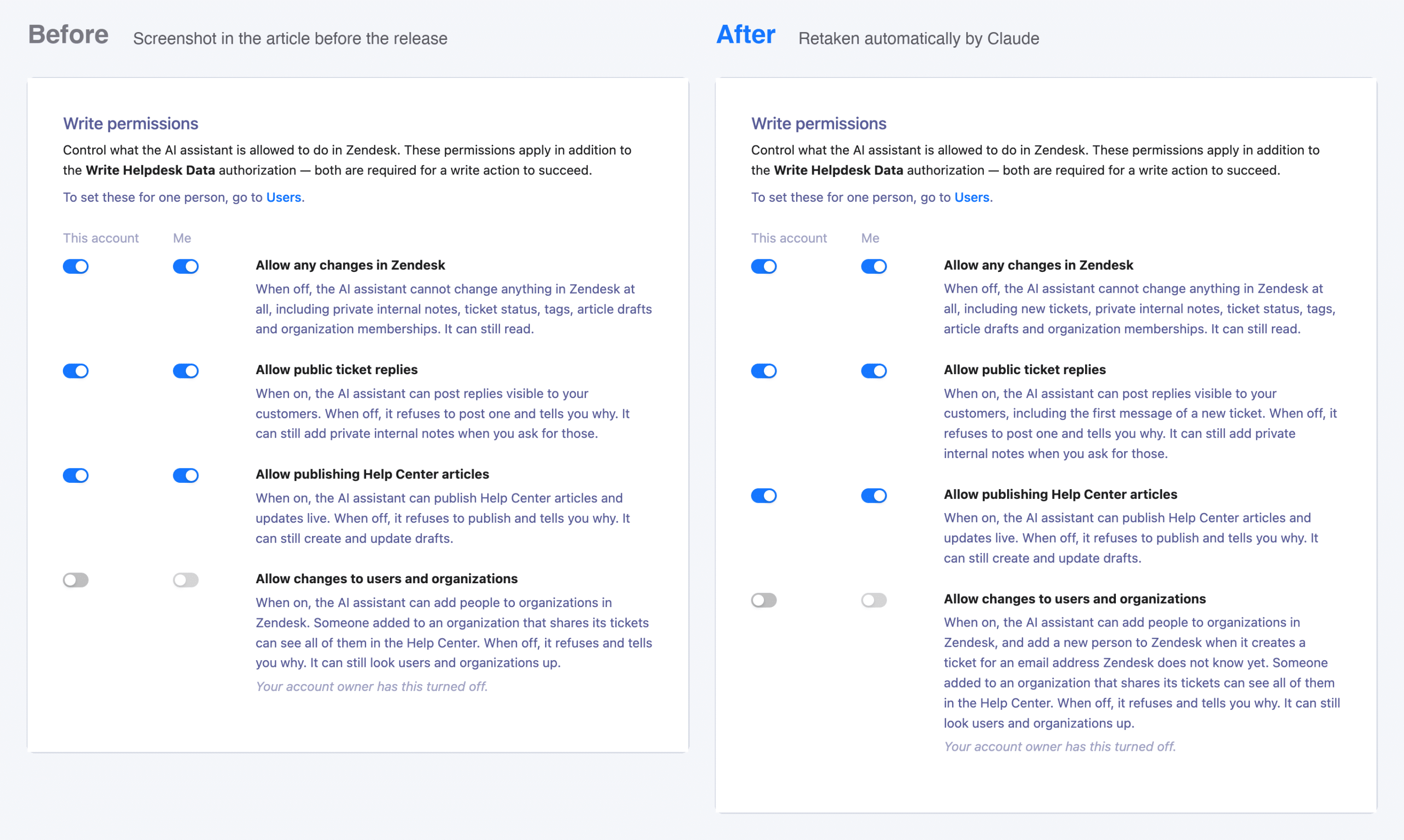
- Permissions stay narrow. The AI should only be able to do what you’ve decided it can do. With Swifteq’s MCP Server, Claude or ChatGPT can only read your help center until you give it write access, it then saves what it writes as drafts, and publishing stays off until an account owner turns on Allow publishing Help Center articles.
Common Problems With AI in Knowledge Management
The problems teams run into are rarely about the AI writing badly. They’re usually about process.
The most common one is publishing too much too fast. AI can draft fifty articles in an afternoon, but your team still has to read them, and articles nobody checked are how wrong answers reach customers. It’s better to start with the ten questions that create the most tickets and get those right.
The second is tone. AI drafts lean toward neutral, generic language, so a help center written mostly by AI can start to sound like nobody in particular. Giving the AI two or three of your best articles as examples, and asking it to follow them, makes a big difference.
The third is trust. When agents see AI suggestions that are wrong, they stop looking at them, and it takes a long time to win them back. That’s another reason to start small, and to fix the articles behind a wrong answer rather than the answer itself.
Finally, think about where your data goes. Ticket conversations are full of personal information, so check what any AI tool stores, and who can see it, before you connect it to Zendesk.
AI Knowledge Management Tools for Zendesk Teams
Most Zendesk teams end up with a few tools that each do one part of the job, rather than one system that does everything.
- Zendesk’s own AI. Generative search and Zendesk’s AI agents answer customers from your help center articles, so they benefit directly from everything above.
- Help Center Manager. Help Center Manager handles the bulk work in a Zendesk help center, such as find and replace across articles, fixing broken links, and assigning tasks to your team.
- Help Center Analytics and Help Center Translate. Help Center Analytics shows how each article performs, and Help Center Translate keeps every language current.
- Claude or ChatGPT with the MCP Server. Swifteq’s MCP Server connects Claude, ChatGPT, or another AI assistant to your Zendesk, so it can read your tickets and your help center side by side and do the work described in this guide.
Where to Start
Pick one job and run it from start to finish before you add another. A good first one is a monthly gap check: ask the AI to read last month’s tickets, list the questions no article answers, and draft articles for the top three. Your team reviews and publishes them, and a month later you can see whether those questions still turn into tickets.
Read last month's tickets in our [group names] groups and list the questions customers asked that no help center article answers, or answers only in part. Put the most common questions first. For the top three, draft an article that follows the structure and tone of our existing articles in [section name], and save each one as a draft.If you’d like to try it on your own help center, here’s how it works with Claude or ChatGPT. Swifteq’s MCP Server is free for 500 calls a month per Zendesk account, shared by everyone at the company. Above that, €49 a month covers the account and its first user, and each extra user is €9 a month, so a team of 10 pays €130 a month. We never store ticket conversations, or any personal information (PII) from Zendesk about your customers or employees.