
How to Manage Your Zendesk Help Center With Claude or ChatGPT
Swifteq's MCP Server connects Claude, ChatGPT, or another AI assistant to your Zendesk, so it can read your tickets and your help center side by side. Ask it to find the questions customers keep asking that no article answers, draft the missing articles in the style of your best ones, or list the articles a new release has made out of date.
- Find the questions no help center article answers
- Draft new articles in the style of your best ones
- Spot the articles a release made out of date
- Nothing is published until you turn publishing on
Free for 500 calls a month per Zendesk account. No credit card required.
Zendesk Help Center Examples
Each example below starts with one request typed into Claude. The screenshots use a made-up outdoor gear store, Larkspur Outdoor, so the questions, articles, and numbers only show the kind of answer you'd get.
Find the Questions No Article Answers
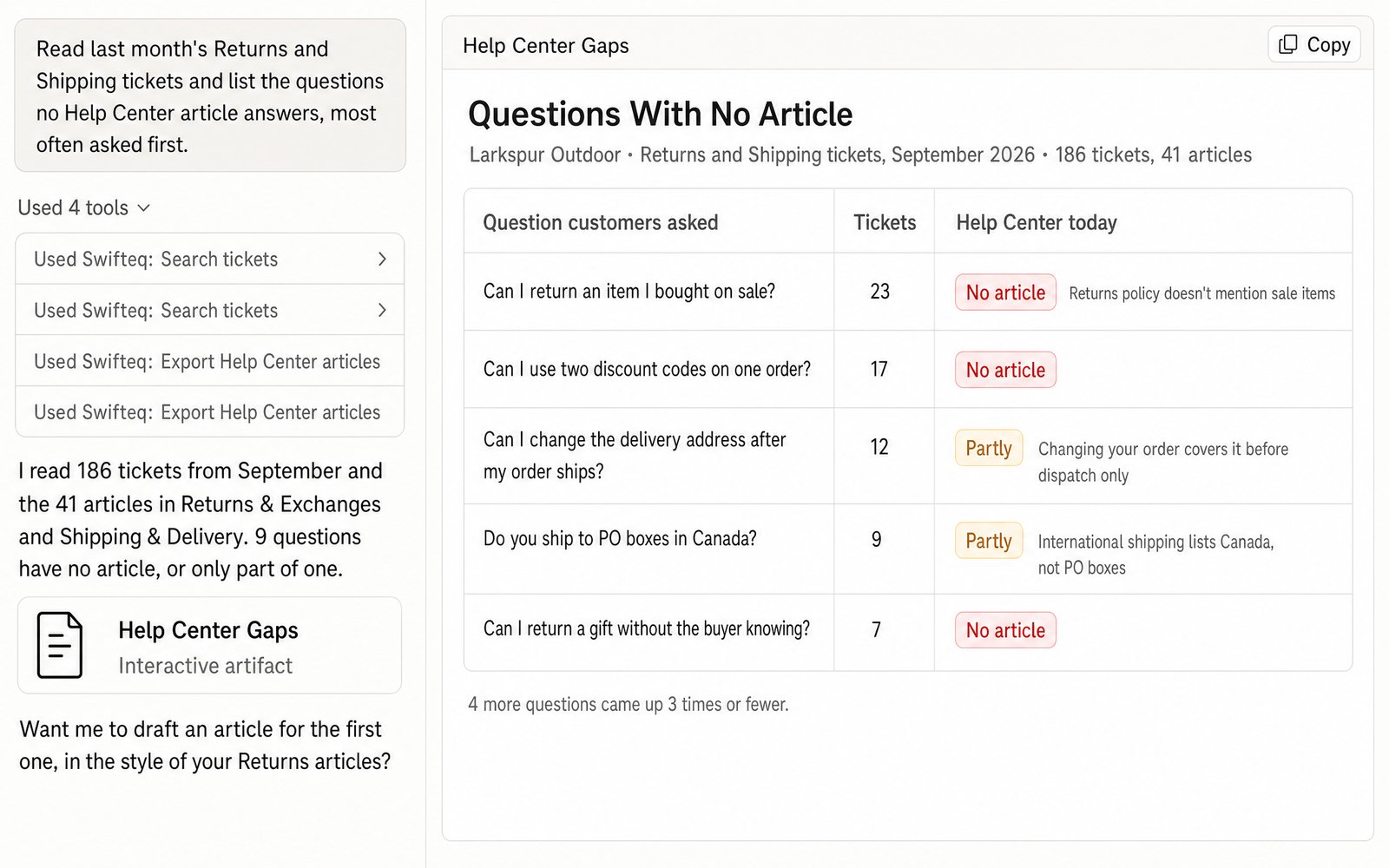
Instead of guessing which article to write next, ask Claude to read last month's tickets and group them by the question each customer asked. It then checks every question against the articles you already have and lists the ones no article answers, or answers only in part. The questions that came up most often are at the top, so you know where to start.
- “Read last month's Returns and Shipping tickets and list the questions no Help Center article answers, most often asked first.”
Draft a Missing Article in Your Own Style
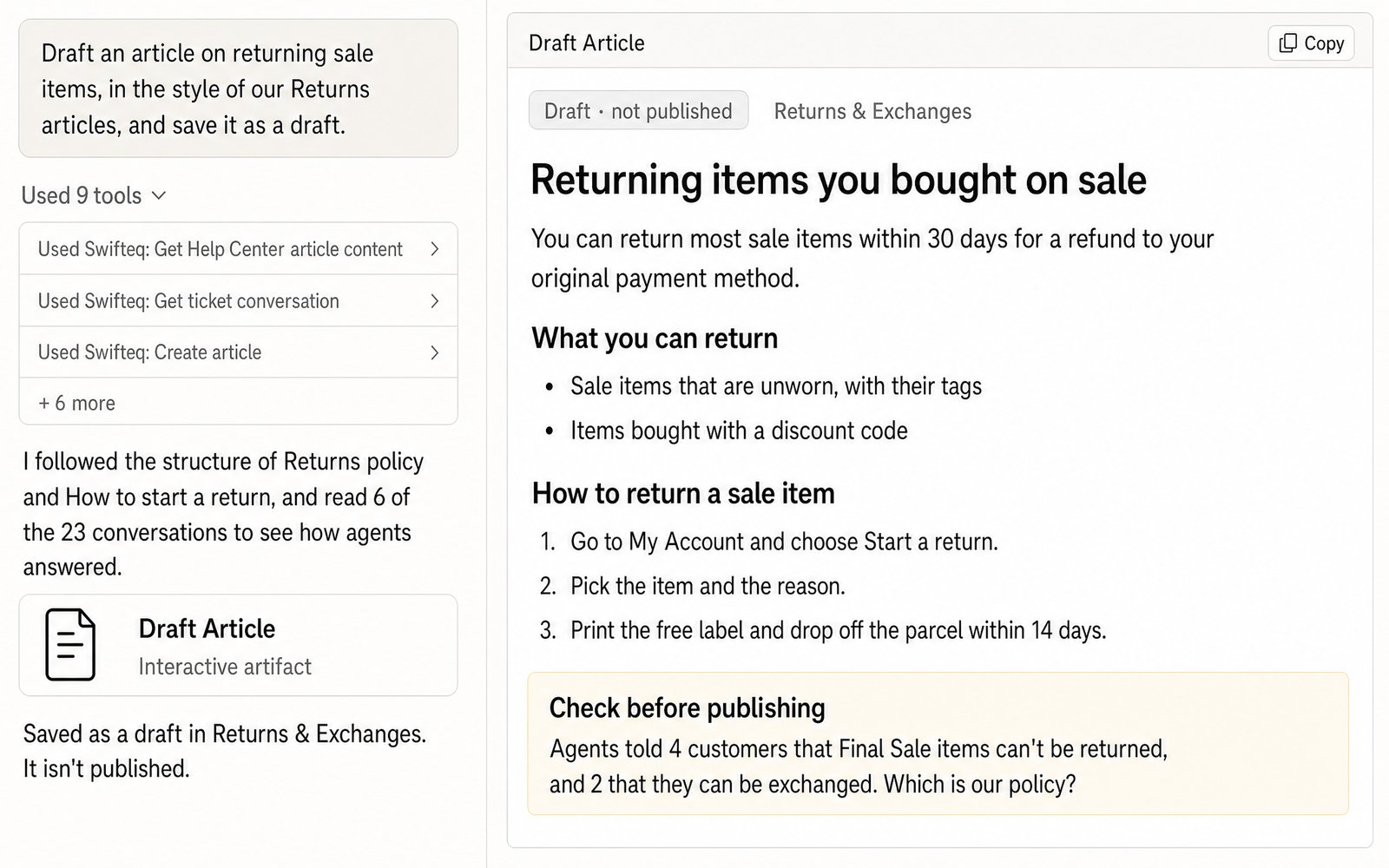
Once you know what's missing, Claude can write the first draft. It reads how your agents answered the question in those tickets and follows the structure and tone of your existing articles, so the new article reads like the rest of your help center. Claude saves it as a draft in the right section, so your team can review it before anyone publishes it. And if agents gave customers different answers to the same question, it asks you which one is right instead of picking one itself.
- “Draft an article on returning sale items, in the style of our Returns articles, and save it as a draft.”
Update the Articles a Release Made Out of Date
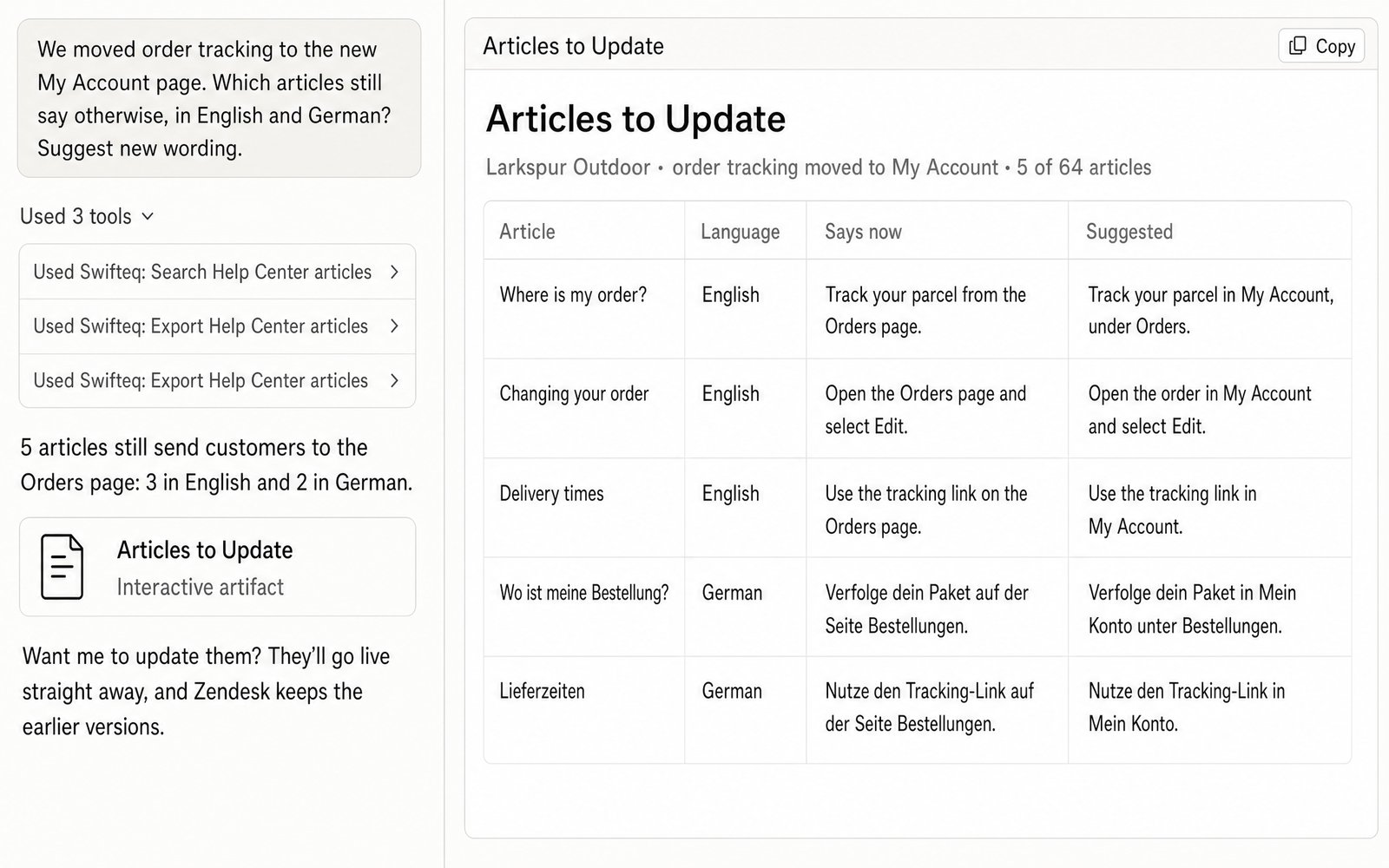
When a release changes how something works, the articles that still describe the old way are easy to miss, especially the translated ones. Tell Claude what changed, and it finds every article that still says otherwise, in every language. It quotes each sentence that's now out of date and suggests new wording. Once you've approved the changes, Claude can update the articles too, as long as publishing is allowed.
- “We moved order tracking to the new My Account page. Which articles still say otherwise, in English and German? Suggest new wording.”
Why Start From Your Tickets
Customers open a ticket when they can't find the answer in your help center, and your agents then answer the same question by hand. That's why Claude reads how your agents answered, not just what customers asked: the draft starts from the answer your team already gives, instead of a blank page.
Someone on your team still decides what the right answer is. For example, if some agents told customers that final sale items can't be returned and others offered an exchange, Claude shows you where the answers differ, so you can settle the policy before the article goes live.
How Drafts and Publishing Work
When you first connect, Claude or ChatGPT can only read your help center. To let it create articles and translations, you give it write access when you authorize your Zendesk account, and it saves what it writes as drafts. Publishing stays off until an account owner turns on Allow publishing Help Center articles for your account. Once it's on, the owner can still keep it off for particular people.
Take care with articles that are already live. Zendesk's API can't save a draft of a published article without unpublishing it, so an update made while publishing is off takes the article offline until someone publishes it again. To update live articles, either turn publishing on, so the change goes live straight away and Zendesk keeps the earlier versions, or ask Claude for the new wording and paste it into the article in Zendesk yourself.
What You Can Ask For
You ask in plain words, and Claude reads your articles and tickets straight from Zendesk, with the same permissions you have.
Your articles
Search articles in any of your languages and brands, read one in full, or export all of them with their text.
Missing articles
Compare the questions customers ask in tickets with what your articles already cover.
Writing and translation
Create articles in the right section, and write or update their translations in any of your help center's languages. You can also import a whole knowledge base.
Categories and sections
Create and reorder categories and sections, and check who can view each article.
In a Customer's Words
We've automated 90% of our Help Center processes with this MCP, having workflows to spot gaps, update or create existing articles directly in Zendesk, with minimal approval from us. It's also helpful with going through tickets, spotting patterns, and getting relevant info!
From a review on the Zendesk Marketplace.
Where the Data Comes From
Claude or ChatGPT gets the data through the Swifteq MCP Server, which asks Zendesk and passes the answer back. We don't store your articles, ticket conversations, or any personal information from Zendesk about your customers or employees. Each person works with their own Zendesk permissions.
| Tool | What it gives you |
|---|---|
| search_help_center_articles | Articles that match a keyword, in one or more languages, with their section, category, and link |
| get_help_center_article_content, export_help_center_articles | One article or all of them, with the full text and who can view each one |
| search_tickets, get_ticket_conversation | The questions customers asked, and how your agents answered them |
| create_article, update_article_translation | New articles and translations, saved as drafts unless publishing is allowed |
| create and update a category or section | New categories and sections, and the order they appear in |
Limits to know
| Limit | What it means |
|---|---|
| Publishing is off by default | An account owner turns on Allow publishing Help Center articles |
| An update made while publishing is off takes a live article offline | Zendesk saves the update as a draft, which unpublishes the article until someone publishes it again |
| Articles in Zendesk's new editor go back to the older editor when changed through the API | This is a Zendesk limitation, so avoid editing the same article both in Zendesk and through Claude |
| No article views or search data | Zendesk doesn't share help center traffic through its API, but Help Center Analytics shows it |
| Nothing can be deleted | Articles, categories, and sections can only be removed in Zendesk |
| Adding images needs a client that can upload files | Claude Code can upload images, but in Claude on the web, the AI can only write the text |
| Only a help center manager can create categories | That's Zendesk's rule for who can change how the help center is organized |
| 100 articles per export call | A larger help center takes one call for every 100 articles |
How it works
Set It Up in Three Steps
- 1
Create your free Swifteq account
Sign up and authorize your Zendesk account. Read access is enough to find the gaps in your help center. To let Claude save drafts, authorize with write access. Publishing also needs an account owner to turn on Allow publishing Help Center articles.
- 2
Add the connector to your AI assistant
In Claude or ChatGPT, add a custom connector with the URL
https://mcp.swifteq.com/api/mcp/mcpand sign in with your Swifteq account. - 3
Ask your first question
For example: “Which questions from last week's tickets does no article answer?”
Frequently Asked Questions
Can it find gaps in our help center?
Yes. Claude reads the questions customers ask in your tickets and compares them with the articles you already have. Then it lists the questions that no article answers, or answers only in part.
Will Claude publish articles?
Only if you allow it. Claude saves new articles and translations as drafts, and publishing stays off until an account owner turns on Allow publishing Help Center articles for your account. Once it's on, the owner can still keep it off for particular people.
Can it update an article that's already live?
Yes, if publishing is allowed. The change goes live straight away, and Zendesk keeps the earlier versions. If publishing is off, Zendesk saves the update as a draft, which takes the live article offline until someone publishes it again. In that case, ask Claude for the new wording and paste it into Zendesk yourself.
Can it translate articles?
Yes, one article at a time. Claude saves each translation as a draft, in any of your help center's languages. If you need to translate many articles at once, using your glossary and including the text inside screenshots, take a look at Help Center Translate.
Can it show article views?
No, because Zendesk doesn't share help center traffic through its API. For that, Help Center Analytics shows article views, helpfulness, and how many article views end in a ticket.
How many calls does it use?
A ticket search or an article export returns up to 100 in one call. Reading a full conversation is one call, and so is saving each draft or update.
What does it cost?
It's free for 500 calls a month per Zendesk account, shared by everyone at your company. Above that, €49 a month covers your account and its first user, and each extra user is €9 a month, so a team of 10 pays €130 a month. See pricing.
Guides and Resources
- Zendesk MCP Server: features, security, and pricing
- Swifteq vs Zendesk's own MCP Server, compared
- How to bulk import articles into Zendesk with Claude or ChatGPT
- How we keep our help center articles and screenshots up to date with Claude
- AI knowledge management: a practical guide for support teams
- Zendesk macros with Claude or ChatGPT
- How do you keep your Zendesk knowledge base up to date?
- Content audit: how to keep your knowledge base and macros up to date
- Writing knowledge base articles for humans and AI
- Our help center: write permissions for the MCP Server
Find the Gaps in Your Own Help Center
Free for 500 calls a month. No credit card required.
Page last updated