
How to Audit, Update, and Create Zendesk Macros With Claude or ChatGPT
Swifteq's MCP Server connects Claude, ChatGPT, or another AI assistant to your Zendesk, so it can help you keep your macros up to date. Ask it to find every macro that still mentions an old policy, spot the ones nobody uses anymore, or turn an answer your agents keep typing by hand into a new macro.
- Search what your macros say, not just their titles
- Find the macros nobody uses and the ones that overlap
- See every change with its old value, so you can undo it
- Changing macros stays off until you turn it on
Free for 500 calls a month per Zendesk account. No credit card required.
Zendesk Macro Examples
Each example below starts with one request typed into Claude. The screenshots use a made-up outdoor gear store, Larkspur Outdoor, so the macro names, counts, and wording only show the kind of answer you'd get.
Find Every Macro With Old Wording
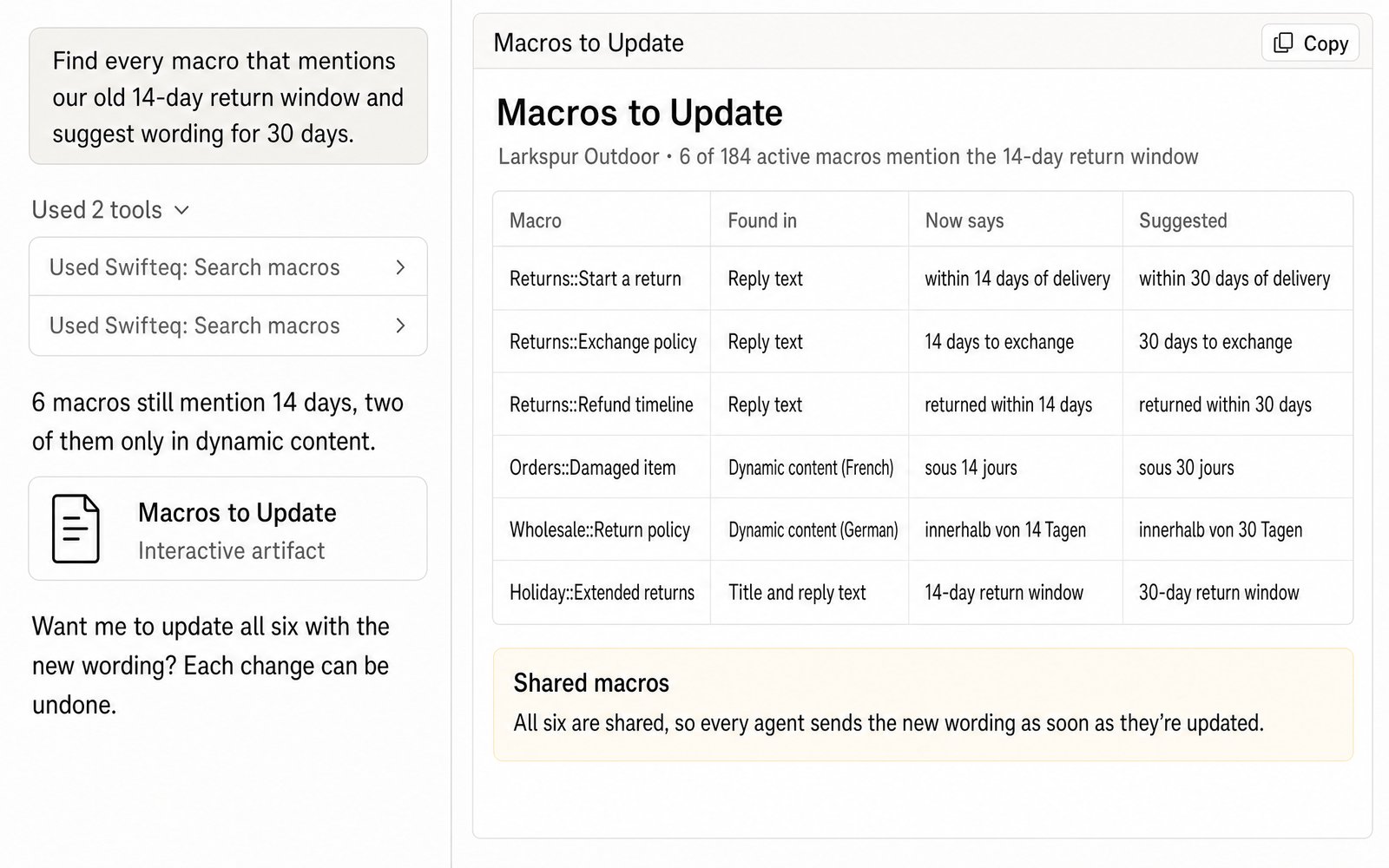
When a policy changes, for example your return window going from 14 to 30 days, the old wording has to come out of every macro that mentions it. That's harder than it sounds, because Zendesk's own macro search only looks at titles. Some of the wording may also be in dynamic content, the reusable text Zendesk fills in with a version for each language. Claude searches the reply text of every macro and the dynamic content it uses, as well as the titles. It shows you where each match is and suggests new wording for you to check.
- “Find every macro that mentions our old 14-day return window and suggest wording for 30 days.”
Find Unused and Overlapping Macros
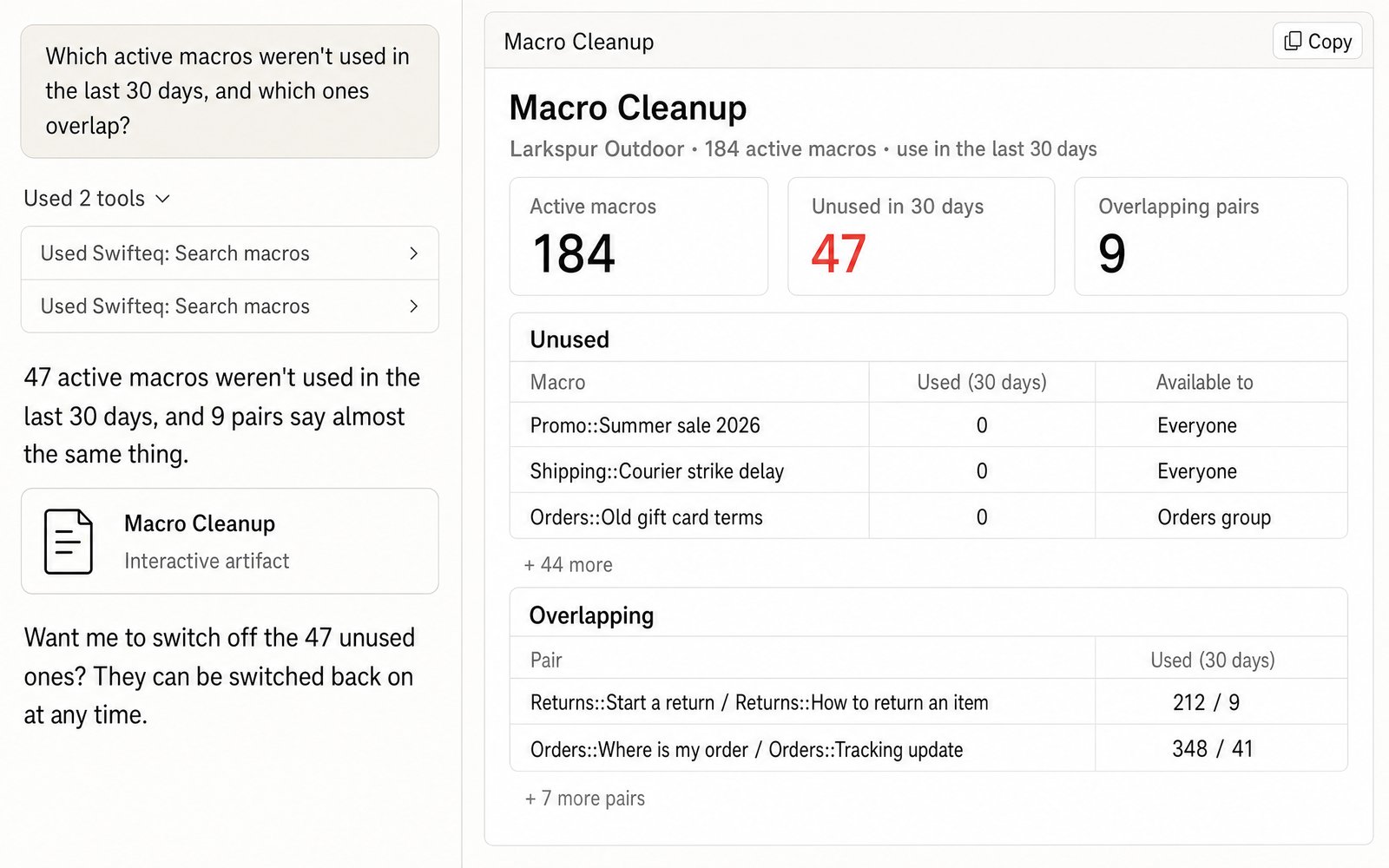
Macro lists grow over time, and after a while agents scroll past macros nobody uses and have to choose between two that say almost the same thing. Claude can list the active macros that weren't used in the last 30 days, along with the ones that overlap, so you can decide which to switch off and which to combine.
- “Which active macros weren't used in the last 30 days, and which ones overlap?”
Turn What Agents Type Into a New Macro
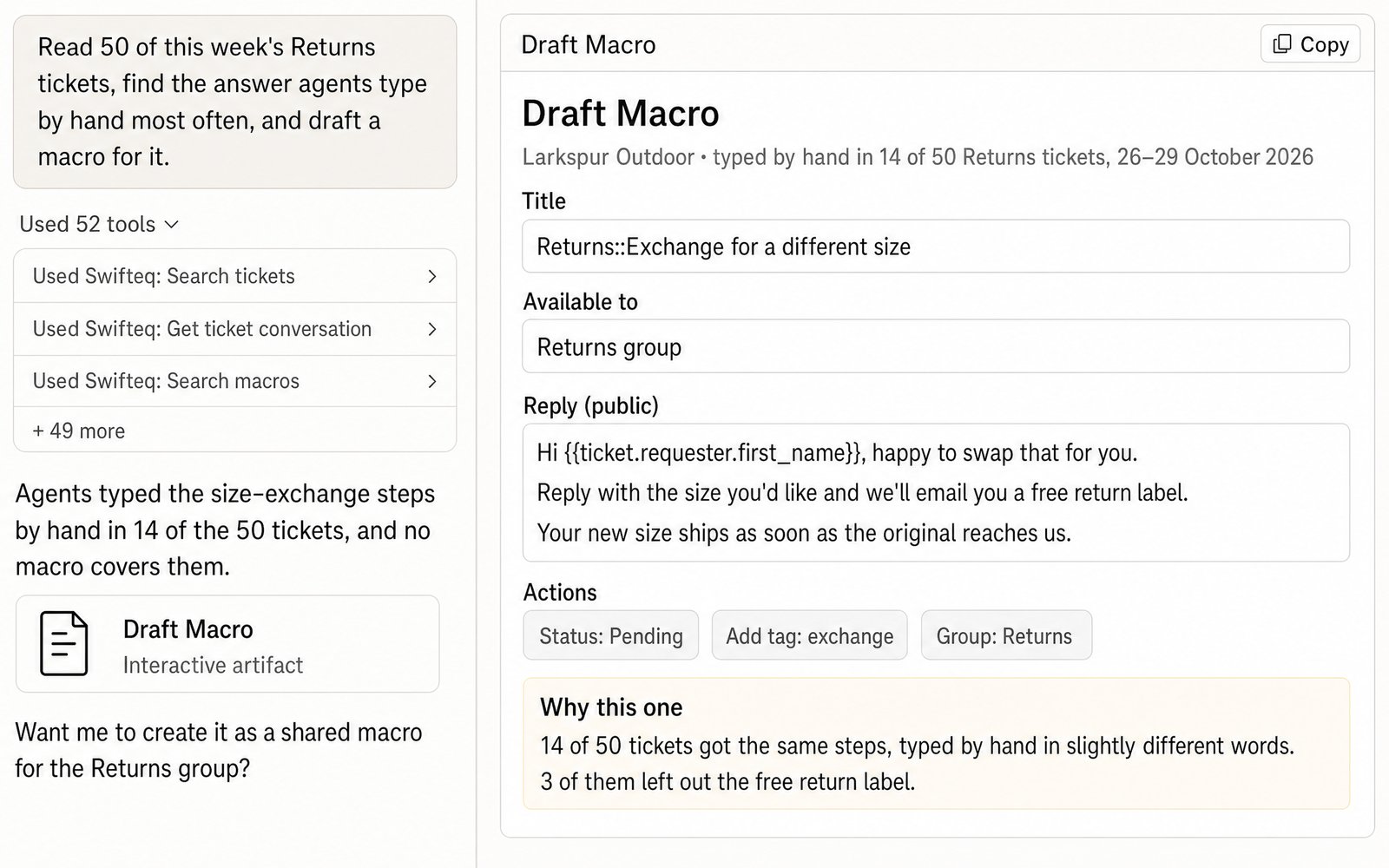
When agents keep typing the same answer by hand, that answer probably belongs in a macro. Ask Claude to read a batch of recent tickets, for example 50 of this week's Returns tickets, and find the answer agents type most often. It then drafts a macro with placeholders, like the customer's first name, and actions, like setting the status or adding a tag. Nothing is created until you've checked the draft and given the go-ahead.
- “Read 50 of this week's Returns tickets, find the answer agents type by hand most often, and draft a macro for it.”
What Claude Can Change in Your Macros, and How to Undo It
When you first connect, Claude or ChatGPT can search and read your macros, and preview what one would do to a ticket with the placeholders filled in, but it can't change anything. To let it create, reword, or switch off macros, authorize with write access and ask an account owner to turn on Allow changes to macros for your account. Once it's on, the owner can still keep it off for particular people.
When Claude does change a macro, every change comes back with its old and new value, so you can always set the macro back the way it was. A change to a shared macro reaches every agent straight away, and Claude points that out whenever it changes one. Claude never deletes a macro, either: it switches it off instead, which hides it from agents until someone switches it back on.
What You Can Ask For
You ask in plain words, and Claude reads your macros from Zendesk at the moment you ask, with the same Zendesk permissions you have.
Find macros by what they say
Search macro titles, reply text, and dynamic content, and see where each match was found.
See what's used
See how often each macro was used in the last hour, day, 7 days, and 30 days, what its actions do, and who can use it.
Clean up
Reword macros, change their actions or who can use them, and switch off up to 100 at once.
Create and apply
Create macros for every agent, some groups, or one person, and apply a macro to a ticket the way an agent would.
In a Customer's Words
We used this to plug Claude into our Zendesk for audit and macro-overhaul work — pulling thousands of tickets across a week-long window, reading individual threads in detail, mapping patterns in our macro misfires, and editing a chunk of our Help Center articles, all through this integration.
From a review of the MCP Server on the Zendesk Marketplace.
Where the Data Comes From
Claude or ChatGPT gets the data through the Swifteq MCP Server, which asks Zendesk and passes the answer back. We don't store your macros, ticket conversations, or any personal information from Zendesk about your customers or employees. Each person works with their own Zendesk permissions.
| Tool | What it does |
|---|---|
| search_macros | Finds macros by text, title, or ID, with their actions, who can use them, and how often they're used |
| preview_macro | Shows what a macro would do to a ticket, with the placeholders filled in, without changing anything |
| update_macro, set_macros_active | Changes a macro's wording, actions, title, or who can use it, and switches up to 100 macros off or on at once, returning each change with its old value |
| create_macro, apply_macro | Creates new macros, and applies a macro to a ticket the way an agent would |
Limits to know
| Limit | What it means |
|---|---|
| Changing macros is off by default | An account owner turns on Allow changes to macros |
| Shared and group macros need the right Zendesk role | Changing them takes a Zendesk admin or a role that's allowed to manage macros. Agents can only change their own personal macros |
| Usage counts need Zendesk Professional or Suite Growth and above | On other plans the counts are empty, but searching macros still works |
| No permanent delete | Switching a macro off hides it from agents, and you can switch it back on. To delete a macro for good, do it in Zendesk |
| A macro applied to a ticket posts an internal note by default | A public reply needs Allow public ticket replies to be on, and once a comment is posted it can't be deleted |
How it works
Set It Up in Three Steps
- 1
Create your free Swifteq account
Sign up and authorize your Zendesk account. Read access is enough to find and review macros. To let Claude change them, authorize with write access and ask an account owner to turn on Allow changes to macros.
- 2
Add the connector to your AI assistant
In Claude or ChatGPT, add a custom connector with the URL
https://mcp.swifteq.com/api/mcp/mcpand sign in with your Swifteq account. - 3
Ask your first question
For example: “Which active macros weren't used in the last 30 days?”
Frequently Asked Questions
Can it find macros by what they say?
Yes. It searches macro titles, reply text, and the dynamic content a macro uses, while Zendesk's own macro search only looks at titles.
Can it delete macros?
No. It switches them off instead, which hides them from agents, and you can switch them back on at any time.
Will a change reach my agents right away?
Yes, for shared and group macros. From the moment a macro changes, agents send the new wording, while replies that were already sent stay as they were.
Can I undo a change?
Yes. Every change comes back with its old value, so Claude can set the macro back with another update.
How many calls does it use?
A search is one call, and so is each change. Switching up to 100 macros on or off is also a single call. If you ask Claude to read tickets to see what agents type, each conversation it reads adds one call.
What does it cost?
It's free for 500 calls a month per Zendesk account, shared by everyone at your company. Above that, €49 a month covers your account and its first user, and each extra user is €9 a month, so a team of 10 pays €130 a month. See pricing.
Guides and Resources
- Zendesk MCP Server: features, security, and pricing
- Swifteq vs Zendesk's own MCP Server, compared
- Zendesk AI agent and ticket QA with Claude or ChatGPT
- Best practices for building and using Zendesk macros
- Content audit: how to keep your knowledge base and macros up to date
- How to improve your customer support using Zendesk dynamic content
- Export Macros: a free CSV export of every macro
- Our help center: write permissions for the MCP Server
Clean Up Your Macros This Week
Free for 500 calls a month. No credit card required.
Page last updated