
How to Track Zendesk SLAs and Breaches With Claude or ChatGPT
Swifteq's MCP Server connects Claude, ChatGPT, or another AI assistant to your Zendesk, so it can answer questions about your SLAs. For example, ask which tickets are about to breach, what your SLA achievement was last week, or why a target keeps slipping. It works from the SLA policies you already have in Zendesk and reads your tickets at the moment you ask, so the answers are always up to date.
- See the tickets closest to breaching, overdue ones first
- Report SLA achievement by group, agent, or week
- SLA tracking reads your tickets and never changes them
- Ticket conversations and PII from Zendesk are never stored
Free for 500 calls a month per Zendesk account. No credit card required.
Zendesk SLA Tracking Examples
Each example below starts with one question typed into Claude. The screenshots use a made-up outdoor gear store, Larkspur Outdoor, so the ticket numbers, groups, and percentages only show the kind of answer you'd get.
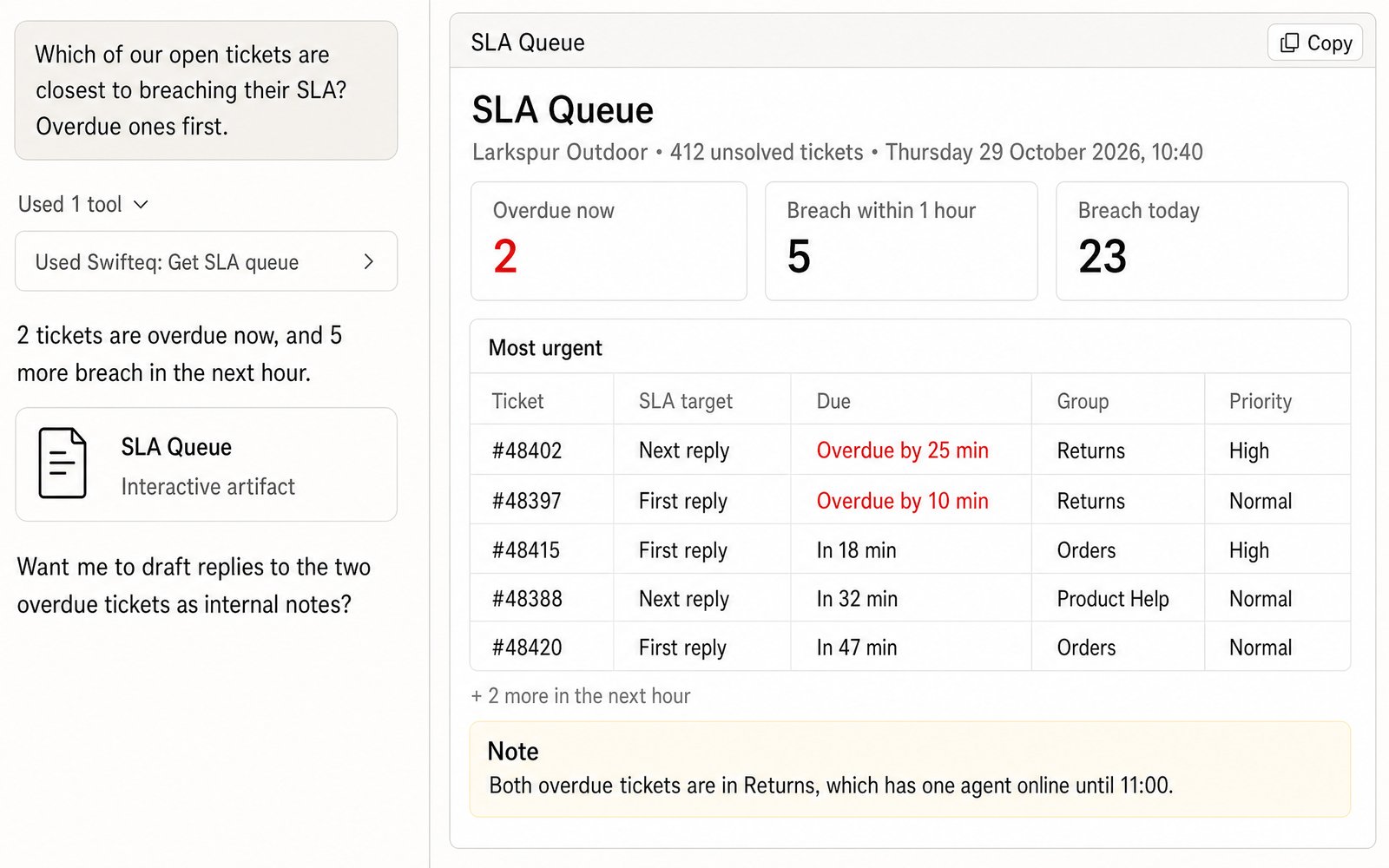
Find the Tickets Closest to Breaching
At the start of a shift, the first thing you want to know is which tickets are about to miss their SLA. Claude checks every unsolved ticket against your SLA policies and lists the most urgent ones, starting with the tickets that are already overdue and then the ones that will breach soonest. A ticket whose late reply has since been sent doesn't count as urgent anymore, and neither does a target that's paused, for example while the ticket is pending.
- “Which of our open tickets are closest to breaching their SLA? Overdue ones first.”
Report Last Week's SLA Achievement
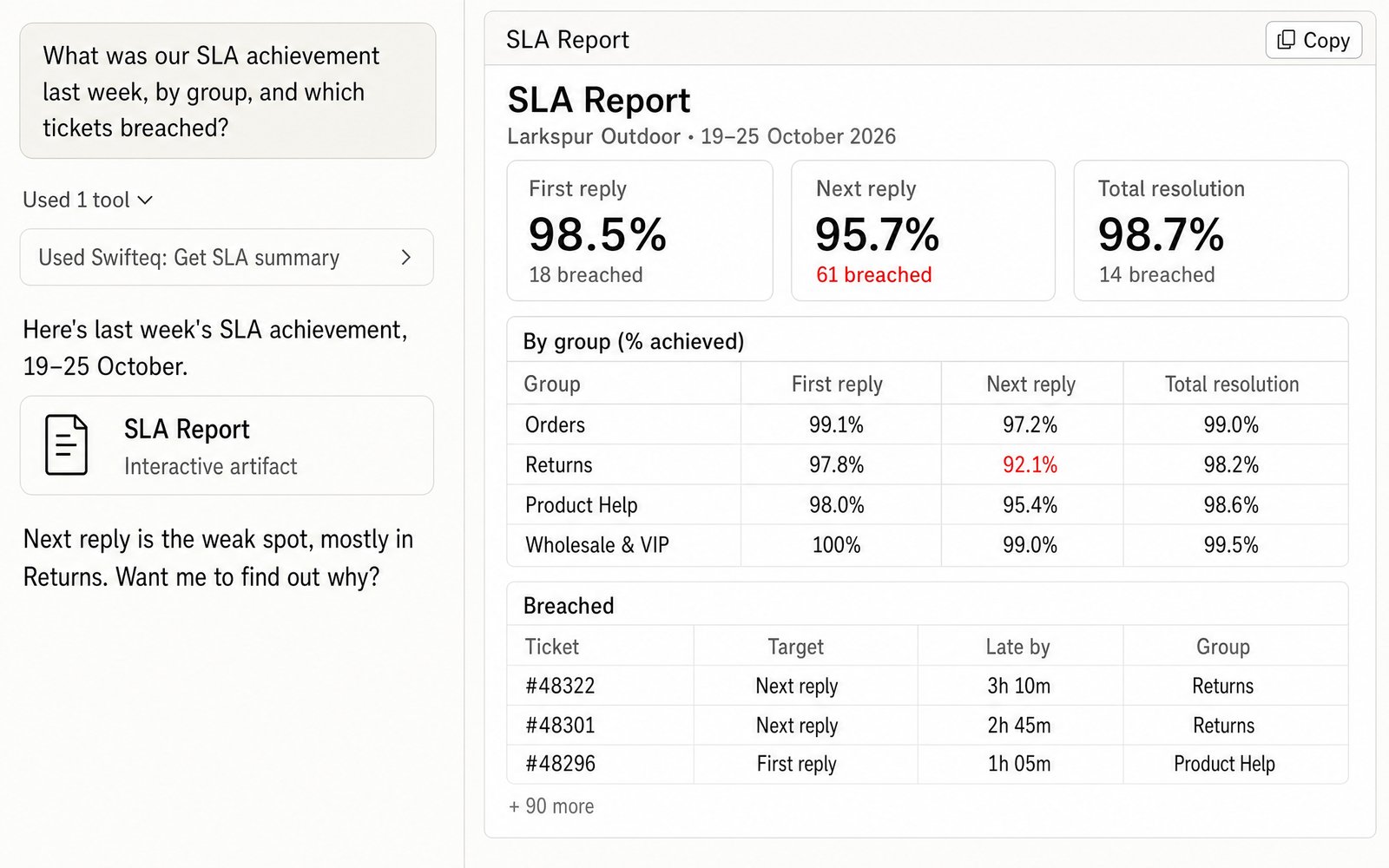
When it's time for your weekly report, ask Claude for last week's SLA achievement. For each SLA metric, such as first reply, next reply, and total resolution, it counts how many targets your team achieved and how many were breached, and works out the percentage achieved. You can split the figures by group, as in this example, or by agent or week. Claude also lists the tickets that breached and how late each one was, so you know which ones to look at first.
- “What was our SLA achievement last week, by group, and which tickets breached?”
Find Out Why Targets Were Missed
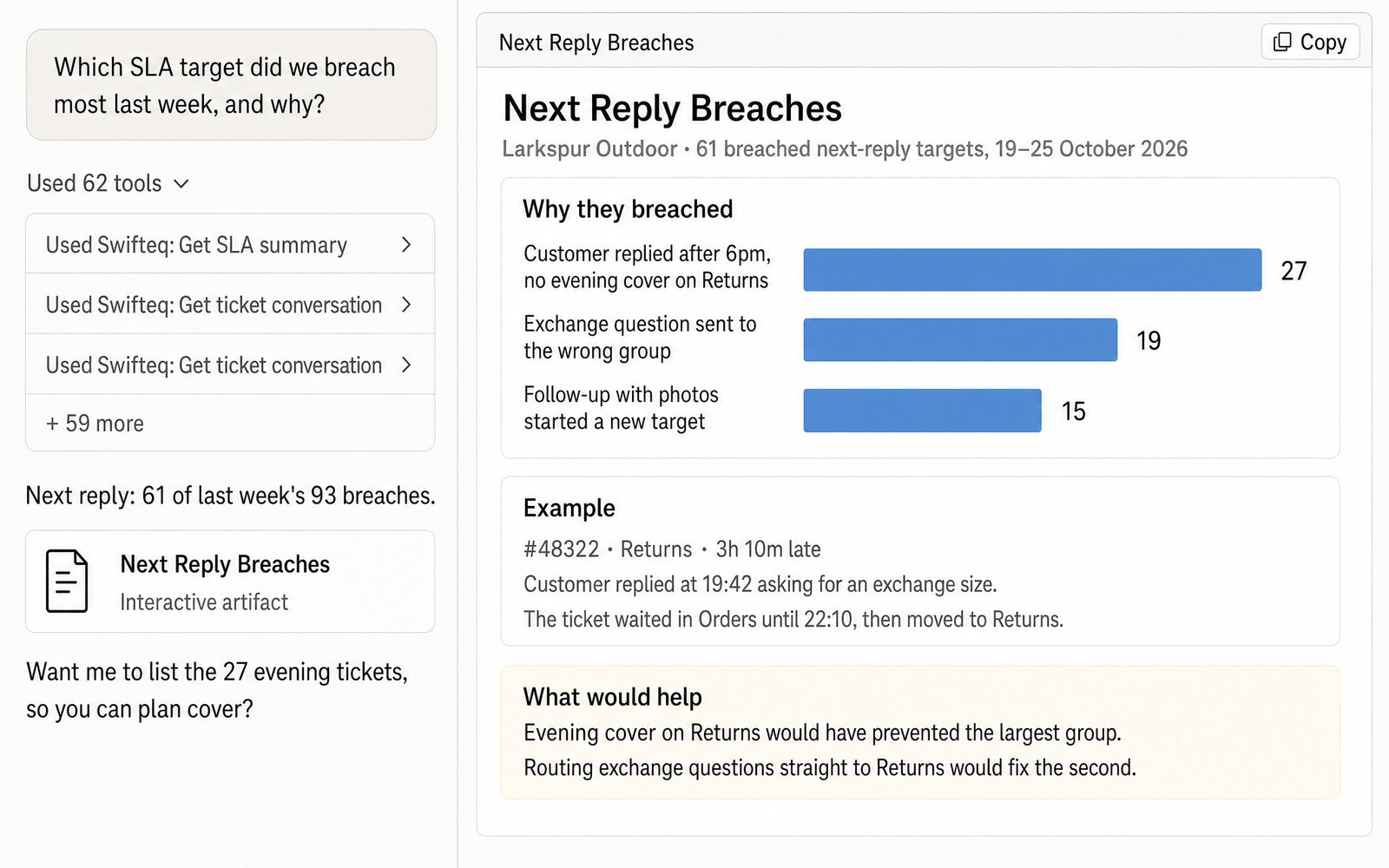
A percentage tells you which target slipped, but not why. To find out, ask Claude to read the conversations on the breached tickets and group them by cause. In this example, the biggest cause is customers who wrote back after 6pm, when nobody was covering Returns, so you'd know to look at evening cover first.
- “Which SLA target did we breach most last week, and why?”
What You Can Track
You ask in plain words, and the figures come from your own SLA policies in Zendesk, read at the moment you ask.
The SLA queue
Your unsolved tickets in order of urgency under your SLA policies, across the whole backlog or narrowed to your own tickets, one group, or one priority.
SLA achievement
The percentage of targets achieved for each metric: first reply, next reply, periodic update, pausable update, requester wait time, agent work time, and total resolution.
Breaches
Every breached target with its ticket and how late it was, along with the agent and group on that ticket.
Any ticket's targets
Every target on a ticket and where it stands (achieved, breached, running, or paused), plus when the next one is due. You can also get them as columns in a CSV export of tickets.
How Claude Finds Out Why a Target Was Breached
SLA figures show which target slipped, but the reason is often in the conversation. For example, a customer replied after hours, a ticket sat in the wrong group, or a customer's follow-up started a new next-reply target. Claude reads the conversations behind the breaches, so it can tell these causes apart and count how many breaches each one explains.
It counts targets the same way Zendesk does. Each target is judged on its own, so a ticket where the customer followed up three times has three next-reply targets, and each of them can be achieved or breached.
Where the Numbers Come From
Claude or ChatGPT gets the figures through the Swifteq MCP Server. The server reads your SLA policies through Zendesk's ticket metric events, the record Zendesk keeps of when each SLA target starts, pauses, and is achieved or breached. It passes the answer back, and ticket conversations and personal information from Zendesk are never stored on our side. If your account has no SLA policies, there are no targets to report.
| Tool | What it gives you |
|---|---|
| get_sla_queue | Your unsolved tickets that are most urgent under your SLA policies, with the overdue ones first and then the ones that breach soonest |
| get_sla_summary | For a period, how many targets were achieved and breached for each SLA metric and the percentage achieved, split by group, agent, brand, channel, priority, policy, week, or month, with the tickets that breached |
| search_tickets, get_ticket with sla | Each ticket's targets: where each one stands, when it's due, and for a breach, when it happened and how many minutes late it was |
Limits to know
| Limit | What it means |
|---|---|
| 2,000 tickets per call | For a busy month, Claude asks for one week at a time, and the weeks add up to months, quarters, and years. A queue with more unsolved tickets than that has to be narrowed down by group or agent |
| Older tickets lose their SLA data | Zendesk archives tickets that have been closed and not updated for about 120 days, and then stops returning their SLA events. That's why it's worth keeping each month's figures as the month closes |
| Past figures can change | If a ticket is reopened later, a target that was achieved can turn into a breached one |
| A target counts on the day it was achieved or breached | Targets that are still running are left out. You can also ask for the targets of tickets created in the period instead |
| Group SLAs aren't covered | Only your SLA policies are covered |
| SLA figures can't be split by AI agent and human yet | You can still count and list your AI agent's tickets |
| Days follow the connected user's timezone | If a report's days look shifted, check the timezone in the Zendesk profile of the user who connected |
How it works
Set It Up in Three Steps
- 1
Create your free Swifteq account
Sign up and authorize your Zendesk account. Read access is all SLA tracking needs, because it never changes anything in Zendesk.
- 2
Add the connector to your AI assistant
In Claude or ChatGPT, add a custom connector with the URL
https://mcp.swifteq.com/api/mcp/mcpand sign in with your Swifteq account. - 3
Ask for your first SLA check
For example: “Which of my tickets are closest to breaching?” Claude uses the SLA policies you already have in Zendesk, so there's nothing else to set up.
Frequently Asked Questions
Does it need its own SLA setup?
No. Claude reads the SLA policies you've set up in Zendesk, so your tickets are measured against the same targets your team already works to.
Which SLA metrics does it cover?
First reply, next reply, periodic update, pausable update, requester wait time, agent work time, and total resolution. It covers SLA policies only, so group SLAs aren't included.
How is SLA achievement calculated?
For each metric, the achieved targets are divided by the achieved and breached targets together. By default, a target counts on the day it was achieved or breached, and targets that are still running are left out.
Can it give us 6 or 12-month SLA figures?
Yes, as long as you keep each month's figures. Zendesk archives tickets that have been closed and not updated for about 120 days, and after that it stops returning their SLA events, so older months can't be worked out again. Counts from separate periods add up, though, so if you save the achieved and breached counts as each month closes, Claude can combine them into quarters, 6 months, or a year.
How many calls does it use?
Checking the queue takes one call, and so does a week's SLA achievement. A busy month takes one call per week, and when Claude reads the conversations on breached tickets, each conversation it reads adds one call.
What does it cost?
It's free for 500 calls a month per Zendesk account, shared by everyone at your company. Above that, €49 a month covers your account and its first user, and each extra user is €9 a month, so a team of 10 pays €130 a month. See pricing.
Guides and Resources
- Zendesk MCP Server: features, security, and pricing
- Swifteq vs Zendesk's own MCP Server, compared
- Zendesk dashboards and KPI reports with Claude or ChatGPT
- Zendesk AI agent and ticket QA with Claude or ChatGPT
- A complete guide to Zendesk SLAs
- Re-thinking SLAs and response time in light of customer support AI
- Our help center: MCP Server tools and limits
Check Your SLAs on Your Own Tickets
Free for 500 calls a month. No credit card required.
Page last updated