
How to QA Zendesk Tickets and AI Agent Conversations With Claude or ChatGPT
Swifteq's MCP Server connects Claude, ChatGPT, or another AI assistant to your Zendesk, so it can take the first pass on your QA reviews. Ask it to score solved tickets against your own QA scorecard, or to check the conversations your Zendesk AI agent resolved on its own. It reads each conversation in full and flags the tickets a person should look at, so your team lead reviews a short list instead of every ticket.
- Score solved tickets against your own QA scorecard
- Check what your Zendesk AI agent resolved on its own
- Reviews only need read access to your Zendesk
- Ticket conversations and PII from Zendesk are never stored
Free for 500 calls a month per Zendesk account. No credit card required.
Zendesk AI Agent and Ticket QA Examples
Each example below starts with one request typed into Claude. The screenshots use a made-up outdoor gear store, Larkspur Outdoor, so the agents, ticket numbers, and scores only show the kind of review you'd get.
Check What Your AI Agent Resolved on Its Own
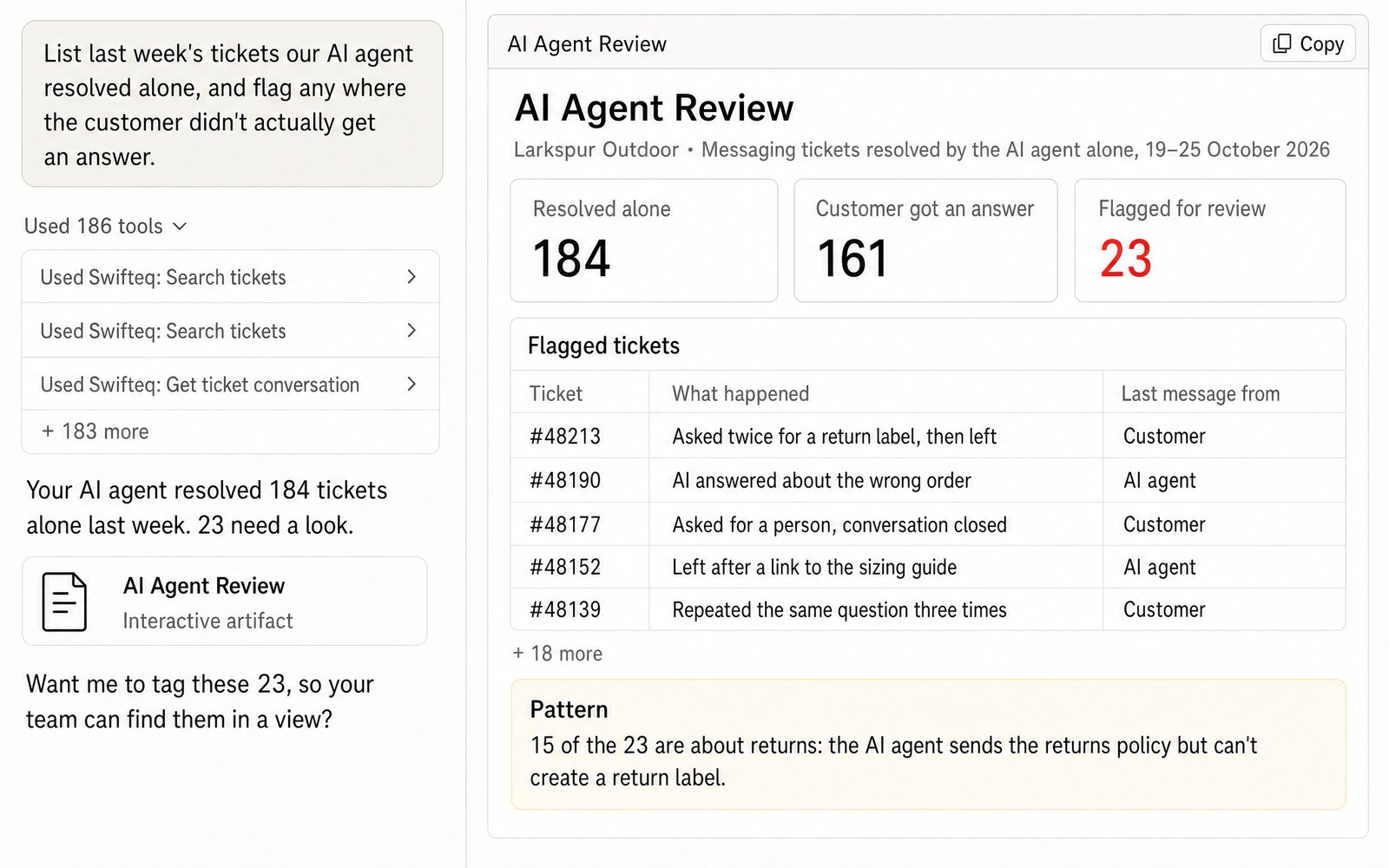
A ticket your Zendesk AI agent resolved isn't always one where the customer got what they needed. Claude can list the messaging tickets the AI agent resolved on its own, read each conversation, and flag the ones where the customer didn't get an answer, like someone who asked twice for a return label and then left. That way a person reviews a short list of flagged tickets instead of every conversation.
- “List last week's tickets our AI agent resolved alone, and flag any where the customer didn't actually get an answer.”
Score Solved Tickets Against Your QA Scorecard
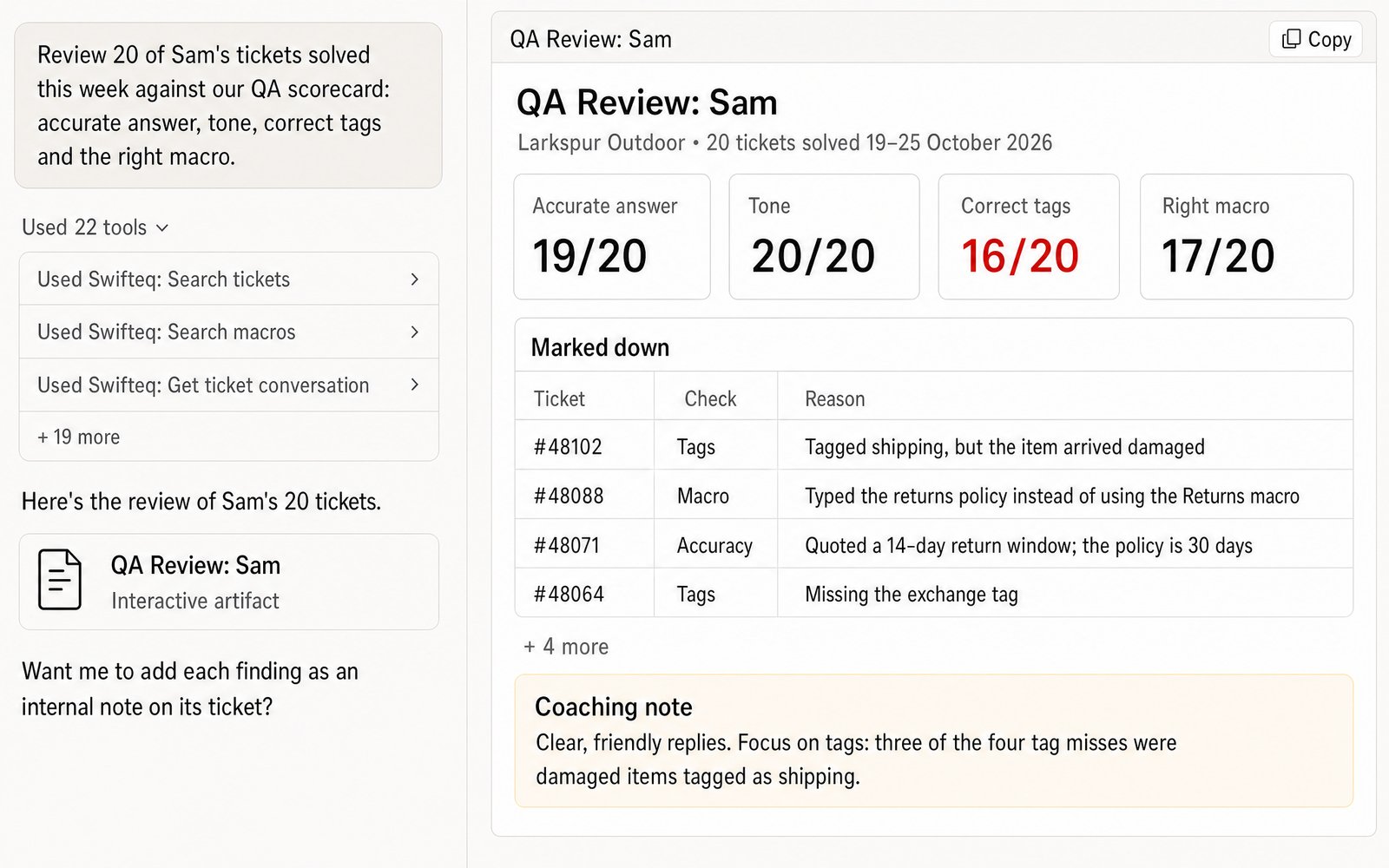
Give Claude the criteria from your QA scorecard, such as an accurate answer, the right tone, correct tags, and the right macro, and it scores each ticket against them. For every point it marks down, it gives you the reason, for example a ticket tagged as shipping when the item arrived damaged. You can then check its reasoning before you go through the review with the agent.
- “Review 20 of Sam's tickets solved this week against our QA scorecard: accurate answer, tone, correct tags and the right macro.”
Coaching Notes for Each Agent
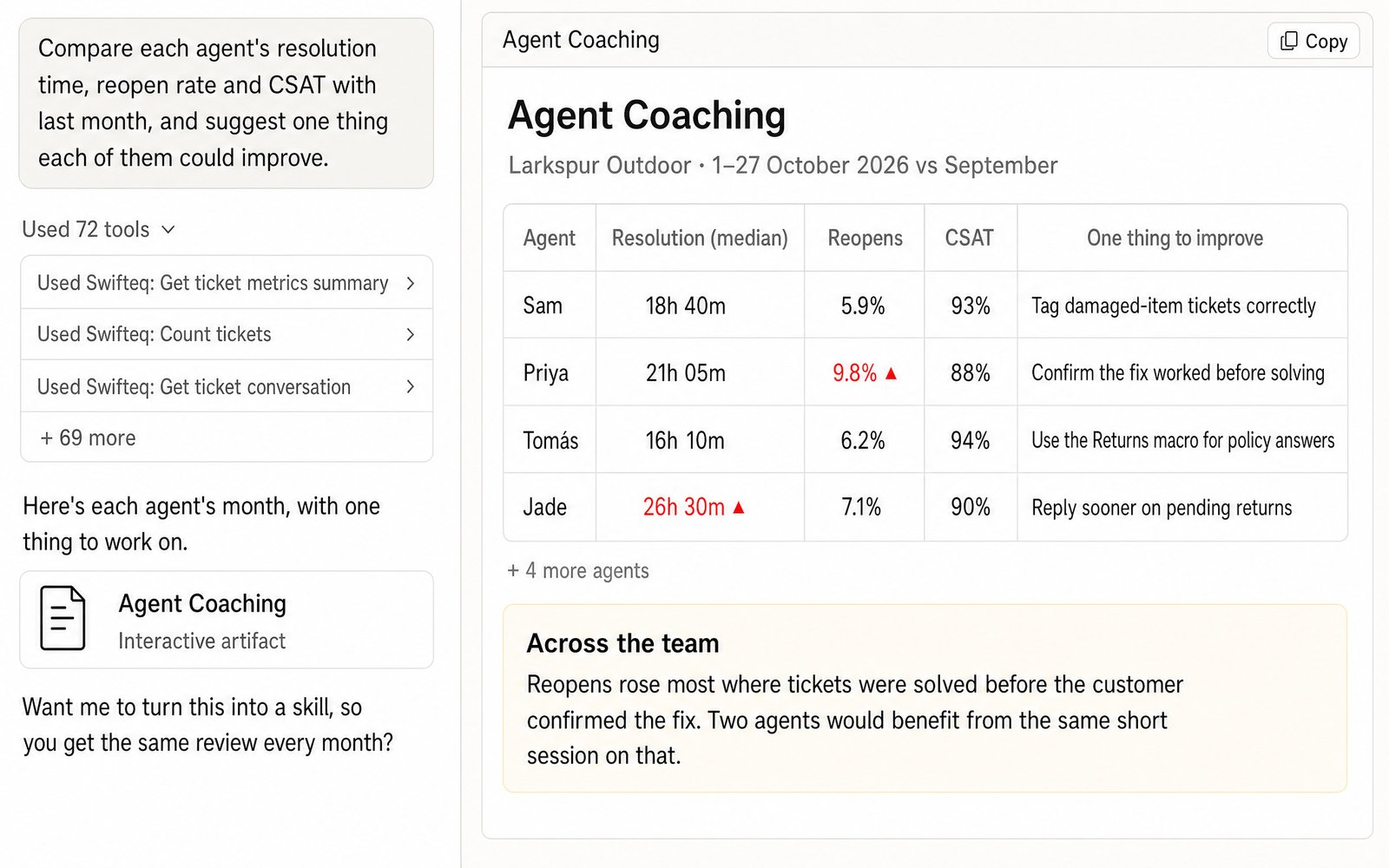
Before your next coaching sessions, ask Claude to compare each agent's resolution time, reopen rate, and CSAT with the month before. It then reads each agent's tickets and suggests one thing they could work on, like confirming a fix worked before solving the ticket. That way the coaching conversation starts from the agent's own tickets, not just their numbers.
- “Compare each agent's resolution time, reopen rate and CSAT with last month, and suggest one thing each of them could improve.”
Check What Zendesk Counts as Automated Resolutions
Zendesk bills its AI agents by automated resolution, so it's worth knowing what gets counted as one. Zendesk's own Resolution type field can mark a conversation as an automated resolution even when the customer simply gave up and left, and we reproduced this on our own test account. On messaging, Claude or ChatGPT can list the tickets Zendesk counted as automated resolutions, read each conversation, and show you which ones actually answered the customer.
- “List last month's tickets Zendesk counted as automated resolutions, and flag the ones where the customer left without an answer.”
What You Can Review
You ask in plain words, and Claude reads the tickets from your Zendesk at the moment you ask.
Tickets against your scorecard
Accuracy, tone, documentation, categorization, and whether the agent used a macro or typed the reply, scored against criteria you write yourself.
Your Zendesk AI agent
The tickets it resolved alone, the ones it handed to a person, and the ones Zendesk counted as automated resolutions. Every message shows who wrote it.
Agent performance
Each agent's first reply and resolution times, reopen and one-touch rates, and CSAT, compared with an earlier period.
Coaching notes
Suggestions drawn from an agent's own replies. If you've given it write access, Claude can also leave them as internal notes or tag the tickets it reviewed.
What the AI Reads in Each Ticket
A QA score is only fair if the reviewer saw everything on the ticket, not just the last reply. So Claude or ChatGPT reads the whole conversation in order, including every public reply and internal note from email, messaging, or WhatsApp, along with the screenshots customers sent. Each message shows who wrote it, whether that's the customer, one of your agents, your Zendesk AI agent, or Zendesk itself. That way, when the AI agent and your team both worked on a ticket, you can tell their replies apart.
Where the Data Comes From
Claude or ChatGPT gets the data through the Swifteq MCP Server, which asks Zendesk and passes the answer back. We never store ticket conversations, or any personal information from Zendesk about your customers or employees. Each person reviews with their own Zendesk permissions, so the AI can't see tickets in a Private Group the person isn't part of.
| Tool | What it gives you |
|---|---|
| search_tickets | The tickets to review, found by solved date, group, agent, tags, form, or what the AI agent did with them |
| get_ticket_conversation | The full conversation, showing who wrote each message and when the AI agent handed over |
| get_ticket with ai_agent | Whether the AI agent handled a ticket alone, handed it over, or wasn't involved, and whether Zendesk counted it as an automated resolution |
| get_ticket_metrics_summary, count_tickets | Reply and resolution times, reopen and one-touch rates, and CSAT for each agent or group |
Limits to know
| Limit | What it means |
|---|---|
| AI agent tickets can be listed on messaging only | Email AI agent tickets, and tickets an agent took over from the AI, are read one at a time, because Zendesk records nothing searchable for them |
| An escalated messaging ticket is dated at the handover | Zendesk moves its created date to the moment of the handover. The ticket itself still shows when the conversation started |
| Times and SLA figures can't be split by AI and human yet | You can still count and list the AI agent's tickets |
| The AI can only read so much at once | About four weeks of tickets at a time works well, so for longer periods, review in batches |
| It can't hand a conversation to the AI agent or take one over | It can read the AI agent's conversations, but not change who's handling them |
| CSAT needs an admin login | Zendesk only shows satisfaction ratings to admins |
How it works
Set It Up in Three Steps
- 1
Create your free Swifteq account
Sign up and authorize your Zendesk account. Read access is enough for reviews. If you'd also like Claude to add internal notes or tags to the tickets it reviews, authorize with write access.
- 2
Add the connector to your AI assistant
In Claude or ChatGPT, add a custom connector with the URL
https://mcp.swifteq.com/api/mcp/mcpand sign in with your Swifteq account. - 3
Ask for your first review
For example: “Review five tickets our AI agent resolved alone yesterday.” Once the reviews look right, save your QA scorecard as a Claude skill, so every review uses the same criteria.
Frequently Asked Questions
Can it review our Zendesk AI agent's conversations?
Yes, on both messaging and email, and it only reads them. On messaging, Claude can list and count the tickets your AI agent resolved alone, the ones it escalated to a person, and the ones Zendesk counted as automated resolutions. In every conversation you can see which messages the AI wrote and when it handed over. Email AI agent tickets, and tickets an agent took over from the AI, are read one ticket at a time.
How does it spot the AI agent on email?
Zendesk doesn't flag the email tickets its AI agent worked on, so the MCP Server recognizes the AI's replies itself. It marks those results as inferred, so you can tell them apart from what Zendesk itself records.
Can it use our own QA scorecard?
Yes. You can put your criteria in the prompt, but it's better to save them in a Claude skill, because then every review follows the same scorecard, whoever runs it.
Does it work with Zendesk QA?
Not today. It reads tickets, conversations, and CSAT, but not the reviews or scorecards you keep in Zendesk QA.
How many calls does a review use?
Each conversation it reads is one call, and listing the tickets adds one call for each page of up to 100. So reviewing 100 tickets takes about 101 calls, and the free 500 calls a month cover about four reviews of that size.
What does it cost?
It's free for 500 calls a month per Zendesk account, shared by everyone at your company. Above that, €49 a month covers your account and its first user, and each extra user is €9 a month, so a team of 10 pays €130 a month. See pricing.
Guides and Resources
- Zendesk MCP Server: features, security, and pricing
- Swifteq vs Zendesk's own MCP Server, compared
- Zendesk dashboards and KPI reports with Claude or ChatGPT
- AI agent evaluation: how to score the handoff to a human
- From 2% to 100%: a practical guide to Auto QA in Zendesk
- What should customer service QA actually measure?
- Claude Skills for Zendesk: 9 practical use cases
- Our help center: MCP Server tools and limits
Run Your First Review on Your Own Tickets
Free for 500 calls a month. No credit card required.
Page last updated