
How to Triage and Reply to Zendesk Tickets With Claude or ChatGPT
Swifteq's MCP Server connects Claude, ChatGPT, or another AI assistant to your Zendesk, so you can hand it the first pass on your queue. Ask it to sort this morning's new tickets, draft replies for your agents to review, or pull every report of the same bug under one problem ticket. It can only read your tickets until you give it write access, and it never replies to customers unless you've turned public replies on.
- Sort new tickets by group, priority, and contact reason
- Draft replies as internal notes for agents to review
- Link reports of the same bug to one problem ticket
- Public replies and merging stay off until you turn them on
Free for 500 calls a month per Zendesk account. No credit card required.
Zendesk Ticket Triage Examples
Each example below starts with one request typed into Claude. The screenshots use a made-up outdoor gear store, Larkspur Outdoor, so the ticket numbers, names, and groups only show the kind of answer you'd get.
Sort This Morning's New Tickets
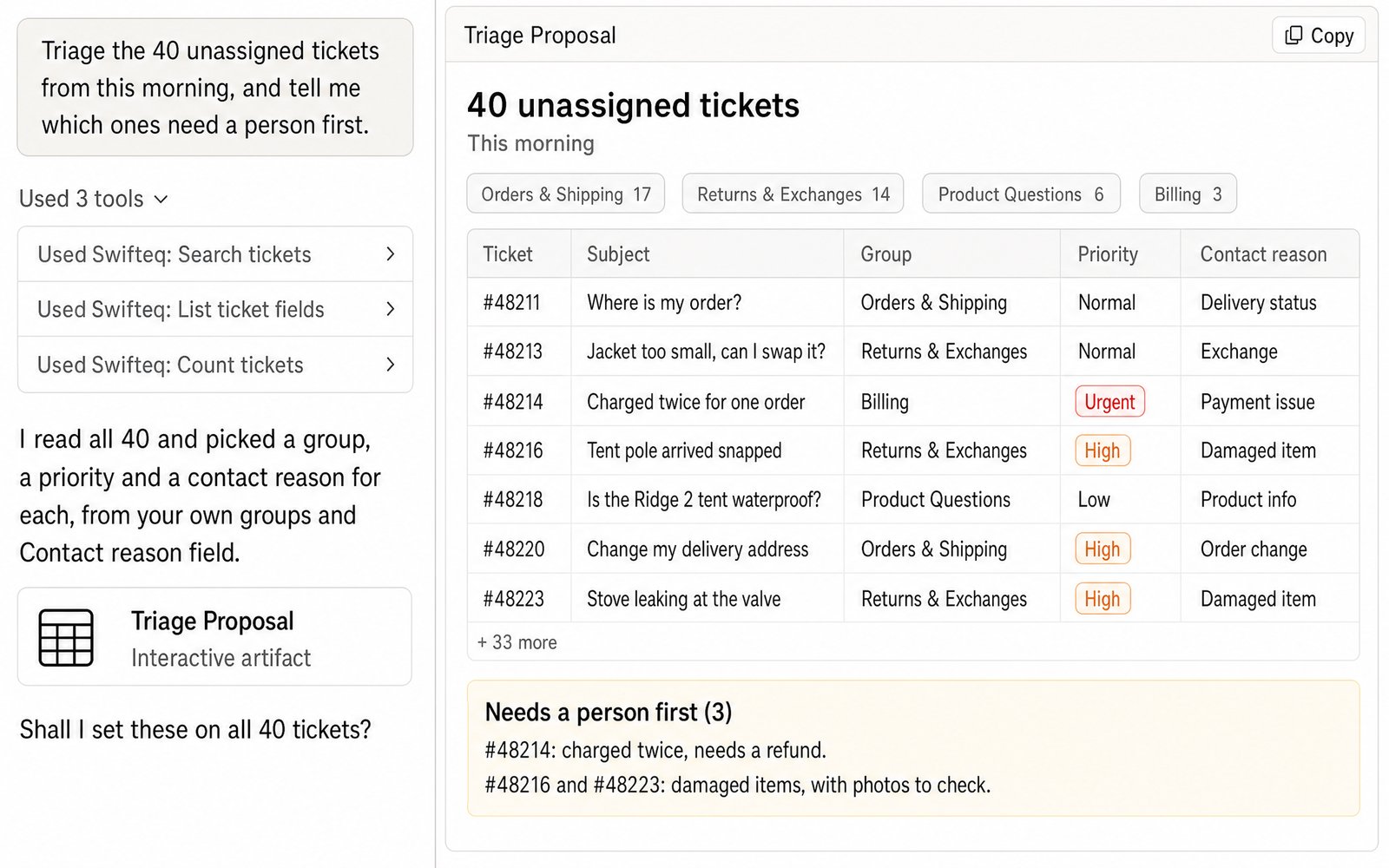
Instead of opening every new ticket to decide where it goes, ask Claude to read them all and suggest a group, priority, and contact reason for each one. It uses the groups and fields you already have in Zendesk, and it points out the tickets that shouldn't wait, like a customer who was charged twice. Once you've checked the list, tell it to go ahead and it updates the tickets for you.
- “Triage the 40 unassigned tickets from this morning, and tell me which ones need a person first.”
Draft Replies for Agents to Review
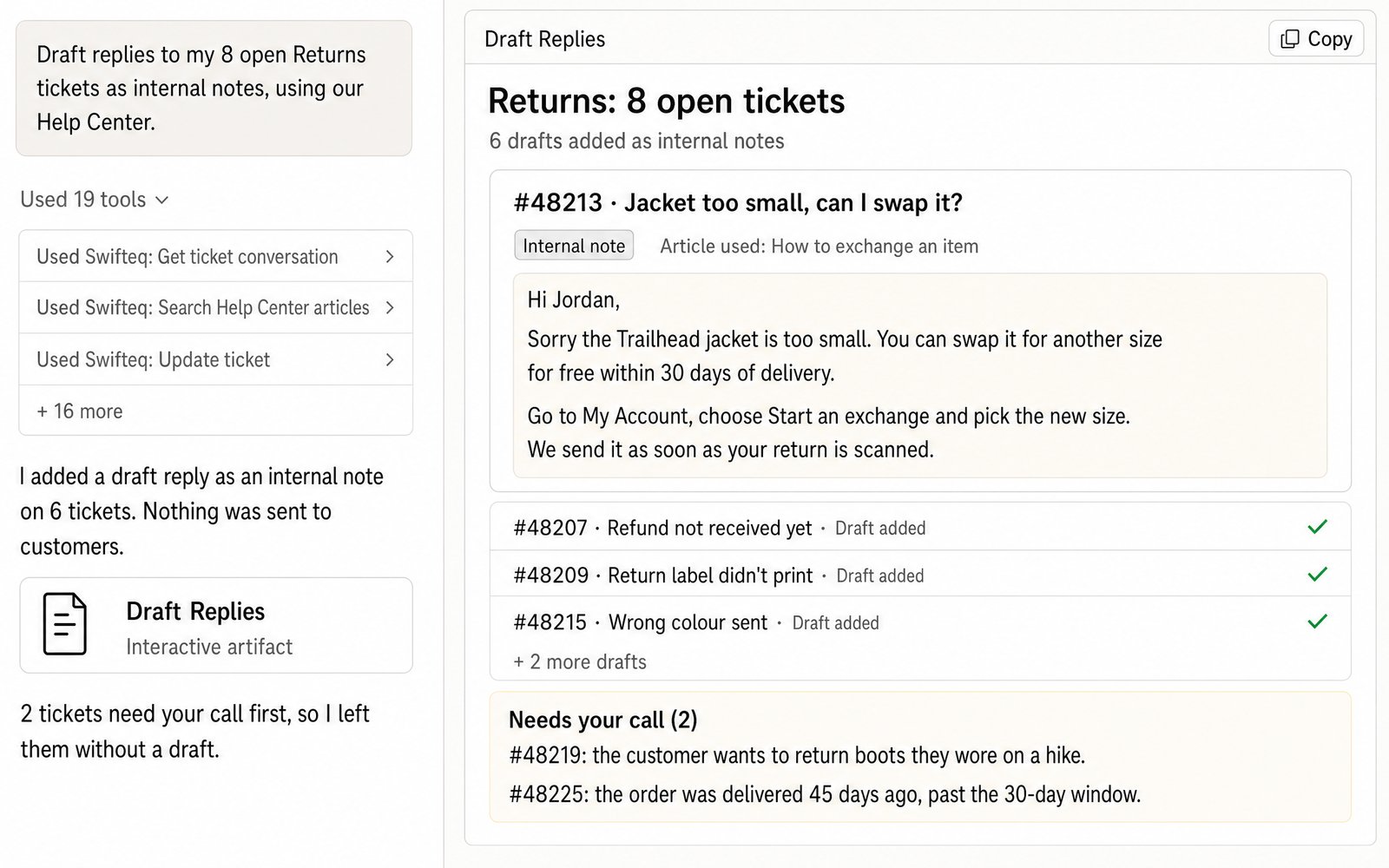
Zendesk doesn't have draft replies, so Claude adds each draft to the ticket as an internal note. It reads the whole conversation and looks up the help center articles that answer the question, so the draft can point the customer to the right one. Your agent then checks the note, edits it if needed, and sends it as a public reply. When a ticket needs a decision first, like a return outside your policy, Claude leaves it without a draft and tells you why.
- “Draft replies to my 8 open Returns tickets as internal notes, using our Help Center.”
Handle an Outage With One Problem Ticket
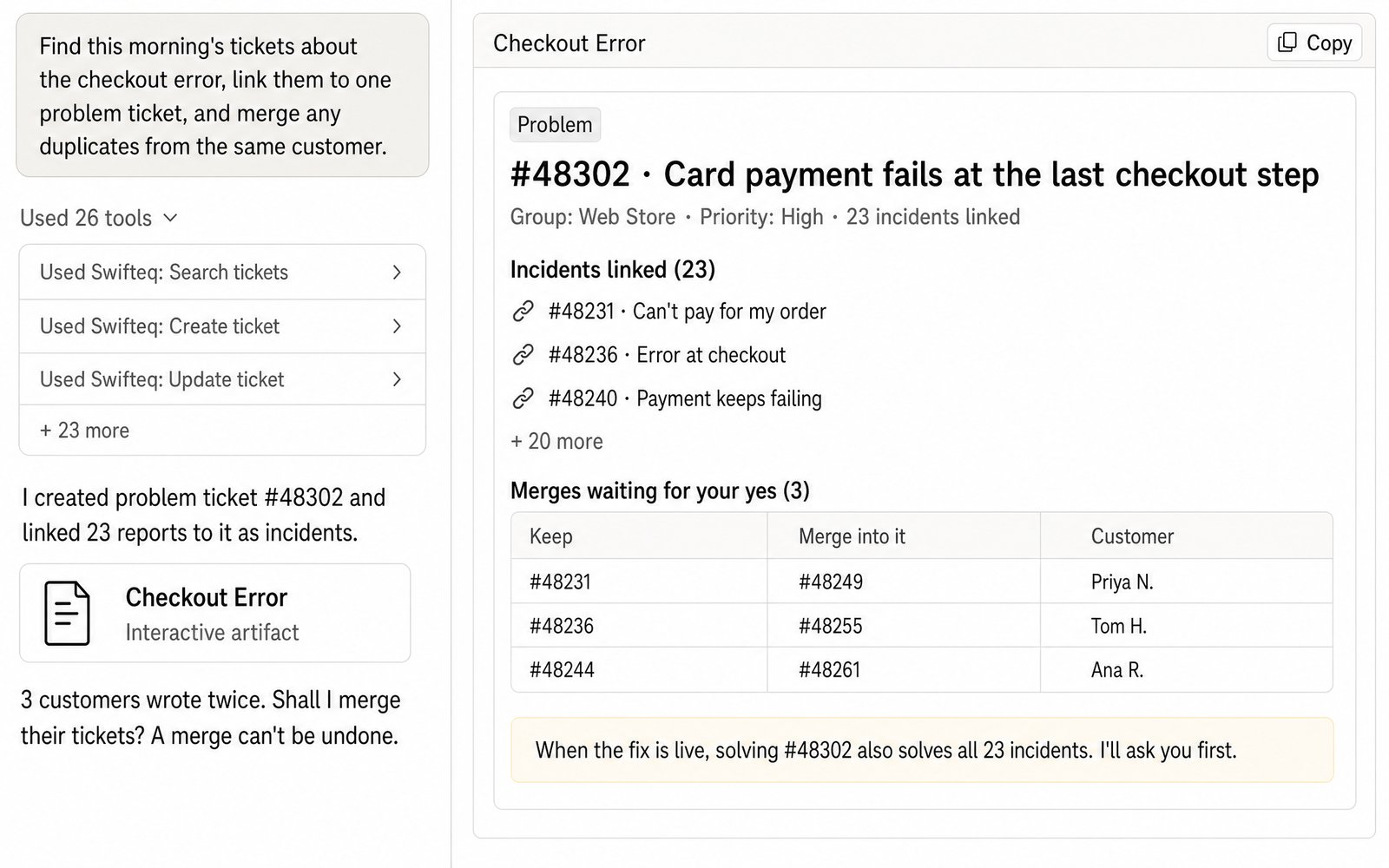
When something breaks, the same report can come in from dozens of customers. Claude can find those tickets, create a problem ticket, and link each report to it as an incident, so your team answers once on the problem ticket instead of on every single ticket. If some customers wrote in twice, it lists those tickets and asks before merging them, because a merge can't be undone.
- “Find this morning's tickets about the checkout error, link them to one problem ticket, and merge any duplicates from the same customer.”
How We Triage Our Own Support Queue
We use the MCP Server on Swifteq's own support. Every hour during the working day, Claude runs a skill we wrote that reads the new and open tickets about the MCP Server in our Zendesk and looks into each one, checking the customer's account and our documentation. When the answer is clear, it writes a draft reply, and when it isn't, it writes down the question for us instead.
The drafts come to us in Slack, and a person on our team reads, edits, and sends every reply. The routine never changes anything in Zendesk itself.
What Claude Can Change, and What Stays Off
When you first connect, Claude or ChatGPT can only read your tickets. To let it add internal notes, update fields, or create tickets, you give it write access when you authorize your Zendesk account.
Two things stay off even then, until an account owner turns them on for your account: replying to customers (Allow public ticket replies) and merging tickets (Allow merging tickets). Once they're on, the owner can still keep them off for particular people. And if public replies are off when you ask for a reply, Claude won't post it as an internal note instead. It tells you it couldn't send it.
What You Can Ask For
You ask in plain words, and Claude works with the same Zendesk permissions you have.
Triage
Set the group, priority, type, status, tags, or custom fields on one ticket or a whole batch of them.
Replies
Add internal notes for agents to review, with files attached. Public replies work too, once you've turned them on.
Problems and duplicates
Link reports of the same issue to a problem ticket, and merge duplicate tickets from the same customer.
New tickets
Create a ticket from a phone call, a chat, or another tool, either for a customer or as an internal follow-up.
Works Alongside Our Zendesk Apps
Our Zendesk apps work inside Zendesk on every ticket, without anyone having to ask. The MCP Server is for the times you want Claude or ChatGPT to take on something specific, like sorting this morning's backlog or handling an outage.
- Agent Co-writer helps agents write replies inside the ticket, in your brand's tone.
- Ticket Classification sorts every new ticket into your own topics as it comes in, and fills in its tags and fields.
- Merge Duplicate Tickets merges duplicate tickets automatically, using rules you set.
Where the Data Comes From
Claude or ChatGPT gets the data through the Swifteq MCP Server, which asks Zendesk and passes the answer back. We never store ticket conversations, or any personal information from Zendesk about your customers or employees. Each person works with their own Zendesk permissions.
| Tool | What it does |
|---|---|
| search_tickets, get_ticket_conversation | Finds tickets by status, group, tag, date, or keyword, and reads the full conversation |
| update_ticket | Changes the fields, group, priority, and tags, adds an internal note or a reply with attachments, and links an incident to a problem ticket |
| create_ticket | Creates a new ticket that starts with an internal note, unless you've turned on public replies |
| merge_tickets | Merges up to five duplicate tickets from the same customer into one |
| search_help_center_articles | Finds the help center articles a reply can link to |
Limits to know
| Limit | What it means |
|---|---|
| Public replies are off by default | An account owner turns on Allow public ticket replies |
| Merging is off by default, and a merge can't be undone | It only merges tickets from the same customer, and Claude shows you each merge and waits for your go-ahead |
| Zendesk has no draft replies | Drafts are saved as internal notes |
| Nothing can be deleted | Tickets and comments can only be deleted in Zendesk. A public reply reaches the customer as soon as it's posted |
| Solving a problem ticket also solves its incidents | Claude has to confirm before it does this, so it tells you first how many incidents will be solved |
| One ticket per update | Updating 40 tickets takes 40 calls. A search returns up to 100 tickets per call |
| Light agents can only add internal notes | Zendesk doesn't let light agents reply publicly or change ticket fields |
How it works
Set It Up in Three Steps
- 1
Create your free Swifteq account
Sign up and authorize your Zendesk account. Read access is enough to get triage suggestions. To let Claude add notes or update fields, authorize with write access. Replying to customers and merging tickets also need an account owner to turn on Allow public ticket replies or Allow merging tickets.
- 2
Add the connector to your AI assistant
In Claude or ChatGPT, add a custom connector with the URL
https://mcp.swifteq.com/api/mcp/mcpand sign in with your Swifteq account. - 3
Ask about your queue
For example: “Which open tickets need a person first, and why?”
Frequently Asked Questions
Will Claude reply to customers?
Only if you allow it. Until an account owner turns on Allow public ticket replies for your account, Claude can only add internal notes, and the owner can still keep public replies off for particular people. Once public replies are on, a reply reaches the customer as soon as it's posted, so ask for a draft first whenever you want to check it.
Can it write a reply without sending it?
Yes. Zendesk doesn't have draft replies, so Claude adds the draft to the ticket as an internal note. Your agent copies it into a public reply, edits it if needed, and sends it.
Can it merge tickets?
Yes, once an account owner turns on Allow merging tickets. It merges up to five duplicate tickets from the same customer at a time, and it shows you each merge and waits for your go-ahead, because a merge can't be undone. If you'd like duplicates merged automatically using your own rules, take a look at Merge Duplicate Tickets.
Can it pick up tickets our AI agent handed over?
Yes, for messaging conversations. Claude can list the tickets your Zendesk AI agent passed to a human, read each conversation, and triage them like any other ticket.
How many calls does it use?
A search returns up to 100 tickets in one call, and reading a conversation is one call. Updates are one call per ticket, so setting the group and priority on 40 tickets takes 40 calls. Merging up to five tickets takes a single call.
What does it cost?
It's free for 500 calls a month per Zendesk account, shared by everyone at your company. Above that, €49 a month covers your account and its first user, and each extra user is €9 a month, so a team of 10 pays €130 a month. See pricing.
Guides and Resources
- Zendesk MCP Server: features, security, and pricing
- Swifteq vs Zendesk's own MCP Server, compared
- Zendesk SLA tracking with Claude or ChatGPT
- Zendesk incident management: how to manage incidents like a pro
- Zendesk intelligent triage: a complete guide
- How to reduce support tickets and shrink a large backlog
- How to streamline Zendesk ticket handling
- Our help center: write permissions for the MCP Server
Clear Your Queue With Claude or ChatGPT
Free for 500 calls a month. No credit card required.
Page last updated