
How to Analyze Zendesk Tickets and Sentiment With Claude or ChatGPT
Swifteq's MCP Server connects Claude, ChatGPT, or another AI assistant to your Zendesk, so you can ask why customers are getting in touch, not just how many did. It counts your tickets by contact reason, compares this week with last week, and then reads the conversations behind a change to find the cause. Analysis only needs read access, and ticket conversations and personal information from Zendesk are never stored.
- Ticket counts by contact reason, week by week
- The cause behind a spike, from the conversations
- Where customers are most frustrated, and why
- Themes your product team can act on
Free for 500 calls a month per Zendesk account. No credit card required.
Zendesk Ticket Analysis Examples
Each example below starts with one request typed into Claude. The screenshots use a made-up outdoor gear store, Larkspur Outdoor, so the contact reasons, numbers, and quotes only show the kind of answer you'd get.
Find Out Why Ticket Volume Went Up
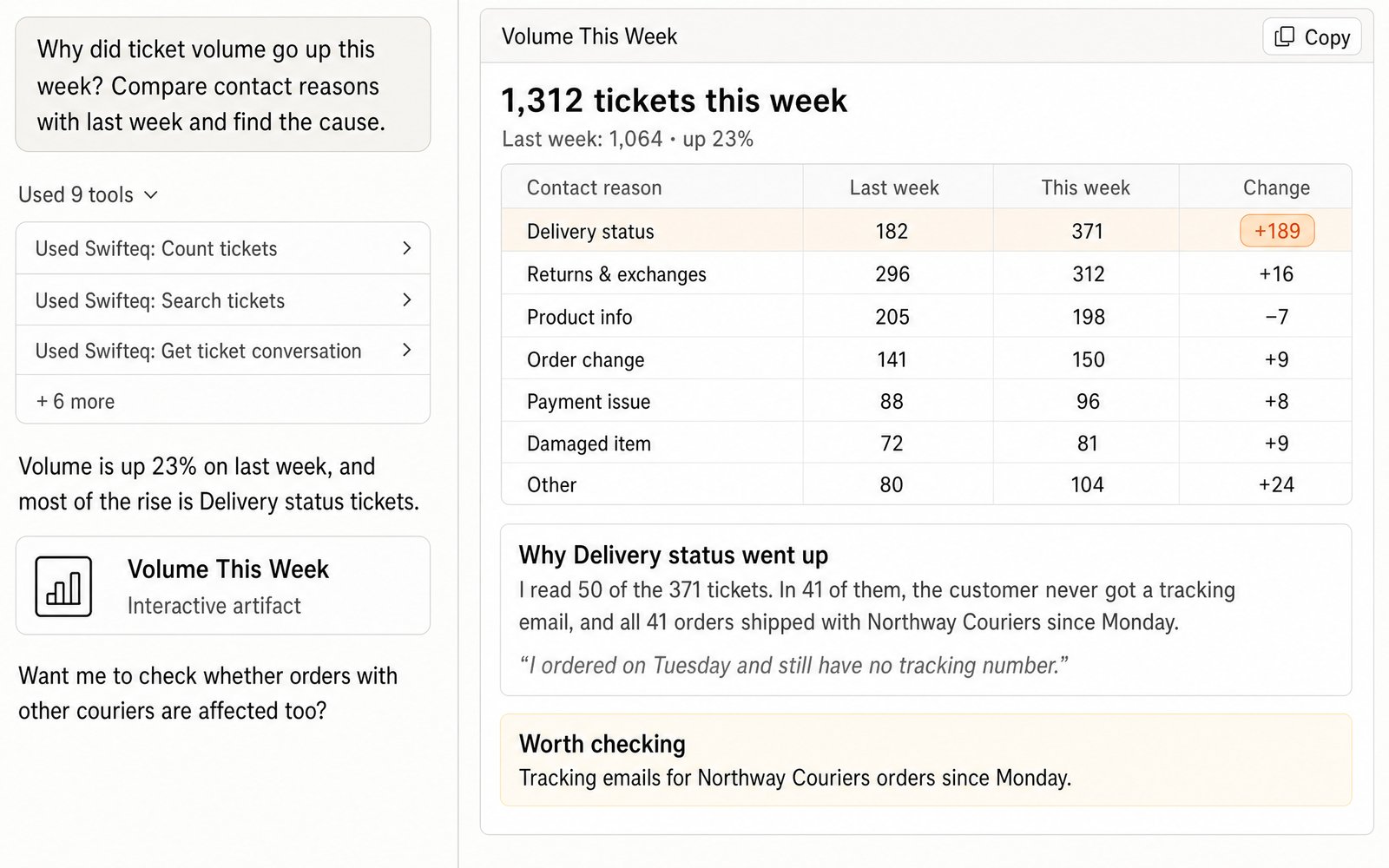
When ticket volume jumps, the first thing you want to know is which kind of ticket went up. Claude counts this week's and last week's tickets by your contact reason field, which takes one call per week however many tickets you have, and puts the two weeks side by side. Then it reads a sample of the tickets behind the biggest change to find the cause. In this example, Delivery status tickets doubled because customers whose orders went with one courier never got a tracking email.
- “Why did ticket volume go up this week? Compare contact reasons with last week and find the cause.”
See Where Customers Are Most Frustrated
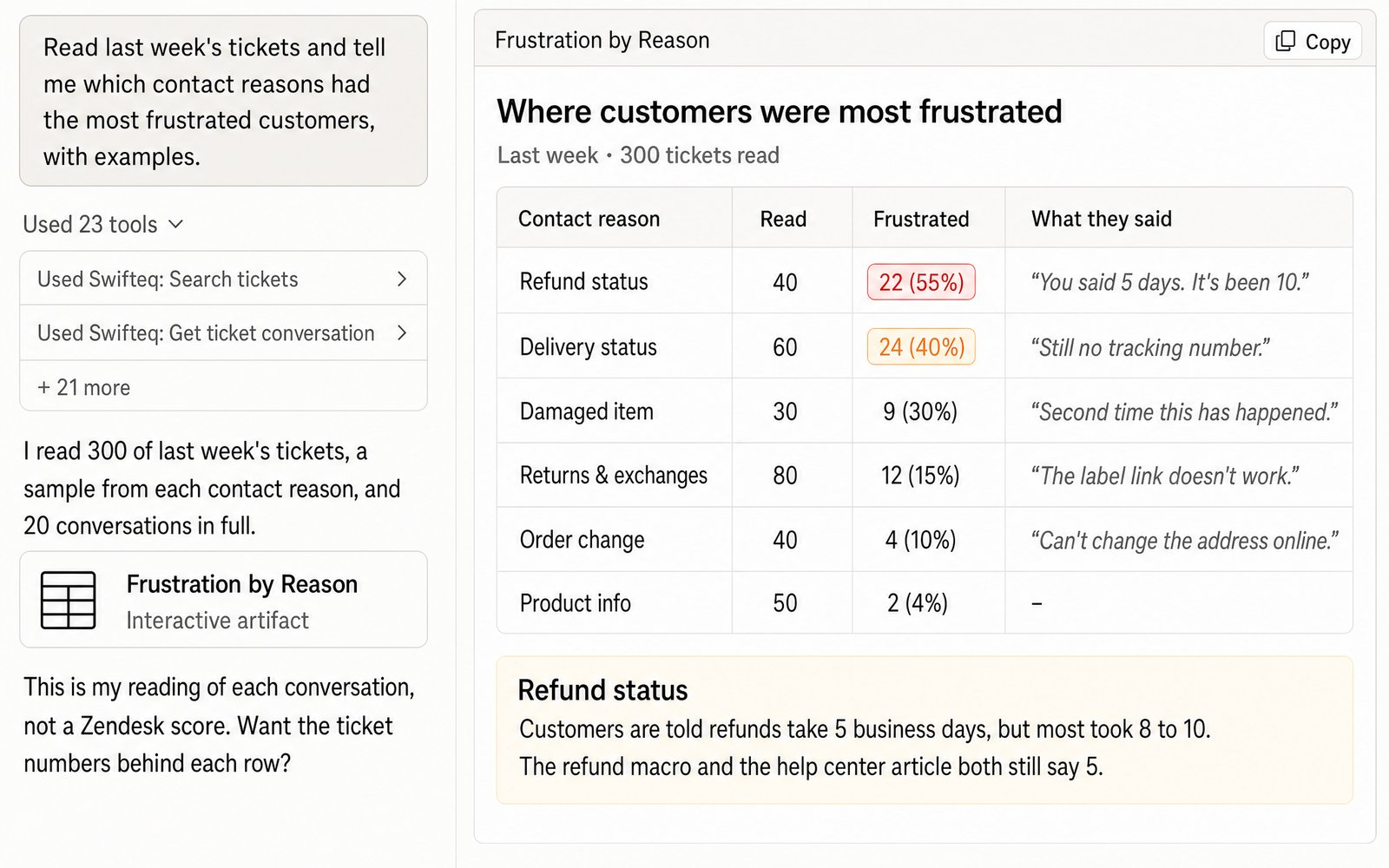
Satisfaction ratings only cover the customers who answered the survey. Claude reads the conversations themselves, so it can tell you which contact reasons have the most frustrated customers and quote what they said. In this example, refund tickets weren't the most common, but more than half of those customers were frustrated, because they were told five business days and waited eight to ten. It's Claude's reading of each conversation rather than a Zendesk score, so it quotes the messages behind each number for you to check.
- “Read last week's tickets and tell me which contact reasons had the most frustrated customers, with examples.”
Turn Tickets Into Themes for Your Product Team
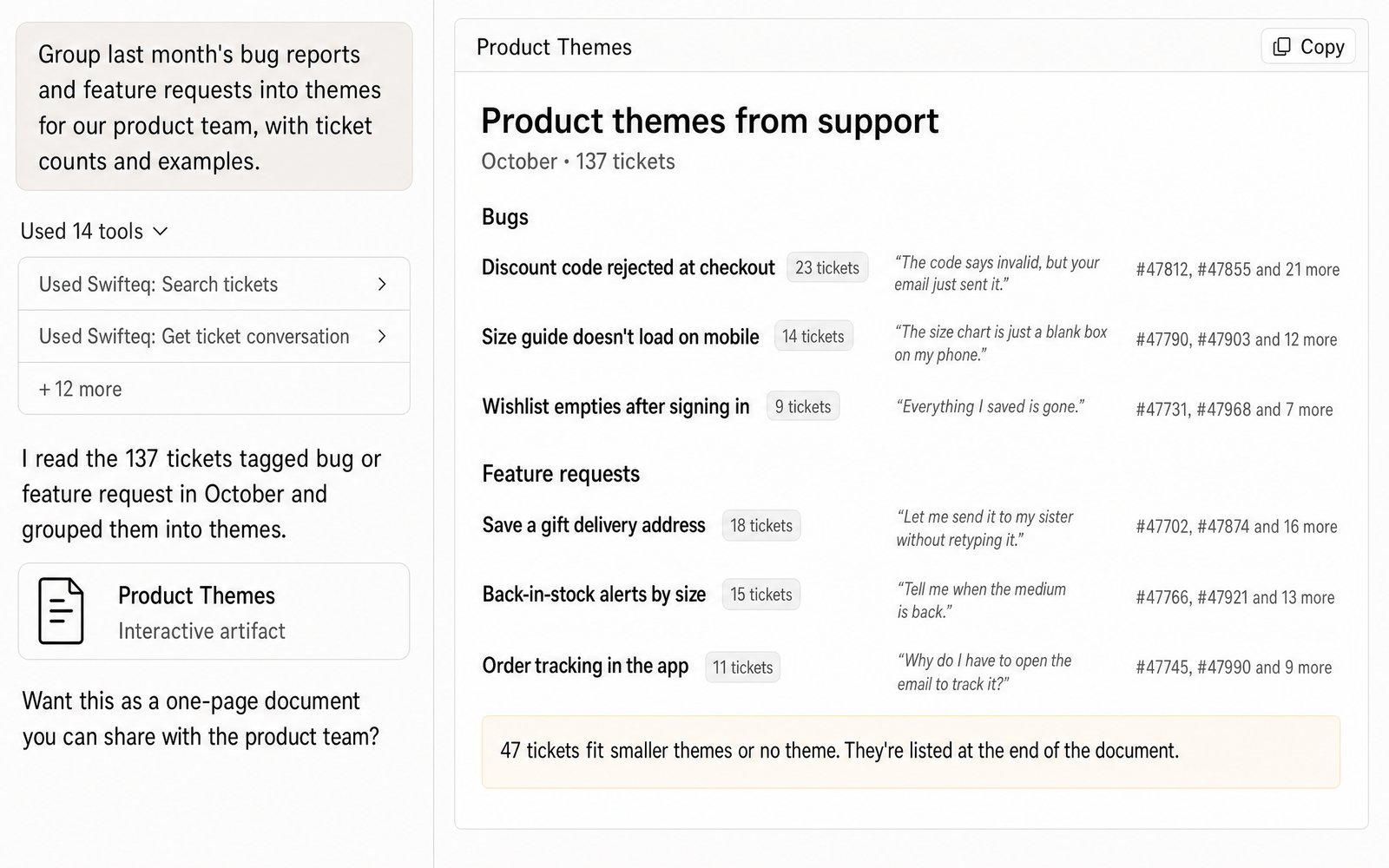
Product teams want to know what customers keep running into, not just how many tickets came in. Ask Claude to group last month's bug reports and feature requests into themes, and it gives you a ticket count, a typical quote, and the ticket numbers for each one. That way your product team gets a list they can open and check, rather than a summary they have to take on trust.
- “Group last month's bug reports and feature requests into themes for our product team, with ticket counts and examples.”
Why Read the Conversations, Not Just the Tags
A contact reason field tells you what a ticket was about, but not why the customer wrote in. Fields also get left on Other, or picked in a hurry at the end of a busy shift, so the counts only take you so far. Claude starts with the counts, because they're quick and cover every ticket, and then reads the tickets behind a change to find the reason in the customer's own words.
For example, a rise in Delivery status tickets could mean a courier delay, a tracking email that stopped sending, or a delivery promise on your website that the courier can't keep. Only the conversations tell you which one it is.
Analyzing a Large Volume of Tickets
Counting tickets by contact reason, channel, or week works at any volume, because Zendesk does the counting and Claude only sees the totals. Reading conversations is different. The AI can only read so much at once, so for a large volume it reads a sample from each contact reason, or works through the tickets a week at a time.
Once an analysis works the way you want, save it as a Claude skill, which is a set of saved instructions Claude follows each time, so you get the same analysis every week from one prompt. There's more on working with large volumes in our best practices.
What You Can Ask For
You ask in plain words, and Claude reads your tickets straight from Zendesk, with the same permissions you have.
Volume by contact reason
How many tickets came in for each contact reason, or for each option of any other dropdown field, in the period you choose.
Week-on-week changes
This week compared with last week, or this month with last month, and which contact reasons moved the most.
Frustration and escalation risk
The conversations where customers are frustrated or about to escalate, like asking for a manager or mentioning a chargeback, with quotes you can check.
Themes for your product team
Bug reports and feature requests grouped into themes, each with a count, a typical quote, and its ticket numbers.
Works Alongside Our Zendesk Apps
Ticket Classification sorts every new ticket into your own contact reasons as it comes in, and fills in the tags and fields for you. That keeps the counts Claude starts from accurate, without agents having to pick a reason by hand. When one of those reasons suddenly goes up, the MCP Server is how you ask Claude or ChatGPT why.
For weekly KPI reports and dashboards built from the same Zendesk data, see Zendesk dashboards and reports with Claude or ChatGPT.
Where the Data Comes From
Claude or ChatGPT gets the data through the Swifteq MCP Server, which asks Zendesk and passes the answer back. We never store ticket conversations, or any personal information from Zendesk about your customers or employees. Each person works with their own Zendesk permissions.
| Tool | What it does |
|---|---|
| count_tickets with group_by | Counts the tickets for each contact reason or other dropdown option, channel, group, or day, week, or month, in one call |
| search_tickets | Finds tickets by date, contact reason, tag, or keyword, with each customer's opening message, up to 100 per call |
| get_ticket_conversation | Reads a conversation in full, including the internal notes |
Limits to know
| Limit | What it means |
|---|---|
| 200 values per count | A field with more than 200 options is counted in parts |
| The AI can only read so much at once | For a large volume, it reads a sample or works a week at a time. Counts aren't affected |
| Frustration is Claude's judgment | It isn't a Zendesk score, so Claude quotes the messages behind each number for you to check |
| Counts only include the tickets you can see | If your Zendesk role is limited to some groups, connect with an admin login for complete numbers |
| 1,000 rows per CSV export | For a longer list of tickets, Claude exports them in batches |
| Days follow the connected user's timezone | If a report's days look shifted, check the timezone in that user's Zendesk profile |
How it works
Set It Up in Three Steps
- 1
Create your free Swifteq account
Sign up and authorize your Zendesk account. Read access is all ticket analysis needs, because it doesn't change anything in Zendesk.
- 2
Add the connector to your AI assistant
In Claude or ChatGPT, add a custom connector with the URL
https://mcp.swifteq.com/api/mcp/mcpand sign in with your Swifteq account. - 3
Ask your first question
For example: “What were our top five contact reasons last week, and what changed since the week before?”
Frequently Asked Questions
Can it count tickets by contact reason?
Yes, if your contact reason is a dropdown, multiselect, or checkbox field in Zendesk. Claude counts the tickets for every option in a single call, however many tickets there are, and it can do the same for channels, groups, forms, or days and weeks.
How does it judge sentiment?
Claude reads each conversation and judges how frustrated the customer is from what they wrote, the way a person reviewing the ticket would. It isn't a Zendesk score, so ask it to quote the messages behind each number, and check a few yourself before you share the results.
What if our contact reason field is empty or often wrong?
Claude can still read the tickets and suggest the right contact reason for each one. With write access, it can also set the field on older tickets once you've checked its suggestions. To fill in the contact reason on every new ticket automatically, take a look at Ticket Classification.
Can it handle thousands of tickets?
For counts, yes: Claude counts any number of tickets in one call. Reading conversations is limited by how much the AI can read at once, so for thousands of tickets it reads a sample from each contact reason, or works through them a week at a time.
How many calls does it use?
Each count is one call, so comparing two weeks by contact reason takes two calls. A search returns up to 100 tickets per call, and reading a conversation in full is one call each.
What does it cost?
It's free for 500 calls a month per Zendesk account, shared by everyone at your company. Above that, €49 a month covers your account and its first user, and each extra user is €9 a month, so a team of 10 pays €130 a month. See pricing.
Guides and Resources
- Zendesk MCP Server: features, security, and pricing
- Swifteq vs Zendesk's own MCP Server, compared
- Zendesk dashboards and reports with Claude or ChatGPT
- Zendesk MCP Server best practices
- The precondition problem: attributing contact drivers appropriately
- How to analyze customer feedback
- Zendesk intelligent triage: a complete guide
- Top Zendesk MCP Server use cases
- Our help center: MCP Server tools and limits
Find Out What's Driving Your Tickets
Free for 500 calls a month. No credit card required.
Page last updated