
How to Audit Zendesk Triggers, Ticket Fields, and Agents With Claude or ChatGPT
Swifteq's MCP Server connects Claude, ChatGPT, or another AI assistant to your Zendesk, so it can read how your account is set up. Ask it which triggers haven't fired in a month, which dropdown options nobody picks, or which agents haven't signed in for weeks, and you get back a list of what to clean up. The AI can read your setup but can't change it, so you make every change yourself in Admin Center once you've checked the list.
- Find triggers that haven't fired, and ones that overlap
- Spot field options and forms no ticket uses
- List agents and admins who haven't signed in
- Reads your setup without changing any of it
Free for 500 calls a month per Zendesk account. No credit card required.
Zendesk Admin Audit Examples
Each example below starts with one request typed into Claude. The screenshots use a made-up outdoor gear store, Larkspur Outdoor, so the trigger names, agents, and numbers only show the kind of answer you'd get.
Find Triggers That Haven't Fired or Overlap
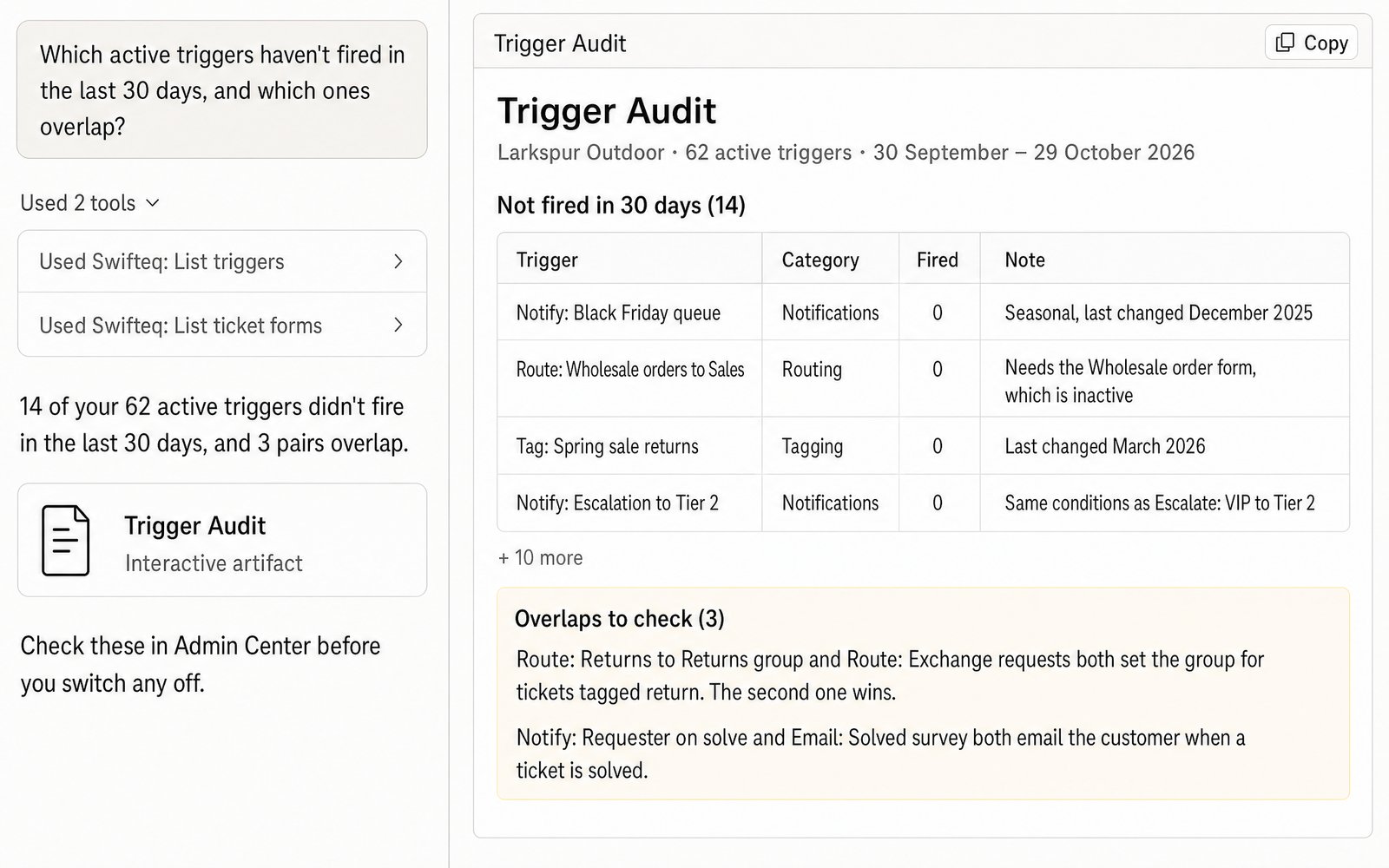
Triggers pile up over the years, and it gets hard to remember which ones still matter. Claude lists every trigger with how many times it fired in the last 30 days, and reads their conditions and actions in the order Zendesk runs them. That way it can point out the triggers that never fire, the pairs that do the same thing, and the ones that undo each other. For example, two triggers might both set the group on tickets tagged return, and the one that runs second wins.
- “Which active triggers haven't fired in the last 30 days, and which ones overlap?”
Find Dropdown Options Nobody Uses
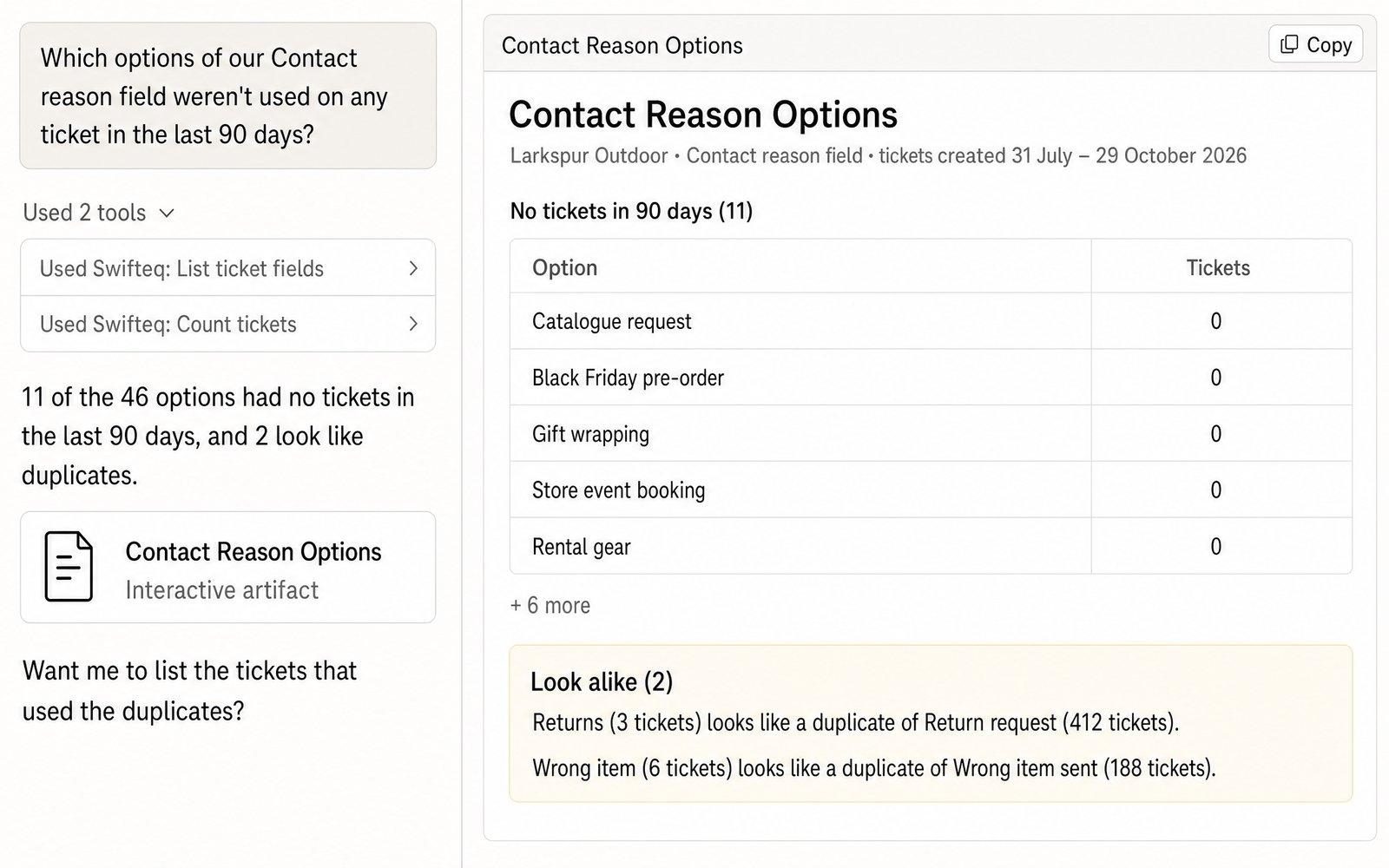
Dropdown fields like a contact reason collect options over time, and the old ones rarely get removed. Claude counts the tickets for every option of a field in a single call, then lists the options no ticket used in the period you ask about. It also points out options that look like duplicates, such as Returns and Return request, so you can tidy the field and give agents fewer, clearer options to pick from.
- “Which options of our Contact reason field weren't used on any ticket in the last 90 days?”
List Agents Who Haven't Signed In
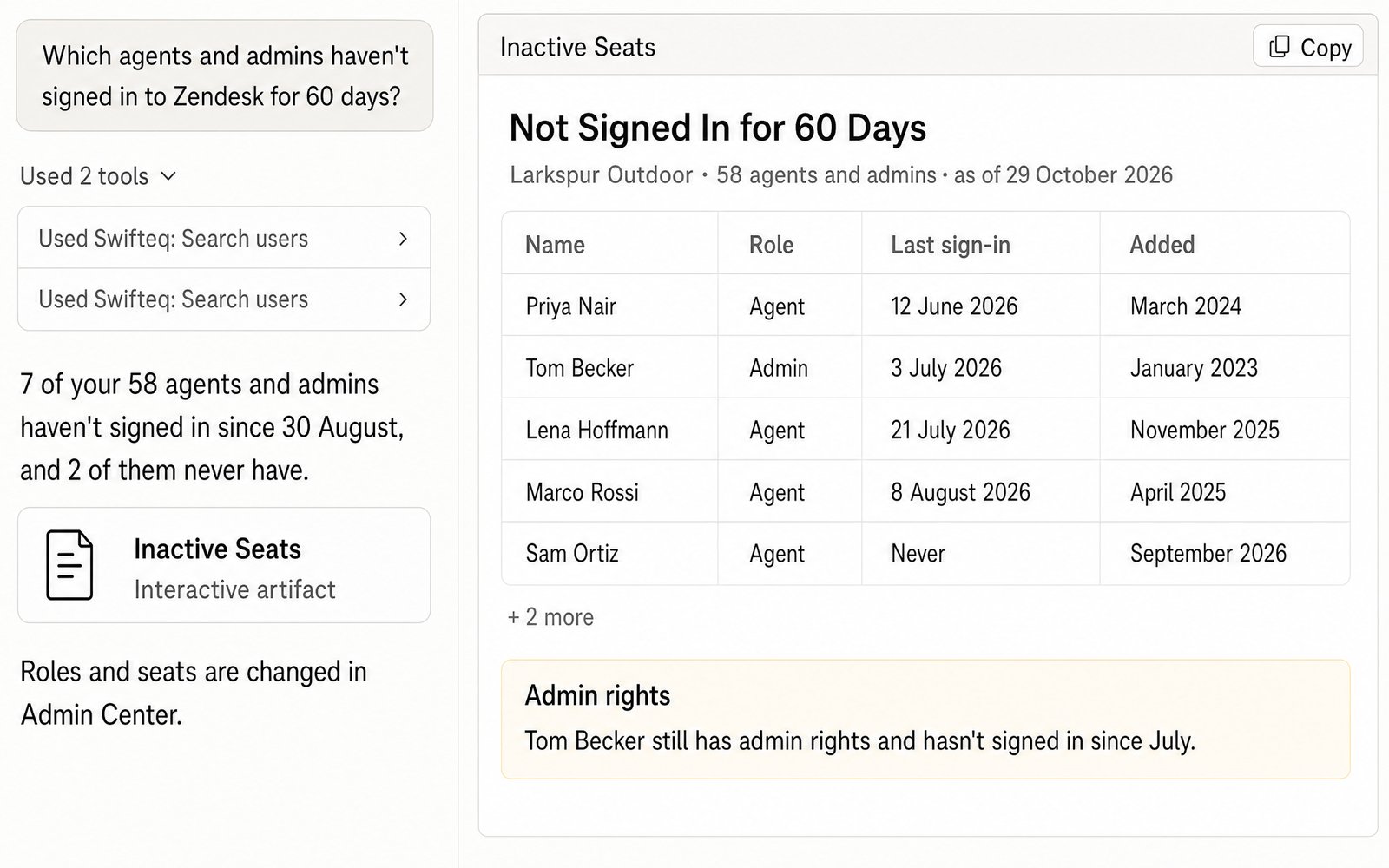
When people change teams or leave, their Zendesk seats and admin rights often stay behind. Claude lists every agent and admin with their role and the date they last signed in, so you can see which seats nobody is using and who still has admin rights. You can then change roles and seats in Admin Center.
- “Which agents and admins haven't signed in to Zendesk for 60 days?”
Checking the List Before You Change Anything
Claude can read your triggers, fields, forms, brands, and roles, but it can't change any of them. You make the changes yourself in Admin Center once you've checked the list, so an audit never switches off a trigger your team still relies on.
Treat the list as a starting point rather than a to-do list. A trigger that didn't fire in the last 30 days may be seasonal, like one set up for Black Friday, and a dropdown option nobody picked this quarter may still matter at year end.
What You Can Audit
You ask in plain words, and Claude reads your setup straight from Zendesk, with the same permissions you have.
Triggers
Every trigger with its conditions, actions, and category, and how many times it fired in the last hour, day, 7 days, and 30 days.
Ticket fields and forms
Every ticket field with its options, every form, and how many tickets used each option or form.
Agents and admins
Who has which role, and when each person last signed in.
Brands and help center access
Your brands and their help centers, and who can view or edit articles.
Where the Data Comes From
Claude or ChatGPT gets the data through the Swifteq MCP Server, which asks Zendesk and passes the answer back. We don't store any of it, and each person works with their own Zendesk permissions.
| Tool | What it gives you |
|---|---|
| list_triggers | Every trigger with its conditions, actions, and how often it fired |
| list_ticket_fields, list_ticket_forms | Every ticket field with its options, and every form |
| count_tickets with group_by | The number of tickets for each field option, form, or brand, in one call |
| search_users | Agents and admins, with their role and when they last signed in |
| list_brands, list_permission_groups, list_user_segments | Your brands, and who can edit or view help center articles |
Limits to know
| Limit | What it means |
|---|---|
| It can't change your setup | It only reads it, and you make the changes in Zendesk Admin Center |
| Trigger usage covers the last 30 days | Zendesk only reports how often a trigger fired in the last hour, day, 7 days, and 30 days, not further back |
| Views, automations, groups, and SLA policies aren't covered yet | Macros are covered separately, on their own page |
| 200 options per count | A field with more than 200 options is counted in parts |
| Days follow the connected user's timezone | If a report's days look shifted, change the timezone in that user's Zendesk profile |
How it works
Set It Up in Three Steps
- 1
Create your free Swifteq account
Sign up and authorize your Zendesk account. Read access is all an audit needs.
- 2
Add the connector to your AI assistant
In Claude or ChatGPT, add a custom connector with the URL
https://mcp.swifteq.com/api/mcp/mcpand sign in with your Swifteq account. - 3
Ask for your first audit
For example: “Which active triggers haven't fired in the last 30 days?”
Frequently Asked Questions
Can Claude change triggers or fields?
No. It can read your triggers, fields, forms, brands, and roles, but you make any changes yourself in Zendesk Admin Center.
How does it know a trigger is unused?
Zendesk counts how many times each trigger fired in the last hour, day, 7 days, and 30 days, and Claude reads those counts. A trigger that hasn't fired in 30 days may still be seasonal, so check what it's for before you switch it off.
Can it find triggers that conflict?
Yes, as a first pass. Claude reads every trigger's conditions and actions in order and flags the pairs that do the same thing or undo each other. Before you change anything, check each pair in Zendesk, for example in a ticket's events, which show the triggers that fired on it.
Does it cover automations and views?
Not yet. It covers triggers, ticket fields, forms, brands, agents and admins, and help center access. Macros are covered separately, on their own page.
How many calls does it use?
Listing triggers, fields, or agents takes one call for every 100 of them. Counting the tickets for every option of a field takes a single call.
What does it cost?
It's free for 500 calls a month per Zendesk account, shared by everyone at your company. Above that, €49 a month covers your account and its first user, and each extra user is €9 a month, so a team of 10 pays €130 a month. See pricing.
Guides and Resources
- Zendesk MCP Server: features, security, and pricing
- Swifteq vs Zendesk's own MCP Server, compared
- Zendesk macros with Claude or ChatGPT
- How to audit Zendesk triggers: a support manager's guide
- Zendesk triggers best practices
- Zendesk triggers vs automations: best practices
- Mastering Zendesk ticket fields
- Our help center: MCP Server tools and limits
Audit Your Zendesk This Week
Free for 500 calls a month. No credit card required.
Page last updated