
Customer Service QA with Claude: How to Help Your Support Team Improve
Sorin Alupoaie · · 11 minutes read
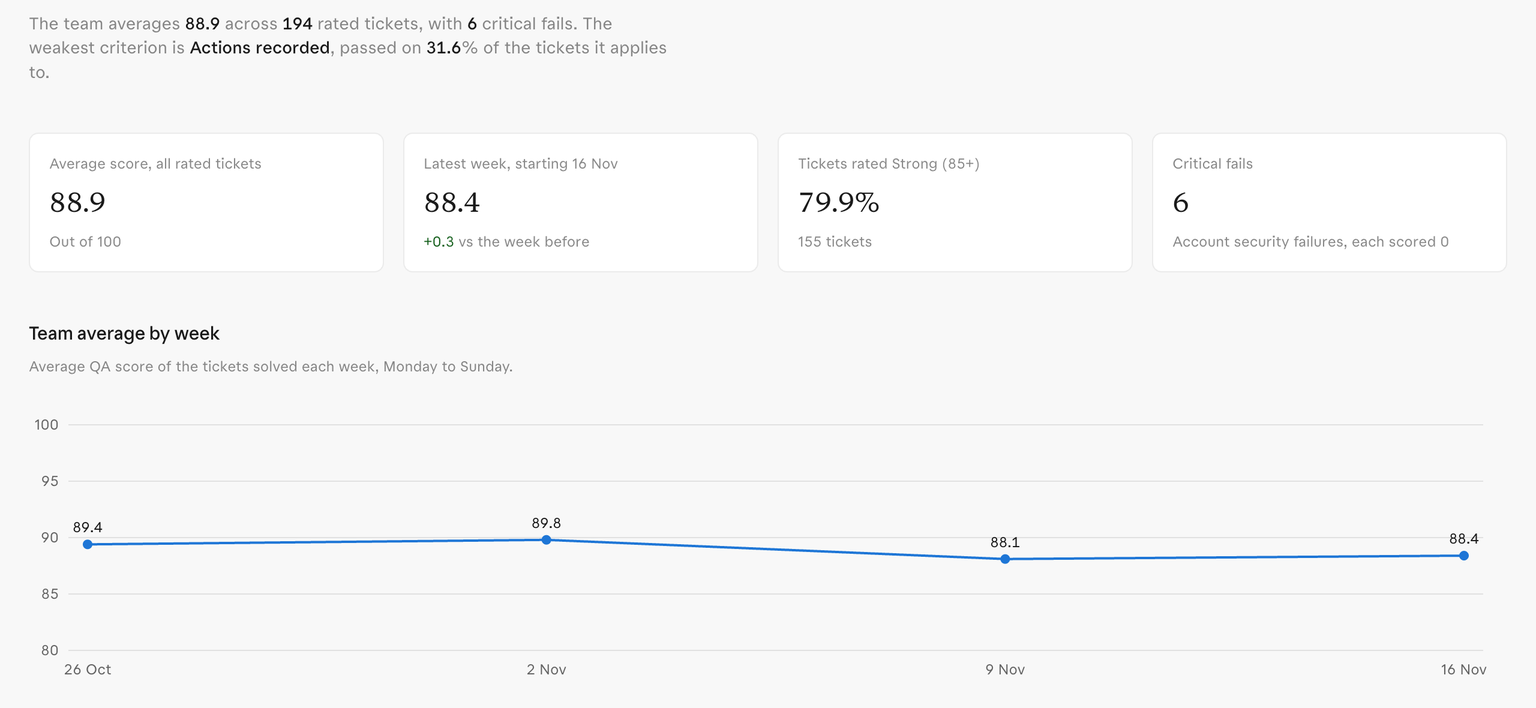
This week we released QA scorecards in Swifteq’s MCP Server, the app that connects Claude or ChatGPT to Zendesk. Claude reads each conversation and rates it against a scorecard your team defines, and the MCP Server turns those ratings into a score from 0 to 100. Swifteq keeps the scores, and nothing is written to Zendesk. Later you can ask what each agent does well and where they need help, and Claude shows you the tickets behind each answer.
To show how a team can use this to review its tickets and help each agent improve, take an online shop that sells outdoor gear. Four agents (Maya Chen, Tom Okafor, Lena Fischer, and Ravi Patel) answer questions about orders, returns, refunds, warranty claims, and accounts. The shop and its tickets are made up, and we wrote some mistakes into the agents’ replies on purpose. The screenshots and numbers are Claude’s real answers.
What you need
- Swifteq’s MCP Server on the paid plan.
- The ticket data store and QA scorecards, switched on. The ticket data store is an optional copy of your tickets’ fields and metrics (never the conversations), and QA scores are saved with it. A Swifteq account owner switches both on in the MCP Server settings. The owner also gives each person a QA level, from viewing results to changing scorecards. For monthly trends, have the ticket data store keep 90 days or more.
- Claude with the MCP Server connected. We used Claude in a browser, at claude.ai, and the desktop app works the same way.
Base the scorecard on your own policies
What makes an answer right at your company is written in your help center, your internal documentation, and your macros, and the reasons customers contact you show what matters most. Ask Claude to read all of them before it suggests any criteria.
Claude reads your help center, macros, and tickets through the MCP Server’s tools. Each tool is one action in Zendesk, such as exporting help center articles or searching macros. You never type their names, but we give them in code font so you can see which tool did what. For the shop, Claude pulled all 21 help center articles with the export_help_center_articles tool and all 14 macros with search_macros. It counted the last 90 days of tickets by contact reason with get_ticket_report, and read 20 conversations with bulk_get_ticket_conversations.
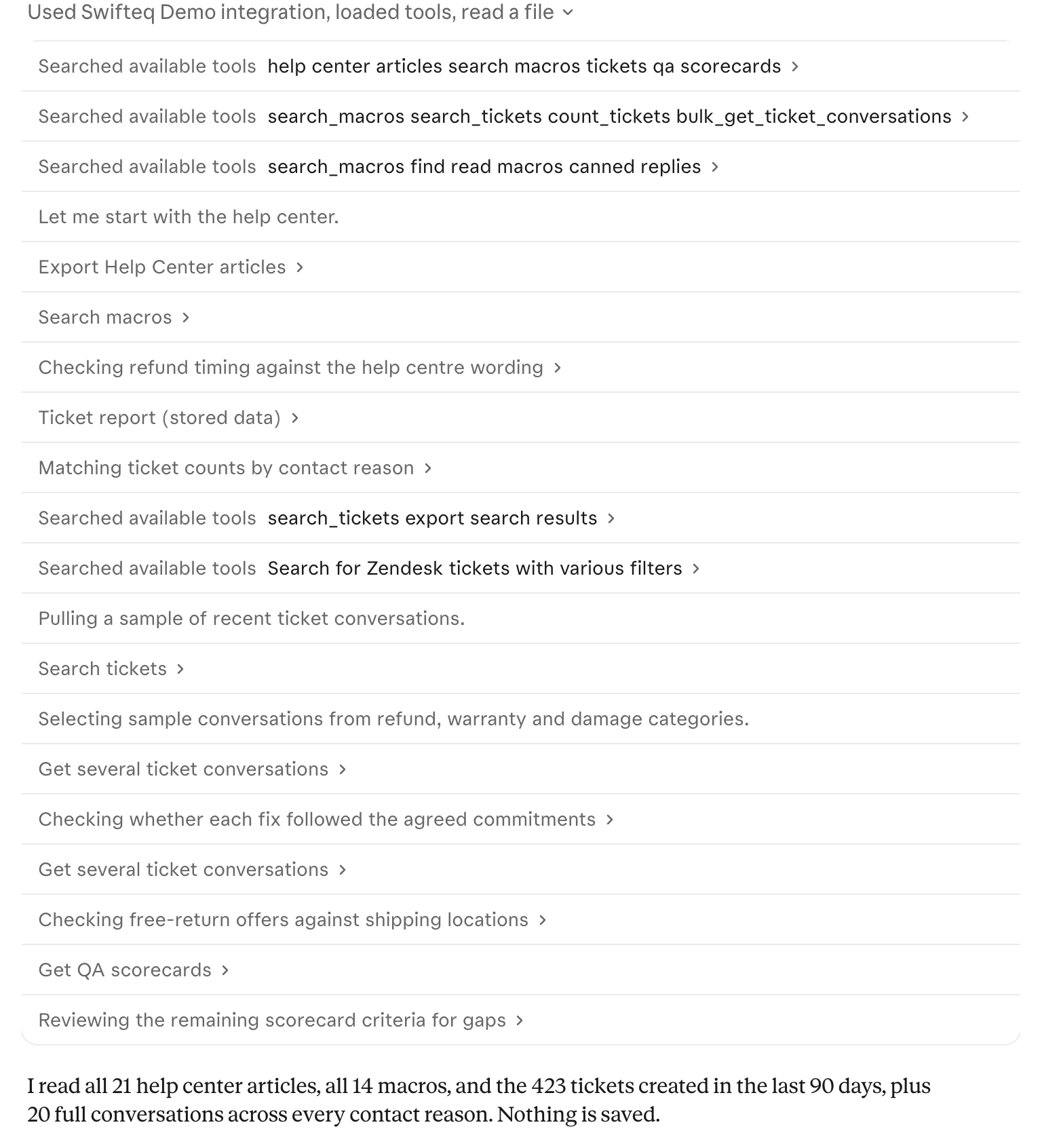
About 70% of the shop’s tickets were about orders, returns, and refunds, so Claude gave the most weight to policy accuracy and made checking eligibility a criterion of its own. Claude also found macros that disagreed with the help center. For example, the macro for starting a return told customers that returns are “free within 60 days”, while the help center offers free returns in the UK and Ireland only.
Claude then proposed 11 criteria, each written as a test it can check, such as “Pass if every timeframe, cost and eligibility rule the agent stated matches the policy facts.” The policy facts are the shop’s rules, copied from the help center into the scorecard’s general instructions, for example 60 days to return an unused item and 5 working days to issue a refund.
The first criterion, Account security, is critical. Its weight is 0, so passing it adds nothing to the score, but failing it sets the whole ticket to 0.
| Criterion | Weight | Fails when |
|---|---|---|
| Account security (critical) | 0 | Account details were changed or shared, or an account deleted, without verifying the customer |
| Policy accuracy | 3 | A timeframe, cost, or eligibility rule in the reply contradicts the help center |
| Eligibility checked | 2 | A return, refund, or claim was approved without confirming the conditions, such as the item being unused |
| Facts checked before promising | 2 | The agent gave a delivery date or confirmed a refund with nothing in the ticket to back it |
| Commitments kept | 2 | A promise such as “I’ll update you within one working day” was missed |
| Request answered | 2 | The reply left part of the question unanswered (rated partial) or answered something else |
| Customer offered the choice | 1 | The agent chose a replacement for a damaged item without offering a refund |
| Clear next step | 1 | The customer can’t tell what happens next |
| No repeated asks | 1 | The agent asked again for something the customer had already given |
| Actions recorded | 1 | A refund, return, or courier case has no reference number in an internal note |
| Reply quality | 1 | A reply has the wrong name, an unfilled placeholder, or no apology when the shop or the courier was at fault |
Two criteria also allow a partial pass. Scores of 85 and up count as strong, 65 and up as adequate, and anything lower as needs improvement.
Each result can also keep Claude’s short reason and up to three quotes from the ticket, stored exactly as Claude writes them. So before Claude saved the scorecard with the save_qa_scorecard tool, we added a rule that reasons and quotes never include customer names, emails, phone numbers, or addresses.
Rate one week and check the tests
Claude applies each test exactly as written, so treat the first week as a trial of the scorecard. Ask Claude to rate last week’s solved tickets, and then to tell you which results it expects you to disagree with.
The shop’s first week, 16 to 22 November, had 55 solved tickets. Claude read them about ten at a time with the bulk_get_ticket_conversations tool and saved the results with save_qa_scorecard_results. The test for facts checked before promising had failed 21 tickets, and Claude thought about 17 of those fails were wrong because they were routine updates, such as a return arriving. The four fails it would keep all had the same scripted reply, from three different agents, promising a late parcel “due tomorrow” with no tracking check in the ticket.
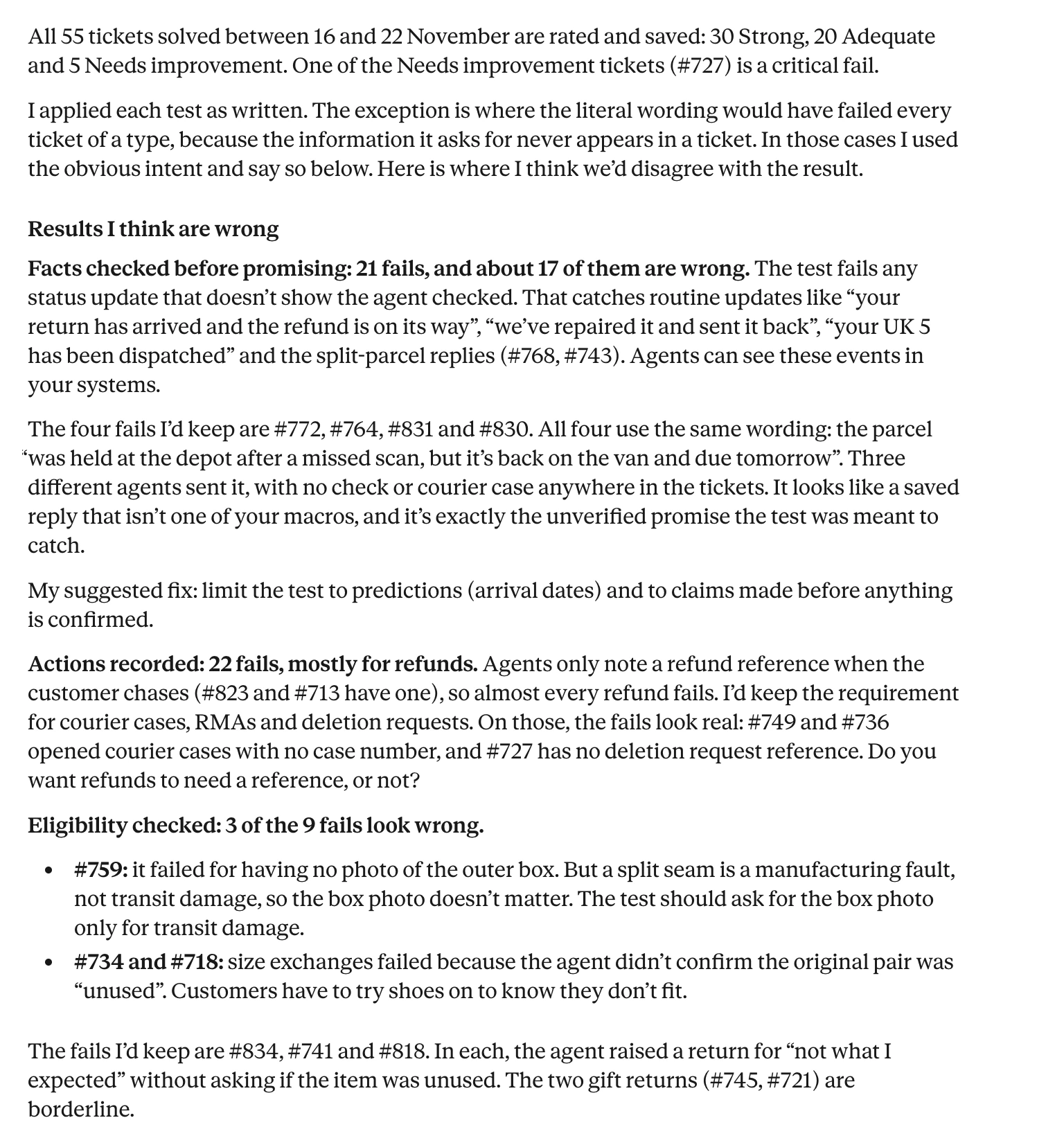
Some tests asked for something a ticket can’t show, such as the purchase date for the 60 day return window. Size exchanges failed because the agent hadn’t confirmed the shoes were unused, although customers have to try shoes on to know they don’t fit. Claude also suggested moving unfilled placeholders such as “[customer name]” out of Reply quality into a criterion of their own, after finding four in one agent’s replies. Once you agree, Claude changes the tests, saving a new scorecard version, and rates the week again. The shop’s average for that week went from 82.8 to 88.4, because agents were no longer marked down for things the tests got wrong.
On Swifteq’s own queue, which I answer with one colleague, Claude flagged four such results in the first week, and we changed all four tests.
Then rate the weeks before with the same request and different dates. The shop’s 139 earlier tickets, from 26 October to 15 November, came next, so all 194 tickets solved in the four weeks had a score.
Find what each agent needs help with
Ask in plain words, for example “Show each agent’s average score by week and which criteria pull each one down.” The criteria that pull a score down show what to work on, and the tickets behind them are examples to go through together. Claude answers with the get_ticket_report tool, which splits results by agent, week, score band, and criterion, and it finds the tickets behind a number with the search_qa_scorecard_results tool.
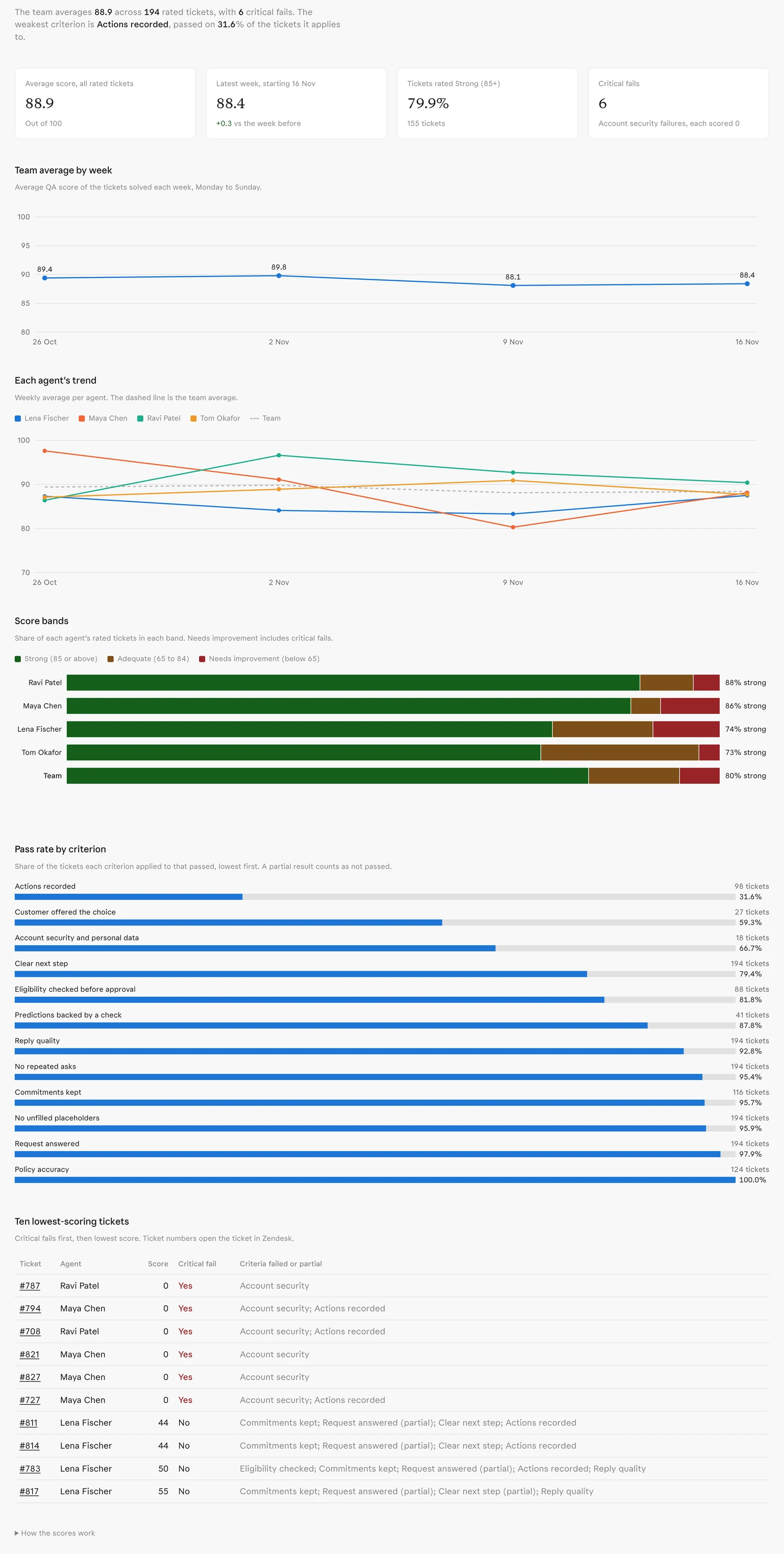
In the chart Claude drew of each agent’s weekly average, most dips came from critical fails. Each agent had 6 to 19 rated tickets a week, so one ticket scored 0 pulled their week down by 5 to 15 points. Maya’s week of 9 November dropped to 80.3 because of two email changes made without verification. Open the tickets behind a dip before reading anything into it.
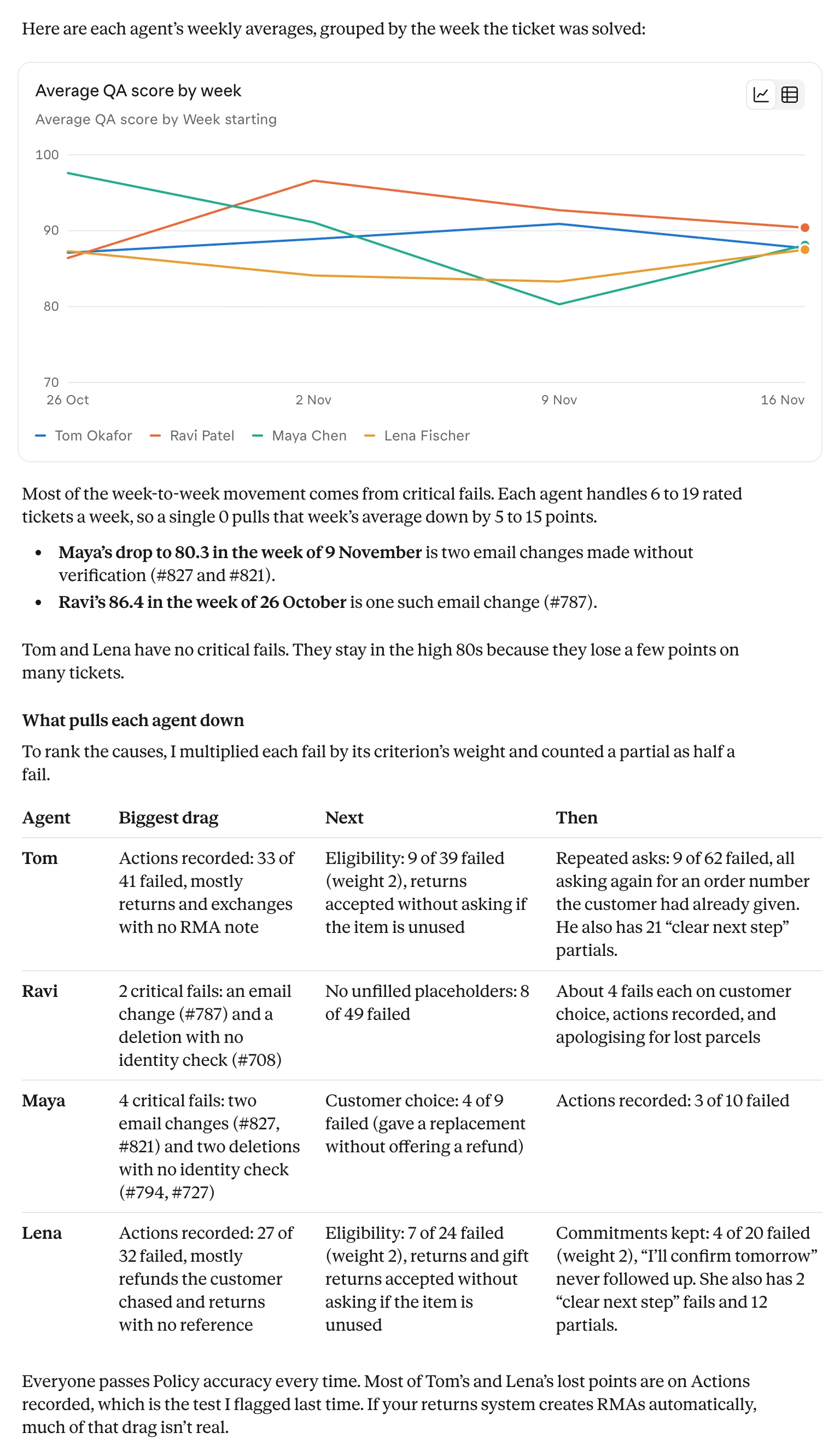
Under the chart is a habit for each agent to work on. All eight replies with a placeholder left in them were Ravi’s, and Tom asked again for an order number the customer had already given on 9 of his 62 tickets. Lena’s missed commitments were all promises to “confirm tomorrow” that she didn’t keep.
The lowest tickets were the six critical fails. Three were email changes for customers who said they’d lost access to their old email, made without sending a confirmation link to the address already on the account, and three were account deletions with no identity check recorded. The same agents verified customers correctly on other tickets, so Claude read the pattern as a missing procedure for customers who’ve lost access to their email.
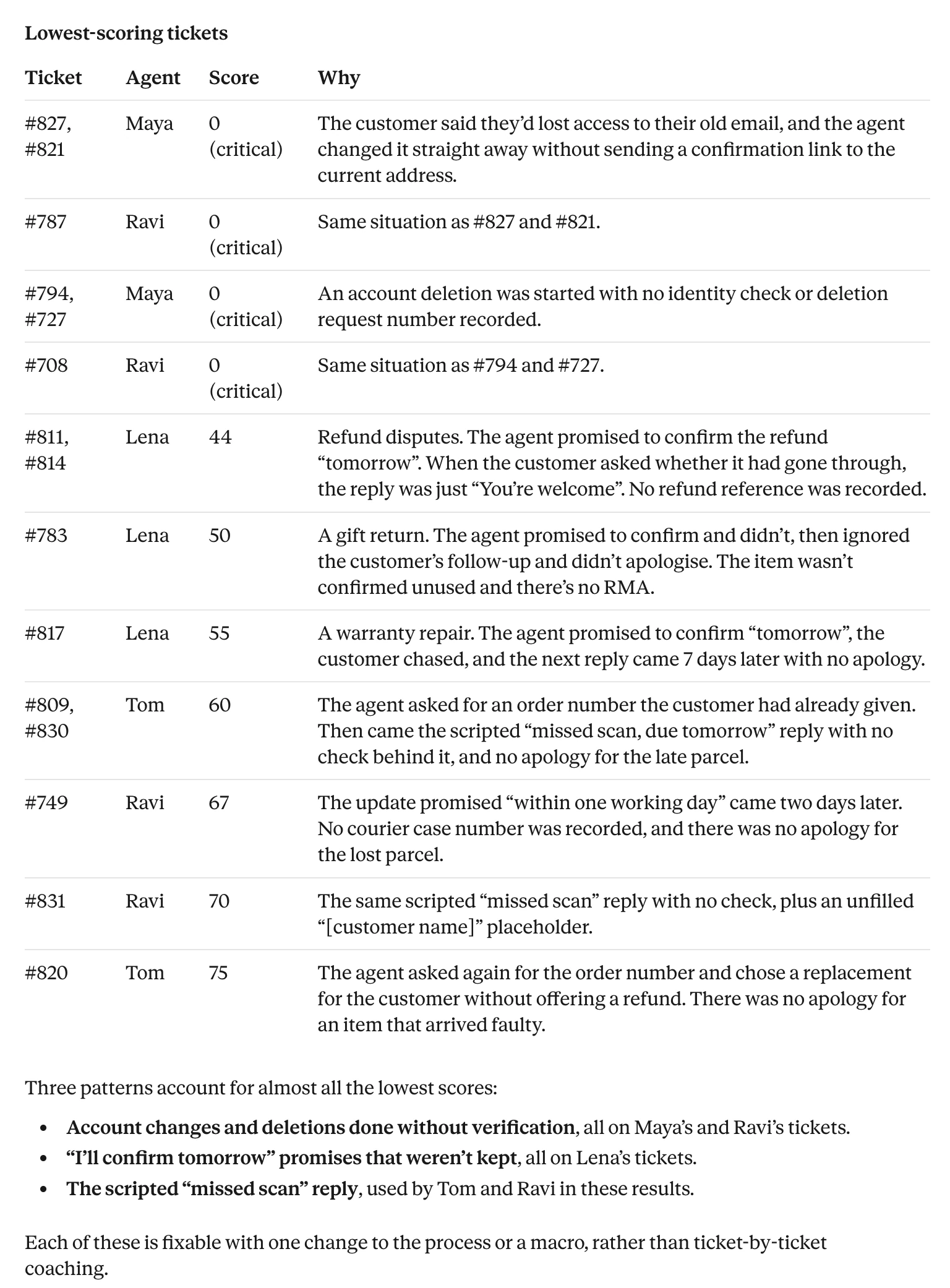
Rate the team lead’s replies on the same scorecard. On our queue, one of the replies that failed account security was mine.
Turn the results into coaching
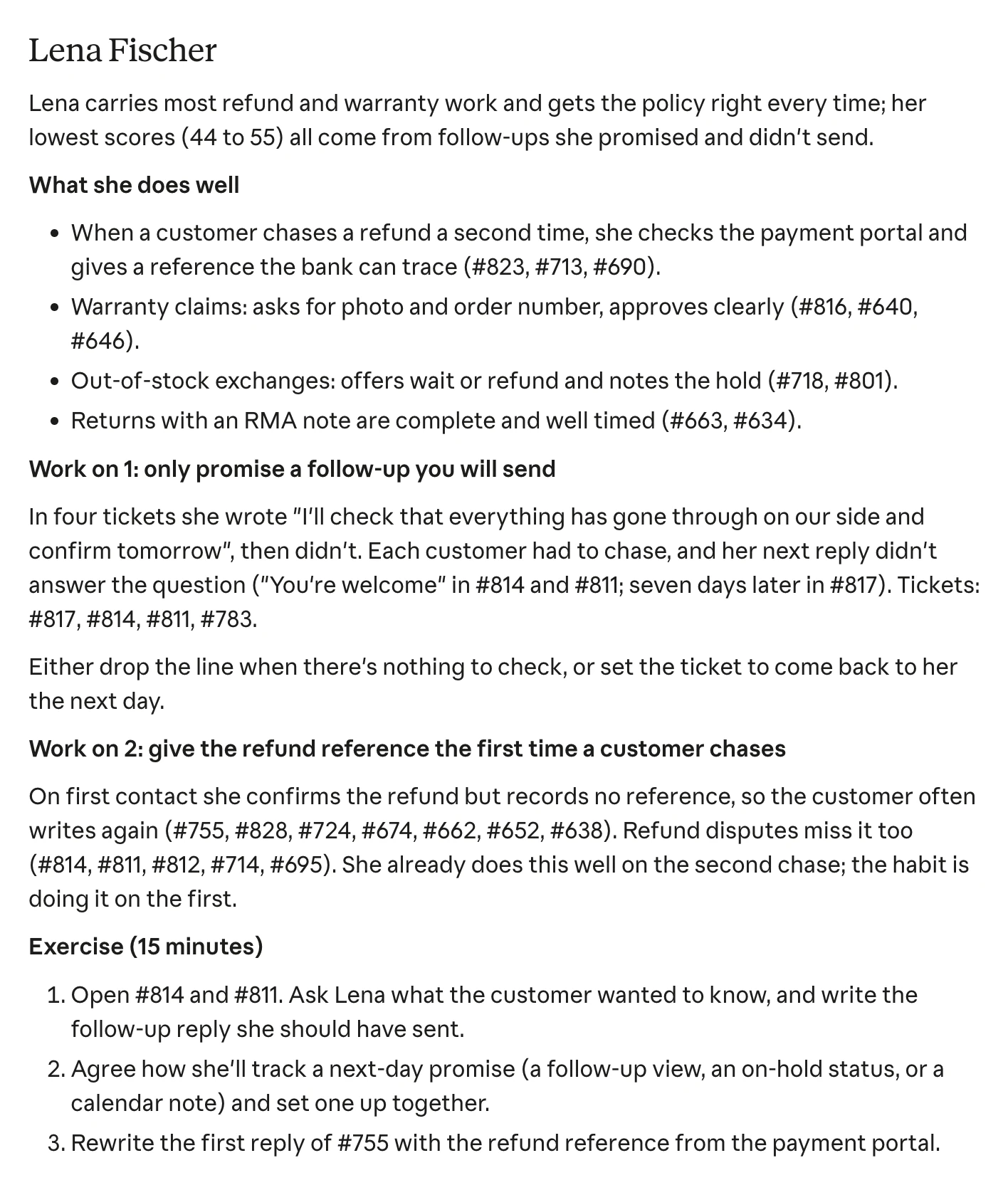
Next, ask Claude for a coaching plan for each agent’s next 1:1. For the shop, Claude wrote them as a document in claude.ai. Each plan has what the agent does well, one or two things to work on with the tickets that show them, and an exercise that takes 15 minutes. The document also suggests opening the tickets together in the 1:1 rather than reading out the scores.
Lena’s plan starts with what she does well, such as giving a refund reference the bank can trace when a customer chases again. Her weakest tickets all came from follow ups she promised and didn’t send. The plan suggests she either drops the line “I’ll check that everything has gone through on our side and confirm tomorrow” when there’s nothing to check, or sets the ticket to come back to her the next day.
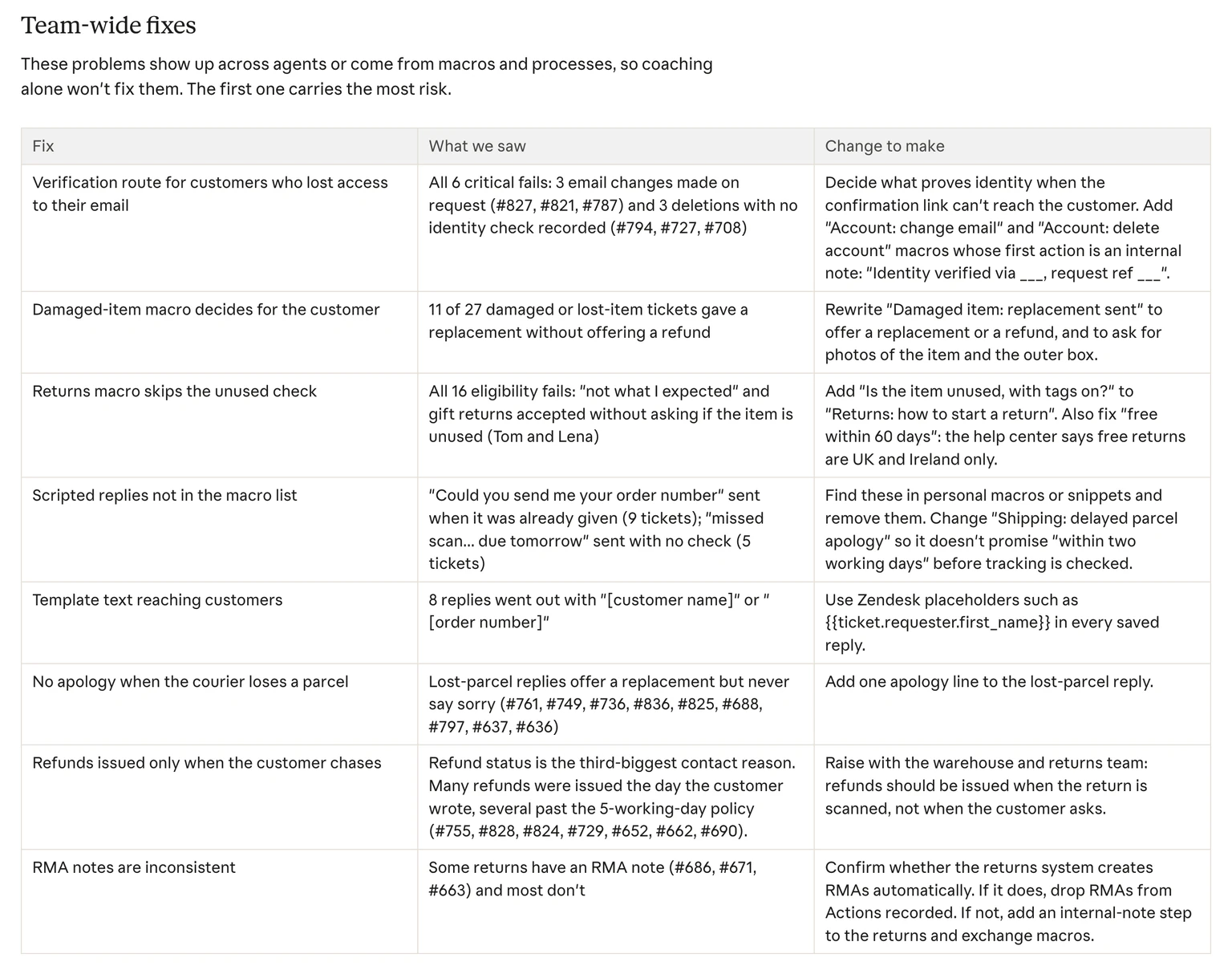
Ask for fixes for the whole team as well, because many problems come from a macro or a process, and coaching one agent won’t fix those. Claude listed eight, and the first covers all six critical fails. That fix has the team decide how to verify a customer who has lost access to their email, and add macros for email changes and account deletions that start by recording the identity check in an internal note. Other fixes rewrite the damaged item macro so it offers a refund as well as a replacement, and add a question about whether the item is unused to the returns macro.
Follow the team’s progress every week
To see whether the coaching and the fixes are working, ask Claude to build a QA dashboard as an artifact, an interactive page next to the chat. The shop’s dashboard shows each agent’s trend by week, the score bands, the pass rate of every criterion, and the ten lowest tickets with links to Zendesk. The page holds six saved queries to the MCP Server, which run with the viewer’s own access each time someone opens or refreshes it. Anyone you share it with needs the MCP Server connected and permission to view QA results.
Then ask Claude to turn the routine into a skill, a set of saved instructions Claude follows each time. The skill Claude wrote for the shop is for Mondays. It rates last week’s solved tickets, opens the dashboard, and writes a short report. The report flags agents for a coaching conversation, for example after any critical fail, and every decision we made about the tests went into a reference file inside the skill.
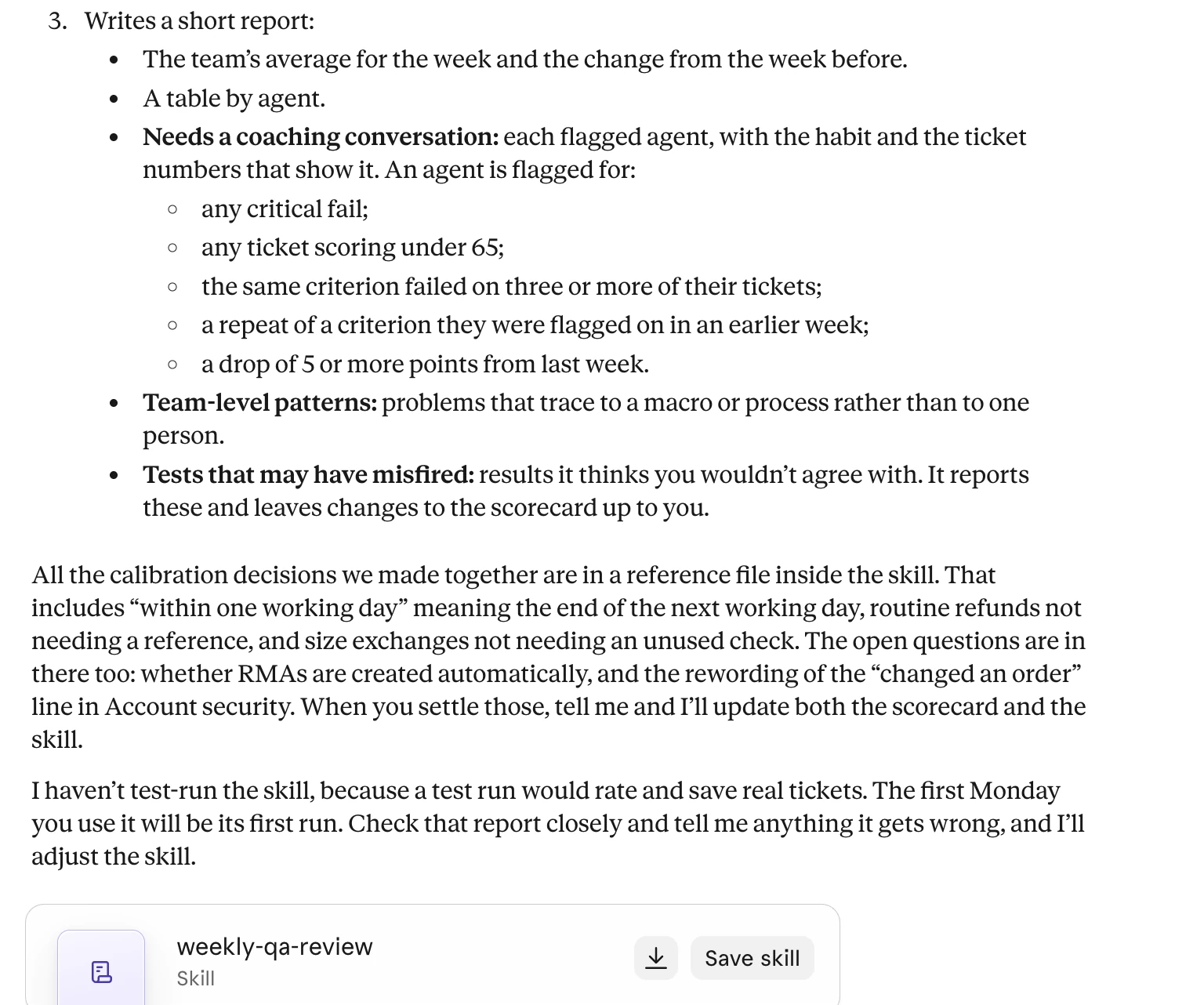
In claude.ai you add the skill to your profile with Save skill. Claude didn’t try it out, because a trial run would rate tickets and save the results, so read the first Monday’s report closely.
Prompts to start with
These are the example’s prompts, in order. Replace the parts in brackets with your own.
We want to start QA on our support team's tickets in Zendesk. Before you suggest a scorecard, read our help center articles on [your policy topics, for example returns, refunds, warranty, delivery and accounts], our macros, and what customers contacted us about in the last 90 days. Then propose a QA scorecard that checks what matters for our business, with each criterion written as a test you can check. Don't save it yet.

Looks good. Add a rule that reasons and quotes never include customer names, emails, phone numbers or addresses. Then save it.

Rate the tickets solved last week, [dates]. Before we rate more, tell me where a test gave a result you think we wouldn't agree with.

Make those changes, re-rate the tickets they affect, then rate the tickets solved in the three weeks before that, [dates].

Show each agent's average score by week and which criteria pull each one down. Then show me the lowest-scoring tickets and why.

Write a coaching plan for each agent for their next 1:1: what they do well, one or two things to work on with the tickets that show it, and a short exercise. Then list fixes for the whole team that aren't about one agent.

Build me a QA dashboard as an artifact: the team's average by week, each agent's trend, the score bands, the pass rate of each criterion, and the ten lowest tickets with links to Zendesk and the criteria each one failed or got a partial on.

Turn what we did into a skill I can run every Monday: rate last week's solved tickets on our scorecard, then show me the dashboard and anything that needs a coaching conversation.
Reports on the rest of your support data
The QA reports above come from the same reporting tools that Swifteq’s MCP Server gives you for the rest of your Zendesk data. Ask for last month’s first reply time, resolution time, and CSAT, and each figure comes back in one call, worked out from Zendesk’s own ticket metrics. With the ticket data store, Claude or ChatGPT can query up to a year of tickets like a database, split up to five ways at once, such as by group, priority, and month. When a number changes, Claude reads up to 10 conversations in one call to find out why.
You can start for free, with 500 calls a month per Zendesk account and no credit card. The ticket data store and QA scorecards are on the paid plan. It costs €49 a month for your account and its first user and €9 a month for each extra user, with no limit on calls, so a month of heavy analysis costs the same as a quiet one.
- Our help center: QA Scorecards with the MCP Server
- Our help center: Ticket Reports and the Ticket Data Store
- Swifteq’s MCP Server for Zendesk