18 Best Zendesk Apps That Every Support Team Needs
Jake Bartlett · · Updated · 17 minutes read

Updated November 2026: we checked every app on the Zendesk Marketplace, took out five that are retired, unmaintained, or duplicated, and added seven, from Shopify for Zendesk to VOC Patterns. We also added Swifteq’s newer apps, including the MCP Server, a summary table, and an FAQ.
Zendesk handles email, chat, phone, and social messages in one place, but no help desk does everything a support team needs. That’s what Zendesk apps are for. An app adds something Zendesk doesn’t do on its own, such as a panel in the ticket sidebar that shows a customer’s orders or a job that tags new tickets in the background, and an admin installs it from the Zendesk Marketplace.
The Marketplace has well over a thousand apps, so this list sticks to the ones that solve problems most support teams share. Every app below was still listed on the Marketplace when we checked in November 2026, and its developer still supports it. If you’re looking for ways to connect Zendesk to Slack, Zapier, or ClickUp instead, the guide to Zendesk integrations covers those.
How Many Apps Does Zendesk Marketplace Have?
Zendesk says its Marketplace has more than 1,800 apps, partners, and integrations, so the apps alone number somewhat fewer than that.
These Zendesk apps cover everything from exporting your Zendesk macros (for free!) to managing customer queries. From automating email campaigns to gathering and analyzing customer feedback. You can also use Zendesk apps integrations to make managing your help center easier or to translate your help center with AI.
The Best Zendesk Apps for Customer Support Teams
Here are the eighteen apps in this list at a glance. The first entry covers Swifteq’s own apps, since this list is published on Swifteq’s blog.
| App | What it does | Price |
|---|---|---|
| Swifteq apps, led by the MCP Server | AI reports and ticket analysis in Claude or ChatGPT, AI tagging, merging duplicates, and help center tools | Free plan or free trial |
| Shopify for Zendesk | Shows Shopify customers and orders next to the ticket, with refunds and cancellations | Free |
| Salesforce by Zendesk | Shows Salesforce accounts and contacts next to the ticket | Free |
| Jira by Zendesk | Creates Jira issues from tickets and links tickets to existing issues | Free |
| Linear | Creates and links Linear issues, and reopens the ticket when the issue is done | Free to install, needs Linear |
| VOC Patterns by Zendesk Labs | Finds recurring problems and their causes in solved tickets | Free |
| Time Tracking by Zendesk | Logs how long agents spend on each ticket | Free, on Suite Growth or Support Professional and above |
| Ticket Field Manager by Zendesk | Hides ticket fields or makes them required or read only | Free |
| Hide Ticket Fields by SweetHawk | Hides ticket fields agents don’t need to see | Free |
| Select an Address by Zendesk | Lets agents choose which support address a ticket uses | Free |
| Geckoboard | Shows support metrics on a live dashboard or office TV | Paid, with a free trial |
| Nicereply | Sends CSAT, NPS, and CES surveys | Paid, with a free trial |
| Trustpilot Reviews by Trustpilot | Turns Trustpilot reviews into tickets you can answer | Free to install, Trustpilot fees may apply |
| Email Tracking by GrowthDot | Shows when customers open your emails and click links | Paid per agent, with a free trial |
| Proactive Campaigns by GrowthDot | Sends email and SMS campaigns to lists of customers | Paid per agent, with a free trial |
| Recurring Tickets by SweetHawk | Creates tickets on a schedule | Paid, with a free trial |
| FlowEQ | Guides agents through troubleshooting step by step | Free plan and paid plans |
| Quickie by Lovestock & Leaf | Adds view folders, bookmarks, and saved searches | Paid per agent, with a free trial |
1. Swifteq Apps for Zendesk
Swifteq builds apps for the jobs that take up a support team’s week: reporting, tagging and routing tickets, cleaning up duplicates, writing replies, and keeping the help center up to date. Each app is installed on its own, so you only add the ones your team needs, and each one has a free plan or a free trial.
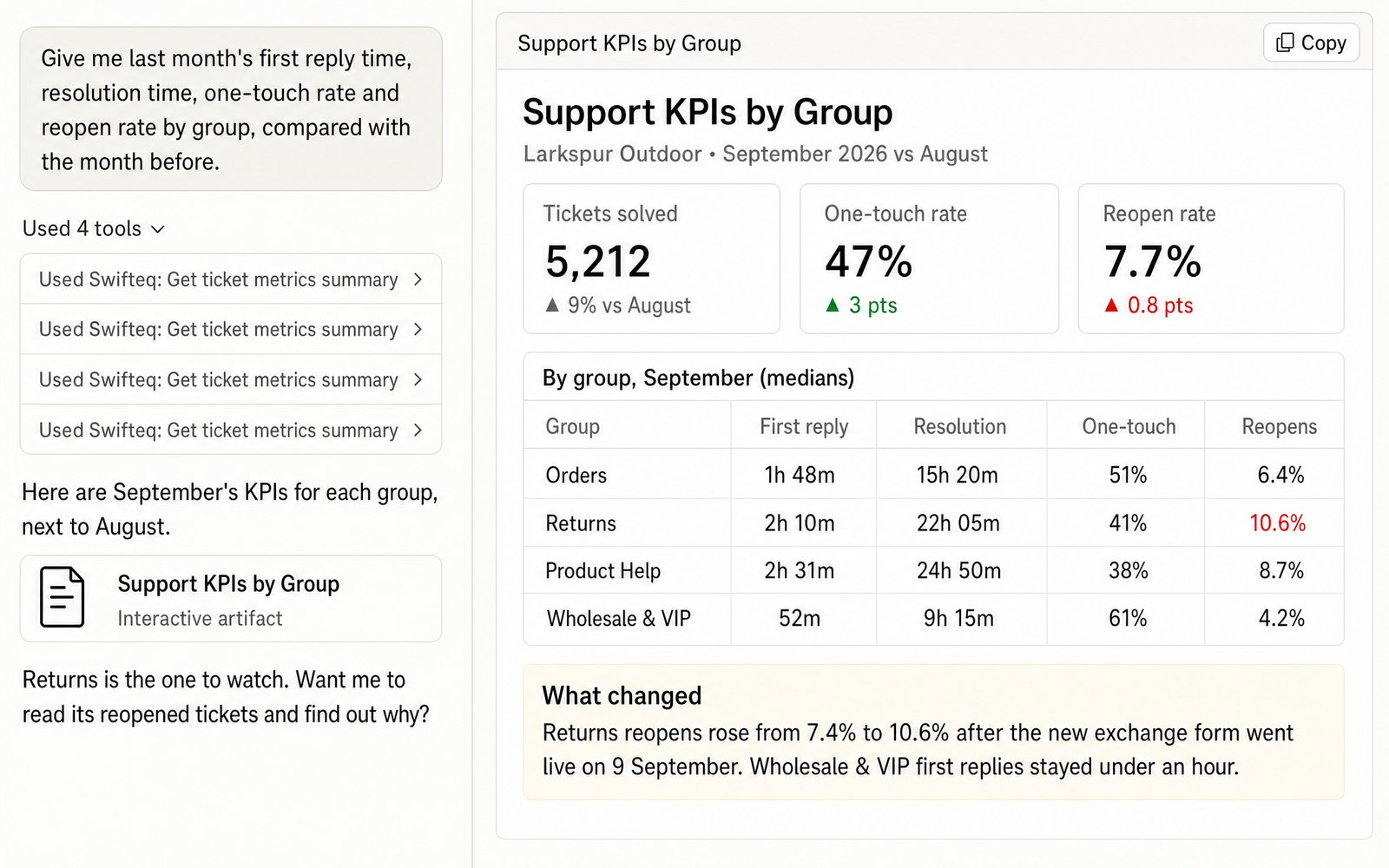
MCP Server for Zendesk connects Claude, ChatGPT, or another AI assistant to your Zendesk, so you can ask questions about your tickets in plain words and get the answer from your own data. For example, a team lead can ask for last month’s first reply time, resolution time, and reopen rate by group, compared with the month before, and Claude builds the report above from the tickets in Zendesk. It can only read your tickets until you give it write access, and Swifteq never stores ticket conversations, or any personal information from Zendesk about your customers or employees. It’s free for 500 calls a month per Zendesk account, with no credit card required. The dashboards and reports page shows more examples.
The other Swifteq apps each handle one job inside Zendesk:
- Ticket Classification reads each new ticket and sorts it into intents and topics you describe in plain language, then fills in the tags and fields your triggers use for routing, so nobody has to tag tickets by hand.
- Merge Duplicate Tickets merges repeat tickets from the same customer automatically, following rules you set, so two agents don’t end up answering the same question.

- Agent Co-writer turns a few words, typed or dictated, into a full reply in your team’s tone, and shows a summary of the conversation when an agent opens a long ticket.
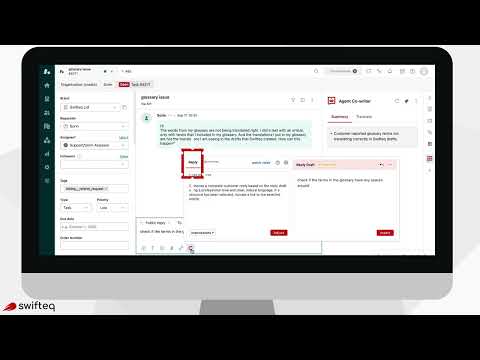
- Document Parser OCR reads the PDFs, scans, and images customers attach, then adds the text to the ticket as an internal note or fills your custom fields with details like an invoice number, so agents don’t have to open each file and retype what’s in it.
- Advanced Search Plus adds “is” and “is not” filters on any system or custom field, exports the results to CSV, and updates the tickets it finds in bulk. It’s free.
- Translate Conversations translates each customer message into the agent’s language, then translates the agent’s reply back into the customer’s.
- For the help center, Help Center Manager finds and replaces text across every article and fixes broken links and images, Help Center Translate translates articles with AI and keeps their formatting, and Help Center Analytics shows which articles people read, what they search for next, and which articles still end in a ticket.
- Auto Remove Attachments deletes attachments from tickets automatically or in bulk, which frees up Zendesk storage and helps you keep only the files you’re allowed to keep under GDPR.
2. Shopify for Zendesk
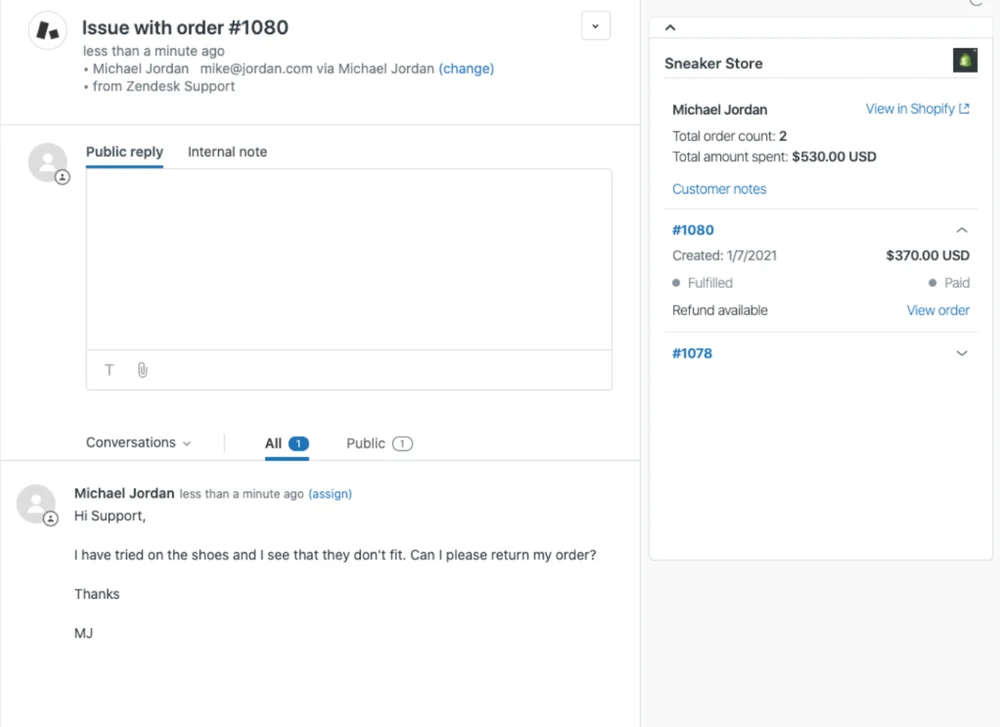
If you sell online, many of your tickets are probably about orders: where a parcel is, how to return something, or why a charge looks wrong. Shopify for Zendesk is Zendesk’s own app for Shopify stores. It finds the customer in your Shopify store and shows their details and recent orders in the ticket sidebar, so agents don’t have to switch to Shopify and search for the order before they can answer.
Agents can also act on what they see, such as refunding or canceling an order, without leaving the ticket. It’s the most installed app on this list, with more than 16,000 installs.
Key features:
- Customer details, order count, and total spent next to the ticket.
- Recent orders with their payment and fulfillment status.
- Refunds and cancellations from the sidebar.
- Works with more than one Shopify store.
Price: Free. For more apps for online stores, see our list of Zendesk apps for eCommerce.
Zendesk Marketplace link: Shopify for Zendesk
3. Salesforce Integration App in Zendesk
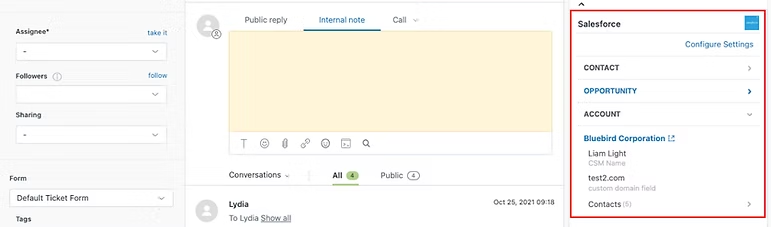
Salesforce is known as the world leader in the CRM space, helping businesses keep track of sales data and organize customer interactions. It’s an extremely robust platform offering a wide range of features for sales and support teams.
With the Zendesk Salesforce app, you can connect Salesforce accounts to Zendesk giving you a holistic view of customer data and keeping your sales and support teams in sync.
The app allows Zendesk tickets to be viewed within Salesforce, and Salesforce data to be viewed inside of Zendesk app. This keeps sales and service teams aligned whenever a high-value customer needs support with their product or service.
Key features:
- Give agents easy access to Salesforce profile data such as job title or plan tier.
- Sync Salesforce accounts and contacts to Zendesk organizations and users.
- Let your sales team see and work on Zendesk tickets from inside Salesforce.
Price: Free. It needs a Salesforce edition with API access, and the person who sets it up must be an admin in both Zendesk and Salesforce. For other ways to connect Zendesk to your CRM and the rest of your tools, see the guide to Zendesk integrations.
Zendesk Marketplace link: Salesforce Zendesk App
4. Jira Zendesk App
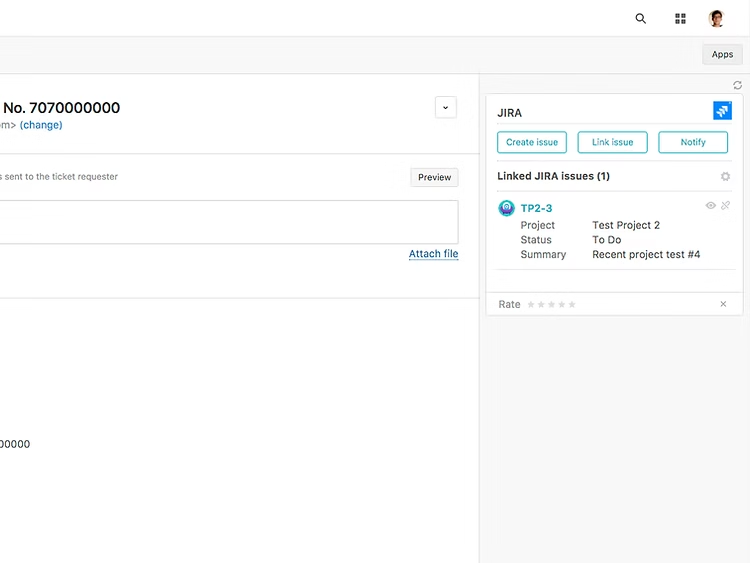
Keeping your support and product departments in sync is critical to the success of software teams. Businesses around the world use Jira to manage projects and keep track of features or bugs that your team is working on.
Jira helps service teams prioritize tasks and closes the gap between customer-reported bugs and feature requests with the development team.
With the Jira Zendesk integration, support teams can easily create Jira issues within Zendesk. Software development teams can then view ticket information in Jira to get more context from the customer interaction.
This enables support, sales, and product teams to work closer together, allowing you to complete the feedback loop with customers when bugs are fixed or features are shipped.
Key features:
- Create a new Jira issue from within Zendesk.
- Link Zendesk tickets to existing Jira issues.
- Give engineers a complete view of customer conversations.
- Choose exactly what info you want to show from Jira in Zendesk.
Price: Free. It works with Jira Cloud and Jira Data Center, since Jira Server isn’t supported any more. For how to build an escalation process around it, see our guide to the Zendesk Jira integration.
Zendesk Marketplace link: Jira Zendesk App
Atlassian Marketplace link: Zendesk Support for Jira
5. Linear
If your engineering team tracks bugs in Linear rather than Jira, the Linear app does the same job for them. Agents can create a Linear issue from a ticket or link the ticket to an issue that already exists, so engineers see the customer’s report without anyone copying it over. When the issue is done, Linear reopens the linked ticket, which reminds the agent to let the customer know the fix is out.
Key features:
- Create a Linear issue from a Zendesk ticket.
- Link tickets to existing Linear issues.
- Reopen the linked ticket automatically when the issue is completed.
Price: Free to install. You need a Linear workspace.
Zendesk Marketplace link: Linear
6. VOC Patterns
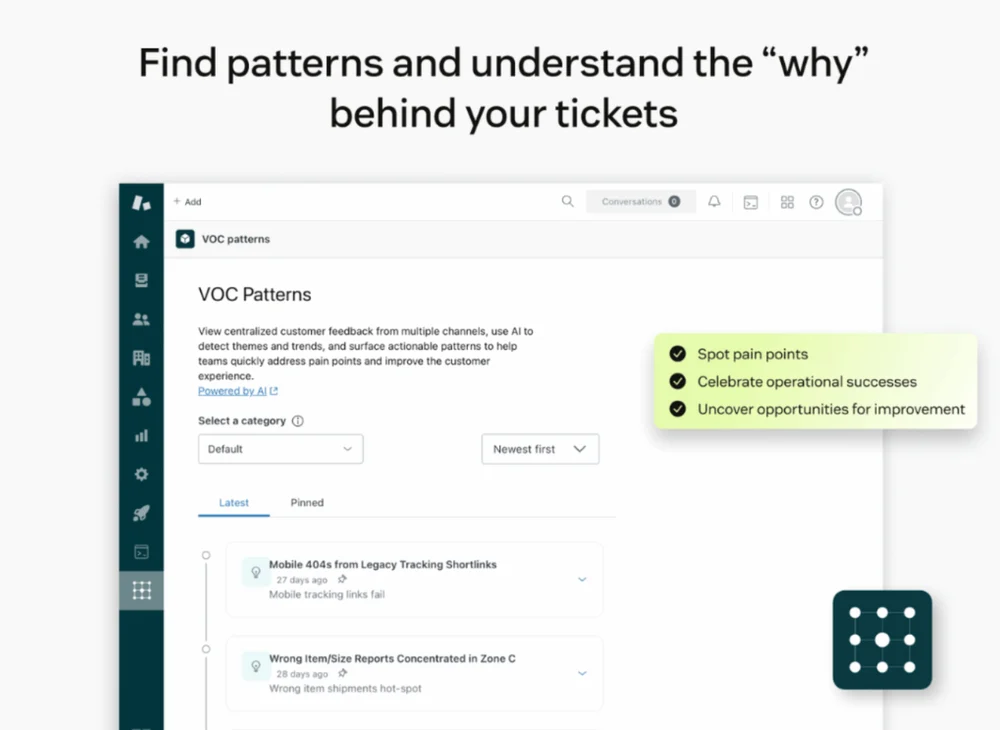
VOC Patterns, short for voice of the customer patterns, is a free app from Zendesk Labs that reads your solved and closed tickets and points out patterns in them: the problems customers keep running into, what drives good and bad experiences, and where there are quick wins. Each pattern comes with a summary, the likely root cause, and suggested actions, and you can open the tickets and customer comments behind it to check it yourself.
Because it’s a Zendesk Labs app, Zendesk is still testing it, so it may change, have bugs, or be withdrawn. It also needs at least 50 solved or closed tickets on a similar topic before it finds anything, it only works in English, and it skips voice tickets and tickets that only an AI agent handled.
Key features:
- Patterns found in solved and closed tickets, with root causes and suggested actions.
- Categories you set up to focus the analysis.
- An AI chat assistant for follow up questions about a pattern.
- Action plans and tasks you can assign and track inside Zendesk.
Price: Free.
Zendesk Marketplace link: VOC Patterns
7. Time Tracking
Time Tracking is Zendesk’s own app for logging how long agents spend on each ticket, and it has more than 10,000 installs. It runs a timer in the ticket sidebar while an agent works on a ticket, or lets them enter the time by hand, and saves the time to the ticket so you can report on it. That’s useful when you bill customers for support time, or when you want to know which kinds of tickets take the longest to solve.
Key features:
- Times each ticket automatically, or lets agents add the time by hand.
- Saves the time spent on each update and the total for the ticket in two ticket fields.
- Lets you report on time spent alongside the rest of your ticket data.
Price: Free. It works on Suite Growth and above, or on Support Professional and Enterprise, and light agents can’t use it.
Zendesk Marketplace link: Time Tracking
8. Ticket Field Manager
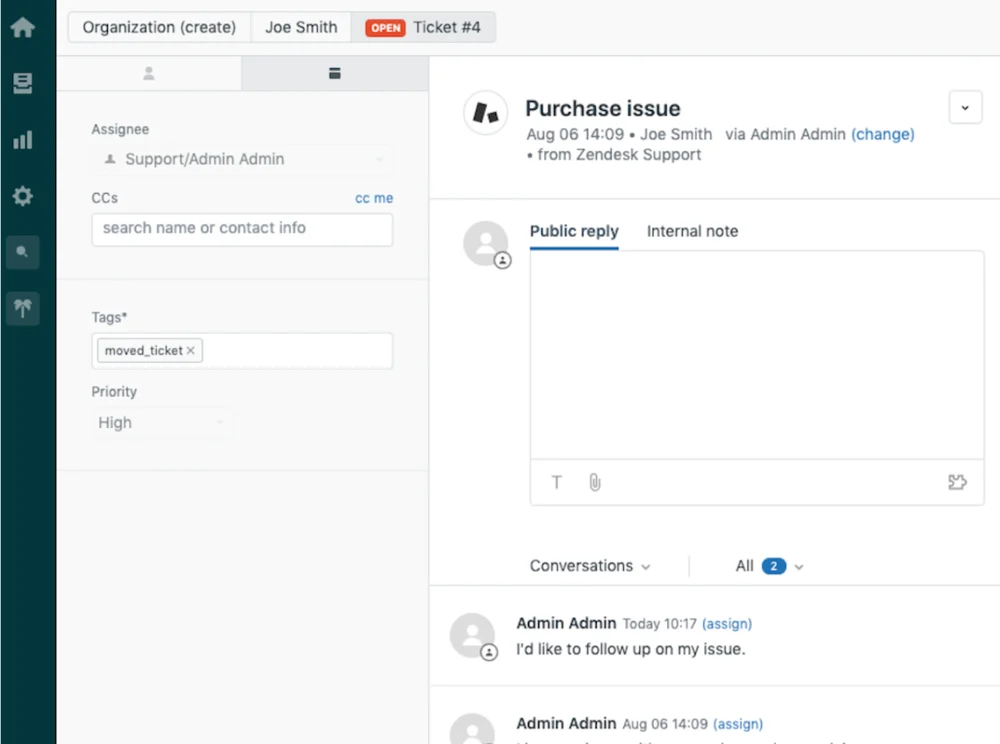
Ticket Field Manager is Zendesk’s own free app for controlling the fields agents see on a ticket. An admin can hide a field, make it required, or make it read only, and that works for standard fields like the assignee, status, priority, and tags as well as for your custom fields. It’s useful when a field should only be set by a trigger or another app, or when agents keep skipping a field your reporting depends on.
Key features:
- Hide fields agents don’t need.
- Make fields required.
- Make fields read only, so agents can see them but not change them.
- Works on standard ticket fields and custom fields.
Price: Free.
Zendesk Marketplace link: Ticket Field Manager
9. Hide Ticket Fields
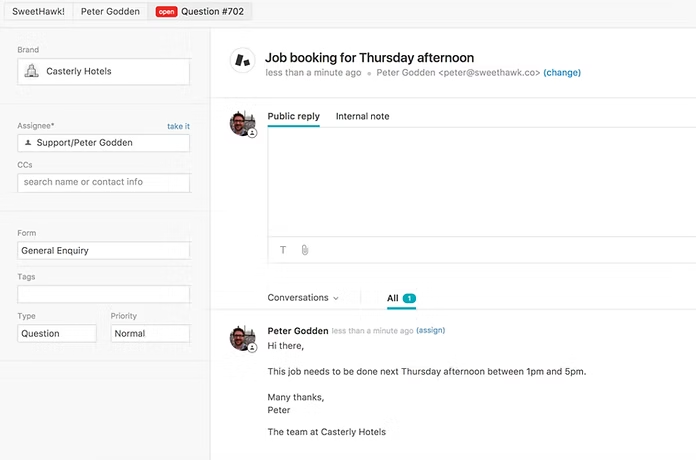
This simple app lets support managers configure the exact fields that are displayed on the ticket screen. Agents then have a clean and simple view of the ticket without any unnecessary information crowding up their space.
You might find this app useful if you have fields on a ticket that don’t need to be seen or updated by an agent. For example, maybe fields are being updated by a trigger, the Zendesk API, or another app.
These fields can now be hidden so your support agents focus on only the most relevant information.
Key features:
- Select which fields to display on the ticket view.
- Create a custom and simple view of tickets for agents.
Price: Free. Hide Ticket Fields is made by SweetHawk and hides a field for every agent. If you’d rather show a field only when another field has a certain value, Zendesk’s own conditional ticket fields do that on Suite Growth and above.
Zendesk Marketplace link: Hide Ticket Fields Zendesk App
10. Select an Address
Many teams receive email at more than one support address, such as one for support, one for billing, and one for each brand. Select an Address is a free Zendesk app that lets agents choose which of those addresses a ticket uses, so the reply goes out from the address the customer expects. Agents can pick the address when they create a ticket or change it later, and admins can set a default address for each group.
Key features:
- A dropdown with all your support email addresses.
- Choose the address when you create a ticket, or change it on an existing one.
- Set a default address and a list of accepted addresses for each group.
Price: Free.
Zendesk Marketplace link: Select an Address
11. Geckoboard
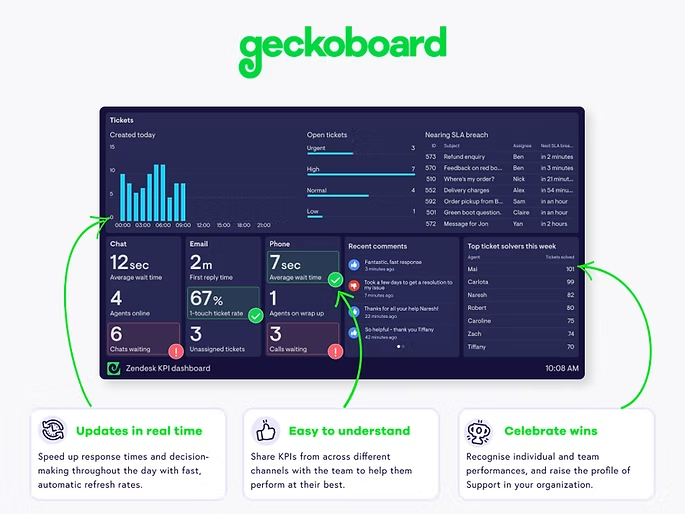
The Geckoboard app increases your team’s visibility into key support metrics so your support managers and agents are aligned on your department’s goals. Agents and managers see real-time metrics on response times, chat duration, ticket volume, chats in queue, and much more.
This gives support teams the insights needed to make quick decisions and prioritize efforts in the right places.
Key features:
- Automatically refreshes data.
- Powerful data filters.
- Display custom reports and dashboards using Zendesk data on a large screen.
- Send dashboard snapshots to Slack or Microsoft Teams, and get an alert when a number crosses a limit you set.
Price: Paid, priced per account rather than per agent, with a free trial.
Zendesk Marketplace link: Geckoboard Zendesk App
12. Nicereply
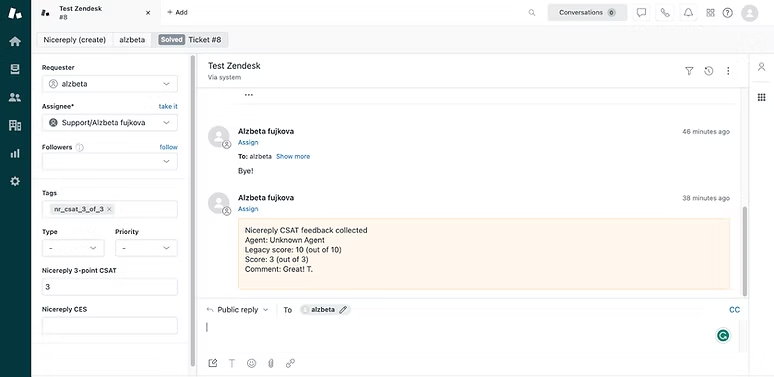
Nicereply is one of the most used customer satisfaction survey apps. It enables service teams to monitor important customer support KPIs like CSAT (Customer Satisfaction Score), NPS (Net Promoter Score), and CES (Customer Effort Score).
Integrating Nicereply with Zendesk gives agents and managers a quick view of survey responses directly within the support ticket. Surveys can be sent after resolving a ticket or within each message to the customer (which can often increase your survey response rates).
Key features:
- Measure CSAT, NPS, or CES.
- Collect qualitative data (comments) from customers.
- View survey data in a sidebar widget.
- Customize surveys.
- Delete spam to keep data clean.
Price: Paid, with a free trial. You need a Nicereply account to use it.
Zendesk Marketplace link: Nicereply Zendesk App
13. Trustpilot Reviews
Some customers who have a bad experience write a public review instead of contacting support. The Trustpilot Reviews app turns each new Trustpilot review of your company or your products into a Zendesk ticket, so your team can answer it from Zendesk like any other ticket and use your triggers and macros on it. That way reviews get the same attention as the rest of the queue, instead of waiting in a separate tool.
Key features:
- A Zendesk ticket for every new service or product review on Trustpilot.
- Replies to reviews sent from Zendesk.
- Triggers and macros that work on review tickets.
Price: Free to install. You need a Trustpilot account for your business, and Trustpilot’s own fees may apply.
Zendesk Marketplace link: Trustpilot Reviews
14. Email Tracking
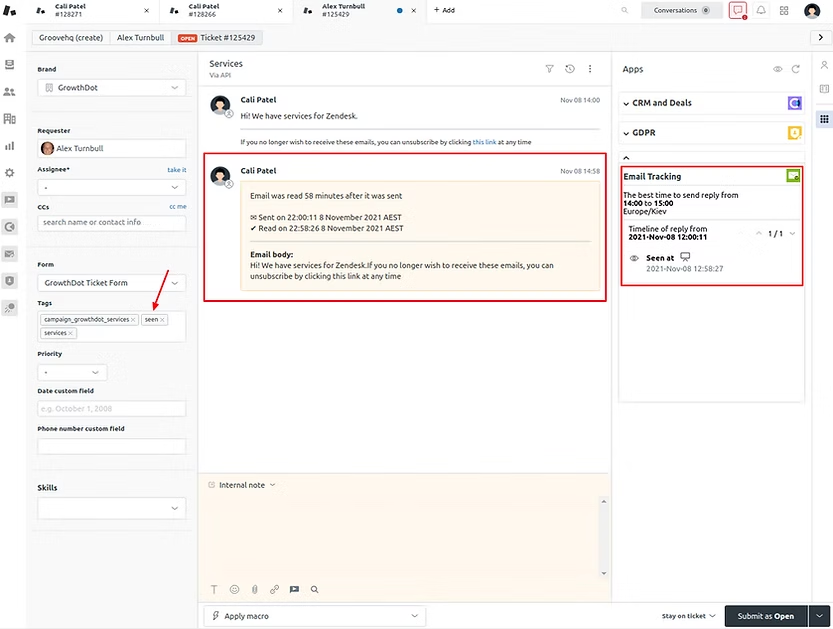
Email Tracking by GrowthDot shows when a customer opens a reply you sent from Zendesk and whether they clicked the links in it. That helps when a customer goes quiet, because you can tell whether they haven’t seen your reply yet or read it and didn’t answer, and decide whether to follow up.
Key features:
- See when each reply was opened and which links were clicked, with the device used.
- Add Seen and Unseen columns to your views, so agents can sort tickets by whether the customer read the last reply.
- Switch tracking off for customers in countries with stricter consent rules, such as France and Italy.
Price: Paid per agent, with a free trial.
15. Proactive Campaigns
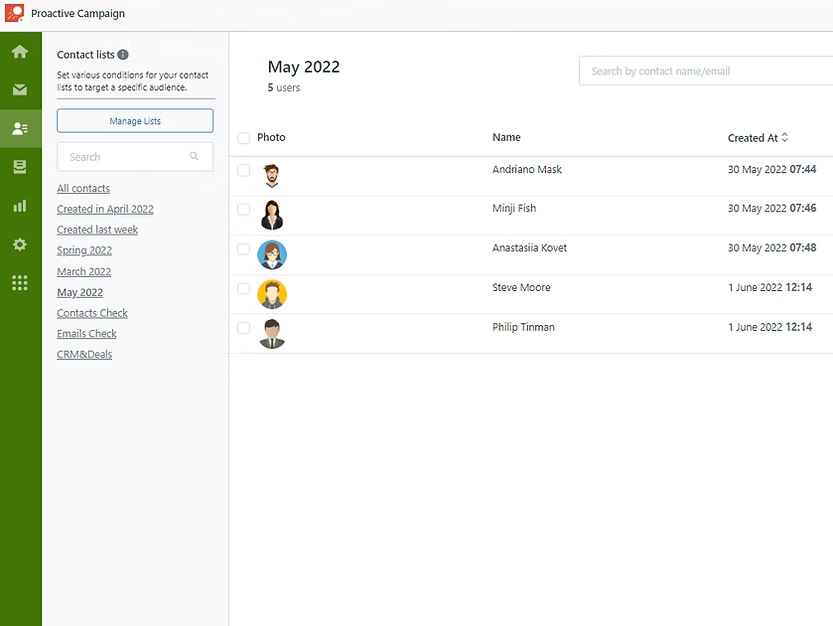
Proactive Campaigns by GrowthDot sends email and SMS campaigns from Zendesk to a list of users, organizations, or tickets. For example, you can tell every customer affected by an outage that it’s fixed, or remind customers on an old plan that it’s being retired, without exporting a list to another tool first.
Key features:
- Build contact lists from users, organizations, or tickets.
- Send campaigns by email or SMS.
- Test two versions of a message to see which one works better.
- Update tickets in bulk.
Price: Paid per agent, with a free trial.
16. Recurring Tickets
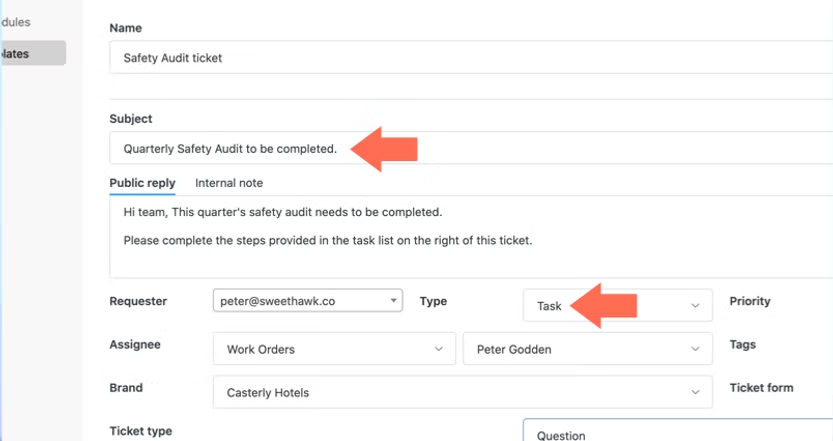
Recurring Tickets by SweetHawk creates tickets on a schedule you set, from every hour to once every few years. It’s useful for routine work that’s easy to forget, like a quarterly safety audit, a monthly check on a customer’s account, or a yearly renewal reminder, because the ticket appears in the right view when the job is due.
Key features:
- Schedules that run hourly, daily, monthly, yearly, or longer.
- Sets any ticket field on the tickets it creates, such as the group, assignee, or type.
Price: Paid, with one flat monthly price for the account rather than per agent, and a free trial.
17. FlowEQ
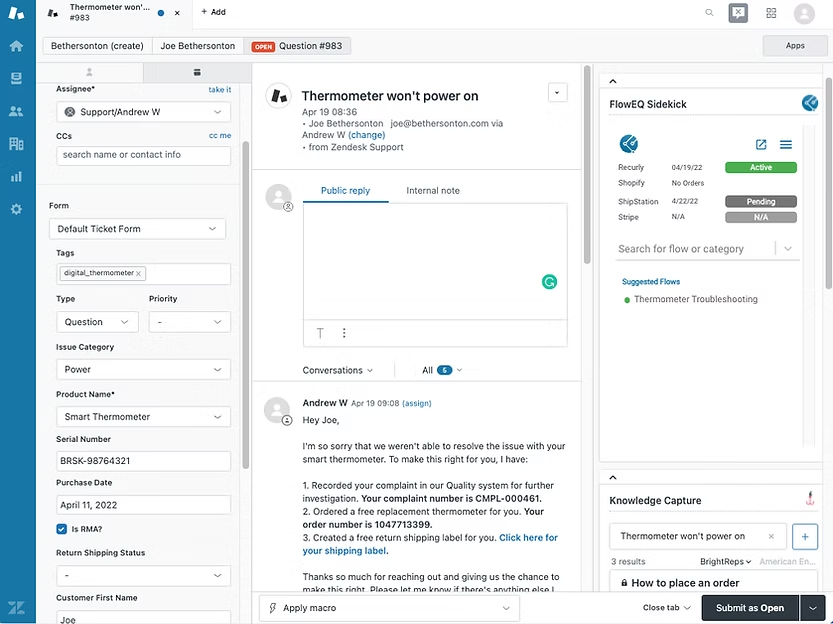
FlowEQ guides agents through complex troubleshooting with decision trees you build for your own products and processes. Each step asks the agent a question or suggests a check, and the answer decides the next step. That helps new agents handle tickets they haven’t seen before, and it keeps the whole team asking the same questions in the same order, so customers get consistent answers.
Key features:
- Decision trees for your own products and processes.
- Step by step guidance in the ticket sidebar.
Price: A free plan and paid plans.
18. Quickie
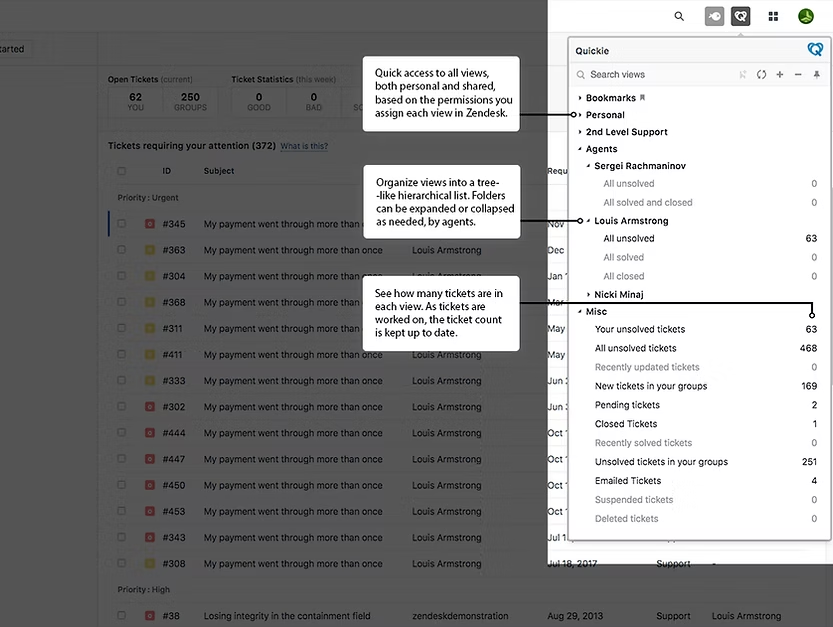
Quickie by Lovestock & Leaf adds a navigation panel where agents can reach their views, bookmarks, and recently opened tickets in one place. Views can be grouped into folders, which makes a long list of views easier to find your way around, and an advanced search tab lets agents save the searches they run often.
Key features:
- Shared and personal views, grouped into folders.
- Bookmarks and a list of recently opened tickets.
- An advanced search tab with saved searches.
Price: Paid per agent, with a free trial.
Frequently Asked Questions About Zendesk Apps
What are Zendesk apps?
Zendesk apps add things to Zendesk that it can’t do on its own. Zendesk itself separates the two kinds: an app adds a feature to Zendesk, like time tracking or an extra search, while an integration connects Zendesk to another tool, like Jira or Salesforce. Most of them appear in the ticket sidebar or run in the background, and you find them on the Zendesk Marketplace. If none of them does what you need, you can also build a private app for your own account, which Zendesk allows on Suite Growth and Support Professional plans and above. Here’s what support teams are building with Zendesk App Builder.
Chrome extensions work differently. Each agent installs them in their own browser, and they change how Zendesk works only for that person, for example by opening ticket links in the Zendesk tab that’s already open. For those, see the best Zendesk Chrome extensions for support agents.
How do you install a Zendesk app?
- Open the app’s page on the Zendesk Marketplace and read the How To Install tab for anything to set up first.
- Click Install in the top right of the page.
- Fill in the app’s settings, accept the Marketplace terms of use, and click Install again.
You need to be a Zendesk admin to install apps. On Enterprise plans, agents in a custom role with the right permission can manage installed apps too.
Are Zendesk apps free?
Many are, and the paid ones usually come with a free trial. Paid apps charge in different ways, often per agent or by how many tickets they process, and each app’s Marketplace page shows its price.
Can you limit an app to some agents?
Yes. In the app’s settings, you can turn on role restrictions or group restrictions so only those roles or groups see the app. Admins count as their own role, so add them to the list if they need the app too.
Choosing the Right Zendesk Apps for Your Team
Zendesk does a lot on its own, and most teams only need a handful of apps on top of it. A good way to choose is to start from the work that slows your team down every week, whether that’s tagging tickets by hand, two agents answering the same customer, or putting together the monthly report, and look for the app that takes it off their plate. It also helps to add one app at a time, try it during the free trial, and uninstall anything nobody uses, because each app is one more thing for agents and admins to keep track of.
If reporting is the job that takes the longest, the MCP Server for Zendesk is a good place to start. With it, Claude or ChatGPT can read your Zendesk tickets, so you can ask for a KPI table by group, a summary of last week’s bad CSAT ratings, or the most common reasons customers got in touch, and the answer comes from your own tickets instead of a spreadsheet export. It’s free for 500 calls a month per Zendesk account, with no credit card required.